20. Redis Cache
About this chapter
In this chapter we start look at optimizing the performance of our API, specifically reducing read response times. We'll do this by introducing Redis, a solution most recognized for its caching abilities as a key-value store.
Learning outcomes
- Understand what caching is and why Redis is significantly faster than traditional databases
- Configure and run Redis in Docker with password authentication
- Install and configure
StackExchange.Redisclient library in a .NET application - Implement the cache-aside pattern to optimize API key validation
- Manage cache entries with Time-To-Live (TTL) expiration
- Use Redis CLI to inspect and verify cached data
- Implement resilient caching that gracefully falls back to the database on Redis failures
Architecture Checkpoint
In reference to our solution architecture, we'll be making code changes to the highlighted components in this chapter:
- Repository (partially complete)
- Redis Connection (complete)
- Redis Cache (complete)
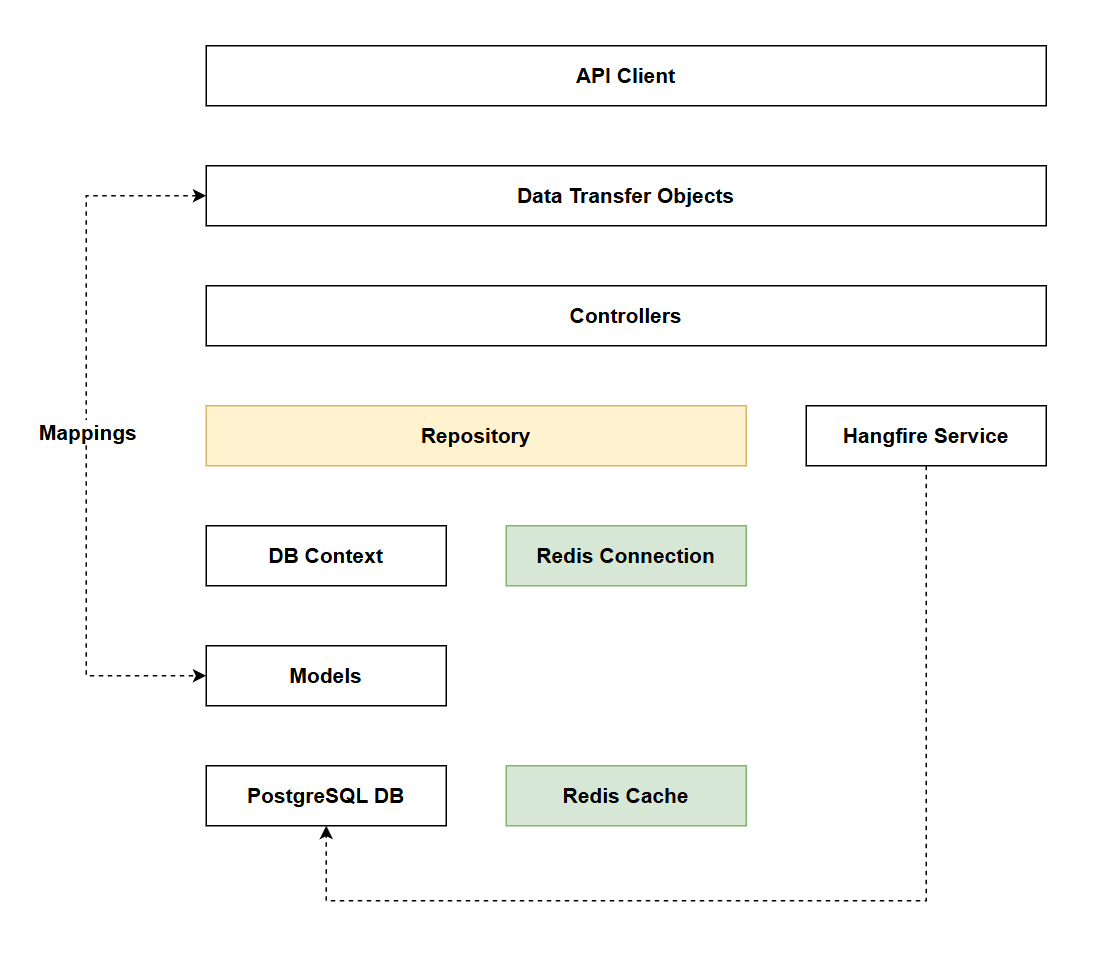
- The code for this section can be found here on GitHub
- The complete finished code can be found here on GitHub
Feature branch
Ensure that main is current, then create a feature branch called: chapter_20_redis, and check it out:
git branch chapter_20_redis
git checkout chapter_20_redis
If you can't remember the full workflow, refer back to Chapter 5
What is caching?
Before we focus in on Redis let's just discuss what caching is more generally. In short it's about storing data that is does not change frequently, but is queried frequently, in such a way that's more performant that a standard database read.
How it works
No caching
In this first example we look at our current solution where we are not using caching:
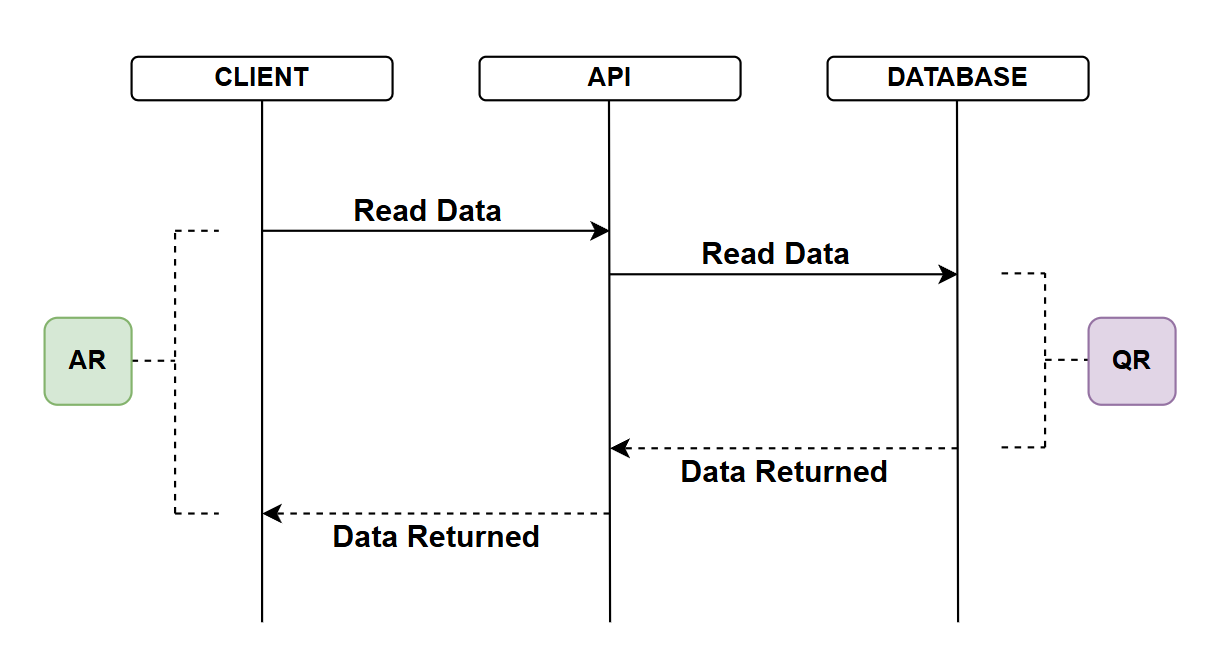
- API client requests data from the API
- The API reaches out to the database to read the data
- Note I appreciate we have DbContext and repositories in play here but from a performance perspective they are largely irrelevant when discussing database reads - so I've left them out to keep the diagram clean
- The database returns the data
- The time taken to do this denoted by QR (Query Response)
- I'm deliberately not mentioning actual response times instead focusing on relative response times as I think this translates better in a discussion like this
- Upon receipt of the database response, the API returns the data to the client
- The total time for the API call is AR (API Response)
Without discussing caching, there are some points to note:
- QR is depicted as the main bottleneck in this diagram, it may well be, but you may also have to take into account other factors such as network latency if the Client, API and Database are separated over a LAN or even the internet
- If we're concerned about database reads (QR) there are things we can do to improve that including but not limited to:
- Using indexes
- Separating the database into read and write DBs and tuning each accordingly
- If we're concerned about overall API response times (AR) we could:
- Colocate services on the same network, or do something "network" related
- Introduce caching...
Caching - no hit
In this example we introduce a cache - a store of data that can serve read operations much faster than the DB (e.g. data may be stored in memory). The main point to note about the cache is that it:
- "Starts empty" - as in this example
- The DB is still the source of truth
- Following on from the 2nd point, any data held in the cache will need to be refreshed to ensure it's not stale and out of sync with any changes that do occur in the DB (our source of truth)
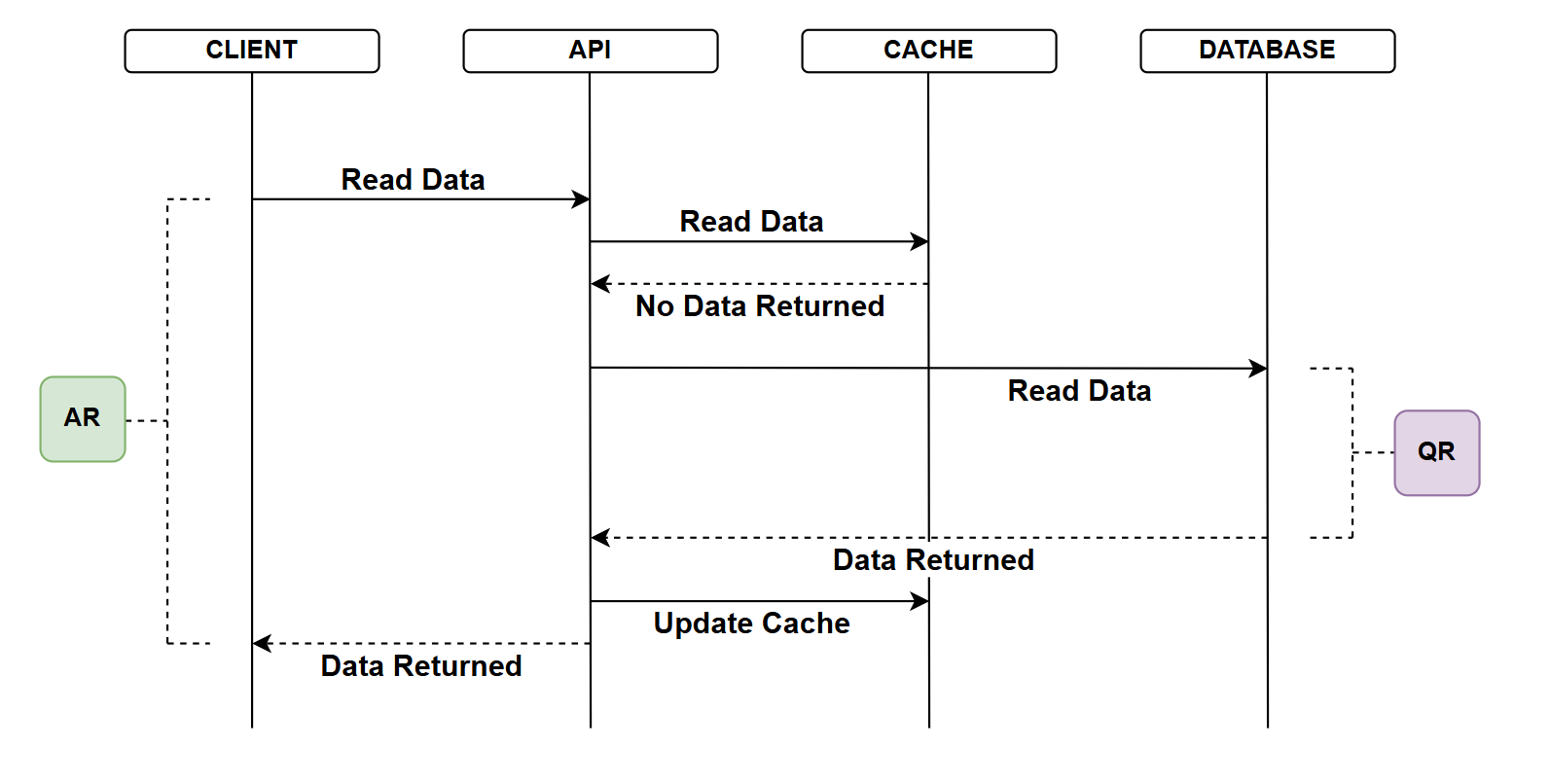
- API client requests data from the API
- The API attempts to read tha data from the cache
- The Cache does not contain that data
- The API attempts to read the data from the database
- The database returns the data
- The time taken to do this denoted by QR (Query Response) - this would be the same or similar to the no cache example
- API updates the cache with that data
- API returns the data to the client
- The total time for the API call is AR (API Response)
- In this example the AR would be slightly longer than with no caching as we do have the addition of the non-successful interaction with the cache. This should be negligible however.
Caching - hit
In the final example, the cache has data:
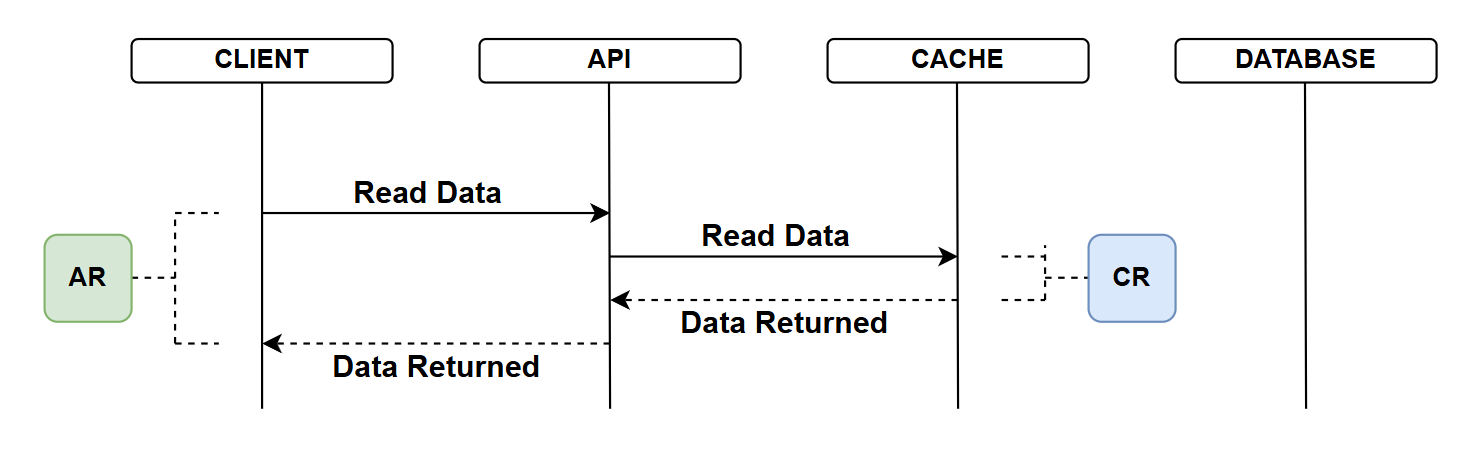
- API client requests data from the API
- The API attempts to read tha data from the cache
- There is a cache hit and it returns the data
- The time taken to do this denoted by CR (Cache Response)
- Upon receipt of the cache response, the API return the data to the client
- The total time for the API call is AR (API Response)
- Given the size of CR which should be dramatically less that QR, the AR is also reduced
Why is a cache faster?
So far we've not mentioned specific technologies, referring only to Database and Cache. When discussing: why is a cache faster I think it's useful to introduce the technologies we have been working with (PostgreSQL: the database), and the caching technology we'll employ in this chapter (Redis). As this helps flush out some of those real differences in speed.
1. In-Memory vs Disk-Based Storage
Redis: Stores all data in RAM (Random Access Memory). RAM access times are measured in nanoseconds.
Postgres: Primarily stores data on disk (SSD or HDD). Even with SSD, disk access times are measured in microseconds to milliseconds. While Postgres does cache frequently accessed data in memory, it's not designed to keep everything in RAM.
Impact: RAM is approximately 100,000 times faster than SSD and millions of times faster than HDD.
This is the single biggest performance difference.
2. Data Structure Complexity
Redis: Uses simple data structures optimized for speed:
- Key-value pairs (hash table lookups)
- No joins, no relationships, no complex schemas
- Direct memory address lookups
Postgres: Relational database with complex features:
- Support for joins across multiple tables
- Complex query planning and optimization
- Row-level locking and transaction management
Impact: A Redis key lookup is essentially a hash table operation, while a Postgres query, (even a simple one), involves multiple layers of abstraction and processing.
3. Query Processing Overhead
Redis: Minimal processing overhead:
- Simple command parsing (e.g.,
GET user:123) - Direct memory lookup
- Return result
Postgres: Significant processing even for simple queries:
- Parse SQL syntax
- Analyze query structure
- Generate query execution plan
- Optimize query path
- Execute across potentially multiple indexes/tables
- Apply WHERE clauses, ORDER BY, etc.
Impact: Redis can execute simple reads in microseconds, while Postgres needs to do substantial work even before touching the actual data.
4. ACID Compliance Overhead
Postgres: Must maintain ACID guarantees:
- Atomicity: All-or-nothing transactions
- Consistency: Data validation and constraints
- Isolation: Concurrent transaction management
- Durability: Write-ahead logging (WAL) to disk for crash recovery
These features require additional work on every operation, including reads.
Redis: By default, prioritizes speed over durability:
- Minimal ACID guarantees
- Configurable persistence (can be disabled entirely)
- Simpler concurrency model (single-threaded for command execution)
Impact: While Postgres's ACID features are critical for data integrity, they come with a performance cost that Redis avoids by design.
The Trade-Off
It's important to understand that Redis's speed comes with trade-offs:
- Limited Query Capabilities: No SQL, no joins, no complex filtering
- Memory Constraints: RAM is expensive and finite
- Data Durability: Less durable than a traditional database (though configurable)
This is why we use Redis as a cache in front of Postgres, not as a replacement. Postgres remains our source of truth with full ACID guarantees, while Redis serves as a high-speed read layer for frequently accessed data that doesn't change often.
What are we caching?
Let's think about the data we're storing, and the read operations we provide on that data:
| Model | Read Operation | Change Frequency | Read Frequency |
|---|---|---|---|
| Platform | Read list of Platforms | Low | Moderate to High |
| Platform | Read a single Platform | Low | Moderate |
| Platform | Read Commands for Platform | Low to Moderate | Low to Moderate |
| Command | Read a list of Commands | Low to Moderate | Low to Moderate |
| Command | Read a single Command | Low to Moderate | Low to Moderate |
| Key Registration | Read a single API Key Registration | Low | High |
The values I've placed for Platforms and Commands are somewhat subjective and would depend on the use-cases the API was supporting. So for now I'll not focus on caching either Platforms or Commands.
That brings is to the API key registrations. I think they are the perfect candidate for caching in Redis given:
- The high level of frequency at which they need to be read (to validate API keys)
- The low level of change involved. Indeed if we're talking about a specific API Key registration - that never changes, except possibly when it's deleted.
We are therefore going to implement caching of API Key Registrations with Redis.
Redis
In this section we set up Redis in Docker, briefly discuss tooling and go through an example to connect to Redis using the Redis CLI. As usual, for a deeper discussion on Redis, refer to the theory section.
Password protection
We'll want to password protect our connection to Redis, so open the .env file in the root of our project and add the following entry:
POSTGRES_USER=postgres
POSTGRES_PASSWORD=pa55w0rd
POSTGRES_DB=commandapi
REDIS_PASSWORD=pa66w1rd
We're going to use the default Redis user, so no separate REDIS_USER attribute is required, a password is enough.
Remember that .env is excluded from Git to prevent leaking sensitive information. We therefore need to update .env.example, which we've provided to users as a config template (which is committed to Git):
POSTGRES_USER=postgres
POSTGRES_PASSWORD=<your password here>
POSTGRES_DB=commandapi
REDIS_PASSWORD=<your password here>
Docker Compose
To stand up an instance of Redis, we'll simply add a service to the docker-compose.yml file:
services:
  postgres:
    image: postgres:16
    container_name: postgres_db
    environment:
      POSTGRES_USER: ${POSTGRES_USER:-postgres}
      POSTGRES_PASSWORD: ${POSTGRES_PASSWORD}
      POSTGRES_DB: ${POSTGRES_DB:-run1api}
    ports:
      - "5432:5432"
    volumes:
      - postgres_data:/var/lib/postgresql/data
    restart: unless-stopped
  redis:
    image: redis:8.4-alpine
    container_name: redis_cache
    command: redis-server --requirepass ${REDIS_PASSWORD}
    ports:
      - "6379:6379"
    volumes:
    - redis_data:/data
    restart: unless-stopped

volumes:
  postgres_data:
  redis_data:
The only thing of novelty here is how we set up the Redis password, which is done by passing the --requirepass flag to the Redis server with the password value from .env.
Save the file, then to spin up the Redis instance type:
docker-compose up -d
Check that it's running by typing:
docker ps
You should see two running containers:
CONTAINER ID   IMAGE              COMMAND                  CREATED          STATUS          PORTS                                         NAMES
9f821bf4ae53   postgres:16        "docker-entrypoint.s…"   32 minutes ago   Up 32 minutes   0.0.0.0:5432->5432/tcp, [::]:5432->5432/tcp   postgres_db
59c6f88f5c5b   redis:8.4-alpine   "docker-entrypoint.s…"   32 minutes ago   Up 32 minutes   0.0.0.0:6379->6379/tcp, [::]:6379->6379/tcp   redis_cache
Tooling
The Redis docs mention 3 client tools that you can use to administer Redis:
- CLI
- Redis Insight
- Redis for VS Code
As usual the choice is yours, but as mentioned in Chapter 2 I'll be using the CLI.
Connecting to Redis using the CLI
We'll run a quick test and connect in to the Redis instance using the CLI, before doing that ensure:
- You've spun up a Redis instance in Docker
- You have Redis CLI installed
redis-cli --versionshould return a value
With both of those a pass, type:
redis-cli -h localhost -p 6379 -a pa66w1rd
That should return you to a command prompt like this one:
localhost:6379>
We can check to see which of the Redis fixed databases are being used (it should be 0 at the moment) by typing:
INFO keyspace
This should return something like:
# Keyspace
That's ok and to be expected, but it does prove out that Redis in up and running and that we can connect.
To exit the CLI, just type:
exit
Implement caching
Package reference
To leverage Redis from with .NET we need to install a package as follows:
dotnet add package StackExchange.Redis
You may be wondering why we are using StackExchange.Redis and not an "official" Redis or Microsoft package? The answer is quite simple: the engineers at StackExchange needed a client that could handle massive scale, and the existing clients weren't good enough - so they built one.
What they built became the de-facto standard because it solved real production problems at scale, was open source and was essentially adopted by Microsoft.
From a .NET perspective it is the "official" package.
Connection string
As with our PostgreSQL instance, we need to know how to connect to Redis, this is done via a connection string. We'll store the non-sensitive component of the Redis connection string in appSettings.Development.json as follows:
 "ConnectionStrings": {
    "PostgreSqlConnection":"Host=localhost;Port=5432;Database=run1api;Pooling=true;",
    "RedisConnection": "localhost:6379"
  }
User secret
We also need to store the Redis password as .NET user-secret in order that we can read that in with the connection string at runtime, so at a command prompt:
dotnet user-secrets set "RedisPassword" "pa66w1rd"
Program.cs
Add the following using statement to Program.cs:
using StackExchange.Redis;
Then add the following service registration:
// .
// .
// .
// Existing code

builder.Services.AddDbContext<AppDbContext>(options =>
  options.UseNpgsql(connectionString.ConnectionString));

var redisConfig = ConfigurationOptions.Parse(
    builder.Configuration.GetConnectionString("RedisConnection")!);

redisConfig.Password = builder.Configuration["RedisPassword"];

builder.Services.AddSingleton<IConnectionMultiplexer>(opt =>
    ConnectionMultiplexer.Connect(redisConfig));

builder.Services.AddScoped<IPlatformRepository, PgSqlPlatformRepository>();
builder.Services.AddScoped<ICommandRepository, PgSqlCommandRepository>();
builder.Services.AddScoped<IRegistrationRepository, PgSqlRegistrationRepository>();

// Existing code
// .
// .
// .
This code sets up a connection to our Redis instance, it:
- Parses the
"RedisConnection"connection string fromappsettings.Development.jsoninto aConfigurationOptionsobject - Adds the
"RedisPassword"from user secrets to the configuration - Registers
IConnectionMultiplexeras a singleton, passing the complete configuration to theConnectmethod
The use of singleton is important here: we want a single, long-lived connection to Redis that's shared across all requests. Redis connections are expensive to create and ConnectionMultiplexer is designed to be reused. Creating a new connection per request would be a significant performance anti-pattern.
Repository
The final thing we need to do is add our caching logic to PgSqlRegistrationRepository.
First, add the following 2x using statements:
using StackExchange.Redis;
using System.Text.Json;
Update the private fields and class constructor:
private readonly AppDbContext _context;
private readonly IConnectionMultiplexer _redis;
private readonly IDatabase _redisDb;
private readonly ILogger<PgSqlRegistrationRepository> _logger;

public PgSqlRegistrationRepository(
    AppDbContext context,
    IConnectionMultiplexer redis,
    ILogger<PgSqlRegistrationRepository> logger)
{
    _context = context;
    _redis = redis;
    _redisDb = _redis.GetDatabase();
    _logger = logger;
}
This code introduces Redis caching capability to our repository:
New private fields:
_redis: Stores the injectedIConnectionMultiplexer(the Redis connection)_redisDb: Stores anIDatabaseinstance for executing Redis commands_logger: Logger for tracking caching operations (new)
Constructor changes:
IConnectionMultiplexer redis: Injected via dependency injection (the singleton we registered inProgram.cs)- In the constructor body, we call
_redis.GetDatabase()which returns anIDatabaseinstance
The IDatabase interface is what we'll use to interact with Redis: executing GET, SET, and other Redis commands. By calling GetDatabase() once in the constructor and storing it in _redisDb, we avoid repeatedly calling this method for every operation.
The AppDbContext context parameter was already part of this repository's constructor, we're simply adding Redis alongside our existing database context. This demonstrates a key principle: caching complements, doesn't replace, our database access.
Finally update the GetRegistrationByIndex method:
public async Task<KeyRegistration?> GetRegistrationByIndex(string keyIndex)
{
    // Try to get from Redis cache first
    try
    {
        var cachedRegistration = await _redisDb.StringGetAsync($"KeyRegistration:{keyIndex}");
        if (!cachedRegistration.IsNullOrEmpty)
        {
            try
            {
                var registration = JsonSerializer.Deserialize<KeyRegistration>((string)cachedRegistration!);
                _logger.LogDebug("Cache hit for KeyRegistration:{KeyIndex}", keyIndex);
                return registration;
            }
            catch (JsonException ex)
            {
                _logger.LogWarning(ex, "Failed to deserialize cached KeyRegistration:{KeyIndex}, falling back to database", keyIndex);
                // Invalid cache data, fall through to database
            }
        }
        else
        {
            _logger.LogDebug("Cache miss for KeyRegistration:{KeyIndex}", keyIndex);
        }
    }
    catch (RedisException ex)
    {
        _logger.LogWarning(ex, "Redis cache lookup failed for KeyRegistration:{KeyIndex}, falling back to database", keyIndex);
    }

    // Fallback to database
    var keyRegistration = await _context.KeyRegistrations.FirstOrDefaultAsync(k => k.KeyIndex.ToString() == keyIndex);

    if (keyRegistration != null)
    {
        // Cache the result in Redis with 30-minute expiry
        try
        {
            TimeSpan expiry = TimeSpan.FromMinutes(30);
            await _redisDb.StringSetAsync($"KeyRegistration:{keyRegistration.KeyIndex}", JsonSerializer.Serialize(keyRegistration), expiry);
            _logger.LogDebug("Cached KeyRegistration:{KeyIndex} for 30 minutes", keyIndex);
        }
        catch (RedisException ex)
        {
            _logger.LogWarning(ex, "Failed to cache KeyRegistration:{KeyIndex}, continuing without cache", keyIndex);
            // Continue without caching - the operation still succeeded
        }
    }

    return keyRegistration;
}
This code implements the cache-aside pattern (also called lazy-loading) to optimize API key lookups using Redis. Here's how it works:
1. Check Cache First (lines 4-6)
- Attempts to retrieve the key registration from Redis using
StringGetAsync() - The cache key follows a namespacing pattern:
KeyRegistration:{keyIndex} - This is our "fast path": if the data exists in cache, we avoid the database entirely
2. Cache Hit - Deserialize and Return (lines 7-12)
- If data exists in Redis, deserialize the JSON string back into a
KeyRegistrationobject - Log the cache hit for monitoring
- Return immediately: this is where we get our performance gain
3. Cache Miss - Log and Continue (lines 21-23)
- If cache is empty, log the miss for observability
- Fall through to database lookup
4. Database Fallback (line 32)
- The original database query unchanged, this is our source of truth
- If Redis is unavailable or cache is empty, we always have this reliable fallback
5. Populate Cache on Database Read (lines 34-43)
- When we successfully retrieve from database, cache the result in Redis
- Set a 30-minute TTL (Time To Live): after this, the cached entry automatically expires
- The 30-minute window balances freshness with cache effectiveness
6. Resilience Through Error Handling
The code uses multiple try-catch blocks to ensure the operation never fails because of caching:
- Redis lookup failure: Falls back to database
- Deserialization failure: Falls back to database (handles corrupted cache data)
- Cache write failure: Continues without caching (the database read still succeeded)
This defensive approach means Redis enhances performance when available, but never breaks functionality when unavailable.
This pattern is called cache-aside because the cache sits aside from the main data flow. The application code is responsible for:
- Checking the cache before querying the database
- Populating the cache when data is retrieved from the database
An alternative pattern is write-through where the cache is updated automatically when the database is written to, but that requires more infrastructure coordination.
Exercising
We've used LogDebug when logging output at certain points in the GetRegistrationByIndex method. I want to view these messages as and when they occur, so will update the log levels for CommandAPI.Data in appSettings.Development.json:
{
  "Serilog": {
    "MinimumLevel": {
      "Default": "Information",
      "Override": {
        "Microsoft.AspNetCore": "Warning",
        "Microsoft.AspNetCore.Hosting.Diagnostics": "Information",
        "CommandAPI.Controllers": "Debug",
        "CommandAPI.Middleware": "Information",
        "CommandAPI.Data": "Debug"
      }
    }
  },
  "ConnectionStrings": {
    "PostgreSqlConnection":"Host=localhost;Port=5432;Database=commandapi;Pooling=true;",
    "RedisConnection": "localhost:6379"
  }
}
Check Redis for 0 keys
Login to Redis via the CLI:
redis-cli -h localhost -p 6379 -a pa66w1rd
Check there are no keys:
INFO keyspace
should return:
# Keyspace
Make a mutation call
Make a call to and endpoint that requires an API key, e.g.:
### Create a new platform
POST {{baseUrl}}/api/platforms
Content-Type: application/json
x-api-key: 276424e3-4372-447f-b321-005e711795b4mSI+wOpdiGV+a4WMsaqi1jvtfl6QyK1NY1/L+jLu+GE

{
  "platformName": "Redis"
}
I.d expect to see the following
1. Cache miss
The API should attempt to validate the API Key against the cache and fail, a LogDebug entry should occur: Cache miss for KeyRegistration:{KeyIndex}
[20:15:26 DBG] Cache miss for KeyRegistration:276424e3-4372-447f-b321-005e711795b4
2. Cache the registration
With a cache miss, we'll store the key in the cache for 30 mins:
[20:15:27 DBG] Cached KeyRegistration:276424e3-4372-447f-b321-005e711795b4 for 30 minutes
Running INFO keyspace at the Redis CLI should yield the following:
db0:keys=1,expires=1,avg_ttl=1552092,subexpiry=0
This tells us we have 1 key in db0. If we then type:
SCAN 0
We should get the key back:
1) "0"
2) 1) "KeyRegistration:276424e3-4372-447f-b321-005e711795b4"
We can then determine what type of key we have:
TYPE KeyRegistration:276424e3-4372-447f-b321-005e711795b4
Will return:
string
We can get the value of the key:
GET KeyRegistration:276424e3-4372-447f-b321-005e711795b4
Will return:
"{\"Id\":1,\"KeyIndex\":\"276424e3-4372-447f-b321-005e711795b4\",\"Salt\":\"9de20ba0-3194-6396-fcea-6a4f06e92102\",\"KeyHash\":\"TVM0vK1wkFwQekxawHl06B11tmEIIVw7wuWy3mTA18Q=\",\"Description\":\"Les Jackson\",\"UserId\":\"auth0|62399ac9647a36006ba4288c\"}
3. Resource is still created
Of course the original API request will still work, the API key was just validated against the DB.
If we make another request with the same API key (with 30 mins), then I'd expect to see a cache hit:
[20:26:47 DBG] Cache hit for KeyRegistration:276424e3-4372-447f-b321-005e711795b4
Version Control
With the code complete, it's time to commit our code. A summary of those steps can be found below, for a more detailed overview refer to Chapter 5
- Save all files
git add .git commit -m "add redis caching for API keys"git push(will fail - copy suggestion)git push --set-upstream origin chapter_20_redis- Move to GitHub and complete the PR process through to merging
- Back at a command prompt:
git checkout main git pull
Conclusion
In this chapter, we tackled a critical aspect of API performance: reducing read response times through caching. By introducing Redis as an in-memory cache, we've created a high-speed read layer that complements our PostgreSQL database rather than replacing it.
We explored why Redis is so much faster than traditional databases, primarily due to in-memory storage that operates at nanosecond speeds compared to millisecond disk access. We also acknowledged the trade-offs: limited query capabilities, memory constraints, and reduced durability. Understanding these trade-offs is crucial for making informed architectural decisions.
The implementation centered on caching API key registrations, which fit the caching use case: frequently read with minimal changes. Using the cache-aside pattern, we built a solution that gracefully falls back to the database when Redis is unavailable, ensuring our API remains operational even if caching fails.
In the next chapter, we'll explore HTTP response caching, a complementary approach that operates at the HTTP protocol level rather than the application data layer.