16. Structured Logging
About this chapter
In this chapter we focus logging, specifically the use of the ILogger interface in the controllers, enabling a more structured way to log application events at different levels.
Learning outcomes
- Understand why using
ILoggeris preferable to writing to the console - Understand logging levels
- Understand how to implement
ILoggerin the controllers - Understand how to set log levels in
appsettings*files.
Architecture Checkpoint
In reference to our solution architecture, we'll be making code changes to the highlighted components in this chapter:
- Controllers (partially complete)
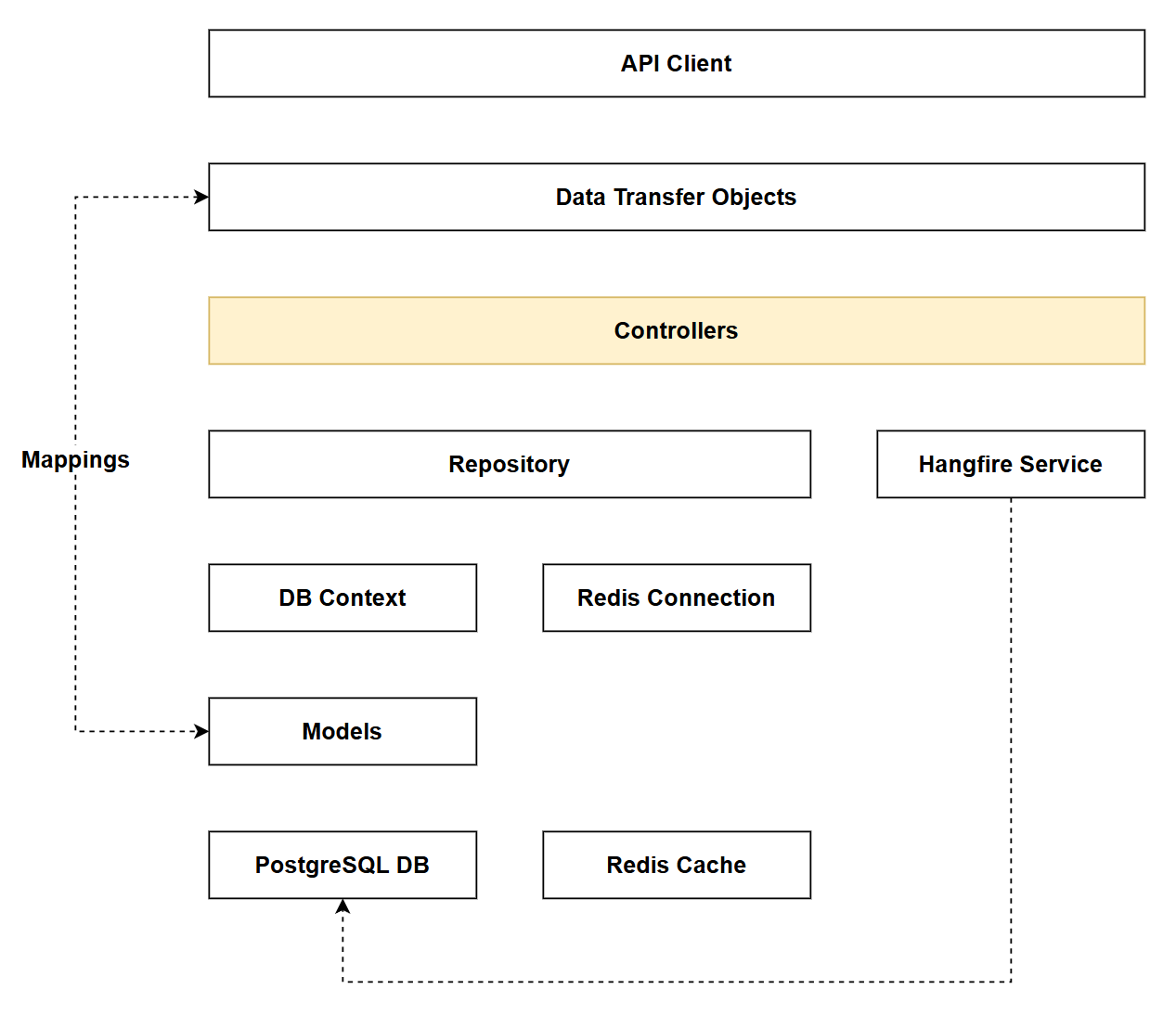
- The code for this section can be found here on GitHub
- The complete finished code can be found here on GitHub
Feature branch
Ensure that main is current, then create a feature branch called: chapter_16_structured_logging, and check it out:
git branch chapter_16_structured_logging
git checkout chapter_16_structured_logging
If you can't remember the full workflow, refer back to Chapter 5
Structured logging
Console.WriteLine
Before looking at structured logging let's look at an approach that is often used: Console.WriteLine.
To our credit we've not used this in our project, which is quite amazing as I have a tendency to use it quite a lot (to assist with in-the-moment debugging). But for examples sake, we could have used it in both the DELETE actions as follows:
[HttpDelete("{id}")]
public async Task<ActionResult> DeleteCommand(int id)
{
    var commandFromRepo = await _commandRepo.GetCommandByIdAsync(id);
    if (commandFromRepo == null)
    {
        return NotFound();
    }

    _commandRepo.DeleteCommand(commandFromRepo);
    await _commandRepo.SaveChangesAsync();

    Console.WriteLine($"-> Command Id: {id} deleted");

    return NoContent();
}
All this does is write out to the console that a resource with a given id has been deleted. This could be used for debugging in the moment (i.e. as we run our app) but would it be sufficient from a more historical perspective?
For example let's say we get a complaint from a customer stating that resources that should be returned by the API are not there - and they suggest it's a "database issue". Could we use the output from Console.WriteLine to identify that it was in fact an API call that caused the deletion, and not some data integrity error?
It would be highly unlikely that the Console.WriteLine method would work for the following reasons:
- Not Persistent: Console output disappears when the application restarts, or the console is closed
- No Automatic Storage: Unless you explicitly redirect console output to a file (which isn't standard practice), there's no historical record
- No Timestamps:
Console.WriteLine($"-> Command Id: {id} deleted")doesn't include when the deletion occurred. - No Context: Missing crucial information:
- Who made the request?, What was the source IP? etc.
- Not Searchable/Queryable: Even if saved, plain text console output is difficult to:
- Search by date range
- Filter by severity
- Correlate with other events
We could of course remediate some of these issues when using Console.WriteLine: we could add a timestamp to the output, we could write to a file etc. But why bother when we have a ready made solution: ILogger.
ILogger
ILogger is ASP.NET Core's built-in logging abstraction that provides a structured, configurable approach to recording application events. Unlike Console.WriteLine, it's designed specifically for production logging scenarios.
Key characteristics:
- Built-in: Ships with ASP.NET Core - no additional packages required
- Structured logging: Records events with structured data (key-value pairs) rather than plain text strings, making logs searchable and queryable
- Log levels: Categorizes log entries by severity (Trace, Debug, Information, Warning, Error, Critical) allowing you to filter what gets recorded
- Provider-based: Works with multiple logging providers simultaneously - console, file, cloud services (Azure Application Insights, AWS CloudWatch), third-party tools (Serilog, NLog)
- Configuration-driven: Log levels and providers can be configured via
appsettings.jsonwithout code changes - Dependency injection ready: Injected into controllers and services through the standard DI container
- Performance optimized: Supports log level filtering to avoid expensive operations when logs won't be recorded
The ILogger interface provides methods like LogInformation(), LogWarning(), and LogError() that automatically include:
- Timestamps
- Log levels
- Category names (typically the class name)
- Correlation IDs for request tracking
This makes ILogger ideal for both real-time monitoring and historical analysis of application behavior. We're going to make use of it in our API in the next section.
Logging configuration
Before we make use of ILogger in the controllers, lets first configure it - we'll do so in 2 places:
appSettings.json: default application settings, common across all environmentsappSettings.Development.json: development environment specific settings (overwritesappSettings.jsonin Development environments)
For a more detailed overview on the .NET Configuration layer, including the order of precedence of configuration sources refer, to the theory section.
Open appSettings.json, and configure logging as follows:
{
  "Logging": {
    "LogLevel": {
      "Default": "Warning",
      "Microsoft.AspNetCore": "Warning",
      "CommandAPI.Controllers": "Warning",
      "CommandAPI.Middleware": "Error"
    }
  },
  "AllowedHosts": "*"
}
In the absence of any other impacting settings (e.g. appSettings.Development.json) from a logging perspective this config would:
Default: Warning- Sets the baseline log level for all namespaces toWarning. This means:- Only
Warning,Error, andCriticallogs are recorded Trace,Debug, andInformationlogs are suppressed- Applies to any namespace not explicitly configured below
- Only
Microsoft.AspNetCore: Warning- Configures ASP.NET Core framework logs toWarninglevel:- Reduces noise from framework-level informational messages
- Still captures important framework warnings and errors
CommandAPI.Controllers: Warning- Sets controller logs toWarning:LogInformation()calls in controllers will be ignoredLogWarning(),LogError(), andLogCritical()will be logged- Good for production to reduce verbose operational logs
CommandAPI.Middleware: Error- Sets middleware logs toError(most restrictive):- Only
ErrorandCriticallogs recorded - Even
LogWarning()calls will be suppressed - Appropriate for middleware like the global exception handler where you only care about actual errors
- Only
This configuration is production-focused, minimizing log volume while capturing important warnings and errors.
Next up, open appSettings.Development.json and configure logging as follows (I've also left in the non-logging aspects):
{
  "Logging": {
    "LogLevel": {
      "Default": "Information",
      "Microsoft.AspNetCore": "Warning",
      "CommandAPI.Controllers": "Debug",
      "CommandAPI.Middleware": "Information"
    }
  },
  "ConnectionStrings": {
    "PostgreSqlConnection":"Host=localhost;Port=5432;Database=commandapi;Pooling=true;"
  }
}
This configuration will be applied when the app is run in Development, and no other configuration sources override it (e.g. Environment Variables). From a logging perspective this:
Default: Information- Sets the baseline log level toInformation(more verbose than production):Information,Warning,Error, andCriticallogs are recordedTraceandDebuglogs are suppressed (unless overridden by more specific settings)- Provides more operational detail during development without being overwhelming
Microsoft.AspNetCore: Warning- Keeps framework logs atWarninglevel:- Same as production configuration
- Prevents excessive framework noise even in development
Run1API.Controllers: Debug- Most verbose logging for controllers:- All log levels except
Traceare recorded (Debug,Information,Warning,Error,Critical) LogDebug()calls will now appear in logs (were suppressed in production)LogInformation()calls will also be recorded (were suppressed in production)- Ideal for troubleshooting controller behavior during development
- All log levels except
Run1API.Middleware: Information- Less restrictive than production:- Records
Information,Warning,Error, andCriticallogs - Production only logged
ErrorandCritical - Provides visibility into middleware operations during development
- Records
This development configuration enables more verbose logging to help with troubleshooting, while still filtering out the most granular Trace level logs that would create excessive noise.
Implementing ILogger
Having set the logging verbosity levels we can move on to making use of ILogger. As we don't need to replace any legacy Console.WriteLine code, we can jump straight in.
Platforms Controller
Open PlatformsController.cs and update the class constructor so that we are injecting ILogger:
private readonly IPlatformRepository _platformRepo;
private readonly ICommandRepository _commandRepo;
private readonly ILogger<PlatformsController> _logger;

public PlatformsController(
    IPlatformRepository platformRepo,
    ICommandRepository commandRepo,
    ILogger<PlatformsController> logger)
{
    _platformRepo = platformRepo;
    _commandRepo = commandRepo;
    _logger = logger;
}
We can then make use of ILogger throughout the PlatformsController.
If I were to document all the suggested places where ILogger could be used in the controllers, this would be an exceedingly large section of mostly code. I don't want to do that as I feel it would be unnecessary bloat, and would make the chapter quite unreadable.
What I'll do instead is document the code fully for the first endpoint, which demonstrates the necessary concepts, then I'd suggest you refer to the code directly on GitHub to see where else I've used ILogger. That way you still have access to all my edits, without scrolling through bunch of repeated code in the book.
You can see how I've introduced the use of ILogger in the GetPlatformById method, where I use 3 different methods on ILogger (LogInformation, LogWarning and LogDebug):
[HttpGet("{id}", Name = "GetPlatformById")]
public async Task<ActionResult<PlatformReadDto>> GetPlatformById(int id)
{
    _logger.LogInformation("Retrieving platform with ID={PlatformId}", id);

    var platform = await _platformRepo.GetPlatformByIdAsync(id);
    if (platform == null)
    {
        _logger.LogWarning("Platform with ID={PlatformId} not found", id);
        return NotFound();
    }

    var platformDto = platform.Adapt<PlatformReadDto>();

    _logger.LogDebug("Successfully retrieved platform: {PlatformName}", platform.PlatformName);

    return Ok(platformDto);
}
This code:
- Logs the incoming request -
LogInformation()records that a platform retrieval was requested:- Captures the
idparameter using the structured placeholder{PlatformId} - Creates a structured log entry (not just plain text) that can be queried/filtered
- Will appear in Development logs (Debug level configured) but not in Production (Warning level configured)
- Captures the
- Logs when platform not found -
LogWarning()indicates a request for a non-existent resource:- More severe than
LogInformation()- suggests potential client error or deleted resource - Captures the requested
idfor troubleshooting - Will appear in both Development and Production logs
- More severe than
- Logs successful retrieval details -
LogDebug()records the platform name:- Most verbose log level used here - captures the actual data retrieved
- Uses structured placeholder
{PlatformName}to capture the platform name - Only appears in Development logs (Debug level enabled) - suppressed in Production for performance
As discussed, the completed Chapter 16 code for
PlatformControllercan be found here on GitHub.
Commands Controller
The completed Chapter 16 code for CommandsController can be found here on GitHub.
GlobalExceptionHandlerMiddleware
GlobalExceptionHandlerMiddleware already made use of ILogger, as a reminder you can view the code here.
Where do we log to?
By default, ILogger writes to the Console. However, unlike Console.WriteLine which is hardcoded to only write to the console, ILogger is provider-based, meaning you can configure it to write to multiple destinations simultaneously, making it much more powerful than Console.WriteLine.
The use of WebApplication.CreateBuilder in Program.cs (as we have in our API), adds the following default logging providers:
Importantly, there is no built-in file logging provider included with ASP.NET Core. To write logs to files, you need to add a third-party logging library, (like Serilog which we'll be using in the next Chapter).
Exercising requests
If we pick an existing request (update a Command) and call it with an id that we know does not exist, we should see logging to the console as follows:
info: CommandAPI.Controllers.CommandsController[0]
      Updating command ID=99 with new HowTo: List all containers (including stopped)
info: Microsoft.EntityFrameworkCore.Database.Command[20101]
      Executed DbCommand (22ms) [Parameters=[@id='?' (DbType = Int32)], CommandType='Text', CommandTimeout='30']
      SELECT c."Id", c."CommandLine", c."CreatedAt", c."HowTo", c."PlatformId"
      FROM "Commands" AS c
      WHERE c."Id" = @id
      LIMIT 1
warn: CommandAPI.Controllers.CommandsController[0]
      Cannot update - command ID=99 not found
I've highlighted the 2 Logs entires that should be generated.
Version Control
With the code complete, it's time to commit our code. A summary of those steps can be found below, for a more detailed overview refer to Chapter 5
- Save all files
git add .git commit -m "configure ILogger"git push(will fail - copy suggestion)git push --set-upstream origin chapter_16_structured_logging- Move to GitHub and complete the PR process through to merging
- Back at a command prompt:
git checkout main git pull
Conclusion
In this chapter we replaced ad-hoc debugging approaches like Console.WriteLine with ASP.NET Core's built-in ILogger interface, providing structured, configurable logging throughout our API.
The use of ILogger brings the following benefits.
- Structured logging: Log entries now include structured data (key-value pairs) rather than plain text, making them searchable and queryable
- Log levels: Categorized log entries by severity (Debug, Information, Warning, Error) allowing different verbosity in Development vs Production
- Configuration-driven: Controlled logging behavior through
appsettings.jsonfiles without code changes. - Provider-based architecture: Unlike
Console.WriteLine,ILoggercan write to multiple destinations simultaneously - Timestamps and context: Automatic inclusion of timestamps, log levels, and category names with every log entry
In the next chapter we'll build upon the work with ILogger and add a 3rd party provider, Serilog, that amongst other things, will allow us to write to log files.