18. API Key Authentication
About this chapter
In this chapter we begin our journey into Authentication and Authorization by implementing the 1st of 2 Authentication approaches: API Key Authentication
Learning outcomes:
- Understand what API Key Authentication is and when to use it
- Differentiate between Authentication (identity verification) and Authorization (access control)
- Implement custom authentication middleware by extending
AuthenticationHandler - Configure authentication schemes and authorization policies in .NET
- Apply authorization policies to controllers and endpoints using the
[Authorize]attribute - Generate cryptographically secure API keys using
RandomNumberGenerator - Implement secure key storage using PBKDF2 hashing with salts
- Understand why API keys should never be stored in plain text
- Validate API keys using constant-time comparison to prevent timing attacks
- Understand rainbow table attacks and why they're not effective against high-entropy random keys
Architecture Checkpoint
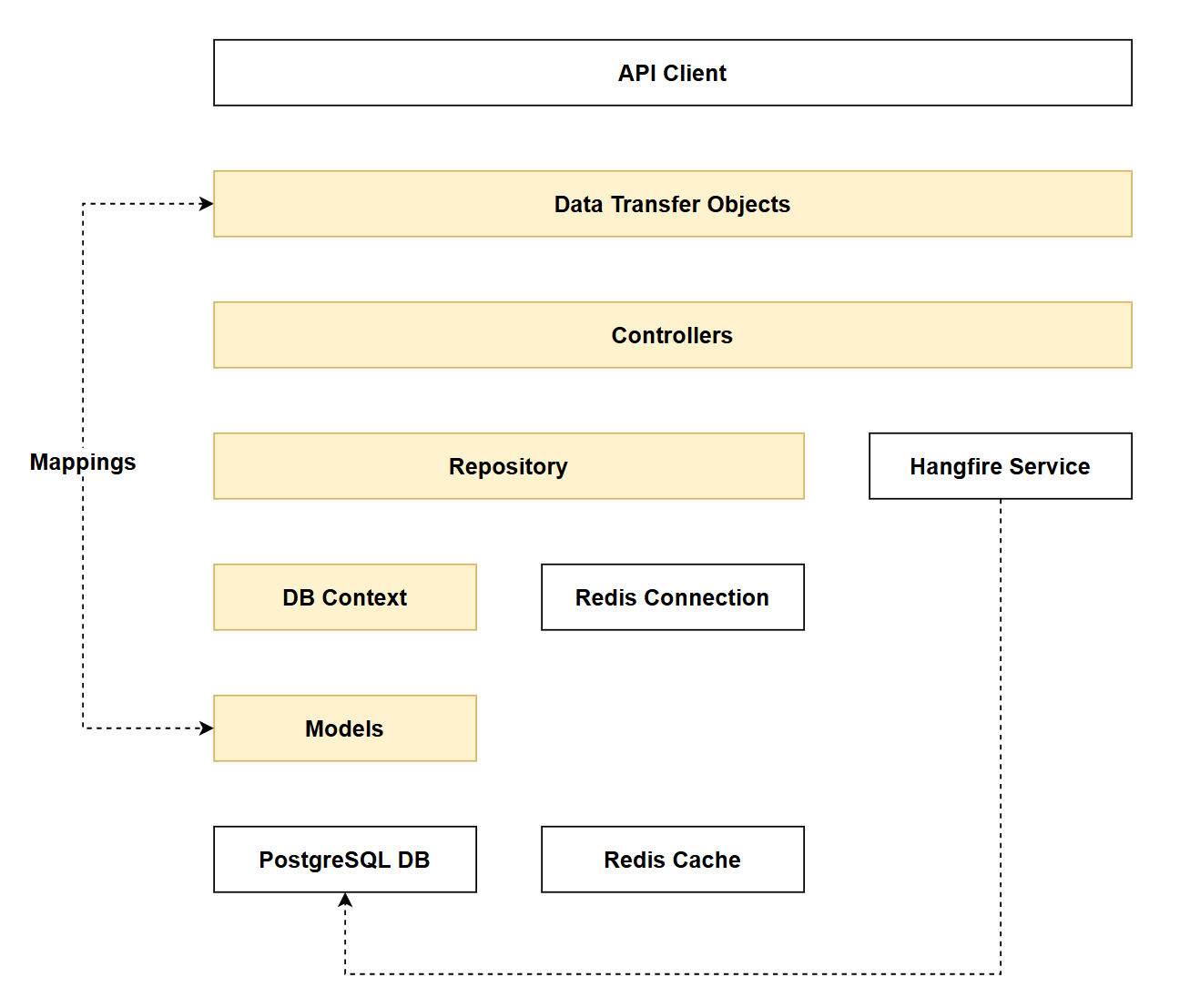
In reference to our solution architecture, we'll be making code changes to the highlighted components in this chapter:
- DbContext (partially complete)
- DTOs (partially complete)
- Controllers (partially complete)
- Models (partially complete)
- Repositories (partially complete)
- The code for this section can be found here on GitHub
- The complete finished code can be found here on GitHub
Feature branch
Ensure that main is current, then create a feature branch called: chapter_18_api_key_authentication, and check it out:
git branch chapter_18_api_key_authentication
git checkout chapter_18_api_key_authentication
If you can't remember the full workflow, refer back to Chapter 5
Chapter approach
Forewarning, this is a big chapter. I could have broken it down into separate chapters, but I feel that would disrupt the learning flow so have kept it as one. That being said, I have broken the implementation into 2 Phases:
- Phase 1: Add API Authentication Middleware
- Phase 2: API Key Registration
Phase 1: Implements the authentication mechanism, but validates user-requests against a static API key stored in config. This purely for testing purposes.
Phase 2: Implements the functionality that allows users to create their own API key, (as opposed to relying in 1 static key in config). This phase relies heavily on working within our data layer.
What is API Key Authentication?
API Key Authentication is typically aimed at system-to-system (machine-to-machine) use cases, where one system needs to access the API of another system programmatically.
Common use cases:
- CI/CD pipelines accessing deployment APIs
- Microservices communicating with each other
- Third-party integrations (e.g., payment gateways, email services)
API Keys can be contrasted with other forms of authentication that are more interactive and directly involve users in the authentication flow: Basic and OAuth authentication are examples.
We'll be implementing OAuth authentication in the next chapter.
Typical API key workflow:
- Key Generation: An admin or authorized user generates an API key through a portal or interface (often requiring them to log in first with their credentials)
- Key Distribution: The generated key is securely provided to the calling system or service
- Key Configuration: The key is stored in the configuration layer of the consuming system (environment variables, config files, secrets management)
- Key Usage: When making API requests, the calling system includes the key as a header (commonly
x-api-key) or as aBearertoken in theAuthorizationheader - Key Lifecycle: Keys may have expiration dates or remain valid indefinitely. They typically have longer lifespans than session tokens but should be rotatable for security
Security considerations:
- API keys should be treated like passwords - kept secret and never committed to source control
- Likewise, API Keys should not be stored in the system database - we'll tackle that challenge in Phase 2.
- They're simpler than OAuth but less secure for scenarios requiring user-specific permissions
- They authenticate the calling system but don't inherently provide user identity
- They can be revoked immediately. E.g. if you think an API Key has been compromised you can delete it and it will stop working from that point on.
- With other token-based authentication methods (JWT) the token is self-contained with its own cryptographically signed claims. The token remains valid until expiration - this is by design and is one of the benefits, and indeed disadvantages of the methodology.
As mentioned previously we 'll break implementation into 2 phases:
- Phase 1: the authentication mechanism (validating incoming API keys)
- Phase 2: the registration system (allowing users to generate their own keys)
- This phase won't be fully complete until we implement OAuth in Chapter 19
Phase 1: API Key Middleware
appSettings.Development.json
So we can quickly validate that the API Key Authentication middleware is functional, we'll temporarily configure a "valid" API key with some associated metadata in appSettings.Development.json as follows:
// .
// .
// .
// Existing configuration
  "ConnectionStrings": {
    "PostgreSqlConnection":"Host=localhost;Port=5432;Database=commandapi;Pooling=true;"
  },
  "ApiKey":{
    "ValidKey" : "abcd1234",
    "UserId": "hardcode",
    "KeyIndex" : "1"
  }
}
ValidKey: This is just a mocked up plain text key value that we'll compare the inboundx-api-keyheader againstUserId: Ultimately an API key will be linked directly to a logged in user, that user will have an id (we'll get this when we implement OAuth in Chapter 19 - for now we'll just hard-code).KeyIndex: API keys will eventually be stored in the database when they're created by a logged in user. I want to add this information to the claim as we'll need to make use of it later.
ApiKeyAuthenticationHandler
Create a file called ApiKeyAuthenticationHandler.cs in the Middleware folder and populate it as follows:
using System.Security.Claims;
using System.Text.Encodings.Web;
using Microsoft.AspNetCore.Authentication;
using Microsoft.Extensions.Options;


namespace Run1API.Middleware;

public class ApiKeyAuthenticationHandler : AuthenticationHandler<AuthenticationSchemeOptions>
{
    private const string ApiKeyHeaderName = "x-api-key";
    private readonly IConfiguration _configuration;


    public ApiKeyAuthenticationHandler(
        IOptionsMonitor<AuthenticationSchemeOptions> options,
        ILoggerFactory logger,
        UrlEncoder encoder,
        IConfiguration configuration)
        : base(options, logger, encoder)
    {
        _configuration = configuration;
    }

    protected override async Task<AuthenticateResult> HandleAuthenticateAsync()
    {
        if (!Request.Headers.TryGetValue(ApiKeyHeaderName, out var apiKeyHeaderValues))
        {
            Logger.LogWarning("API key header missing from request");
            return await Task.FromResult(AuthenticateResult.NoResult());
        }

        var providedApiKey = apiKeyHeaderValues.FirstOrDefault();


        if (apiKeyHeaderValues.Count == 0 || string.IsNullOrWhiteSpace(providedApiKey))
        {
            Logger.LogWarning("Empty API key provided");
            return await Task.FromResult(AuthenticateResult.NoResult());
        }

        //Validate the API Key
        var validApiKey = _configuration["ApiKey:ValidKey"];
        if (providedApiKey == validApiKey)
        {
            Logger.LogInformation("API key authentication successful for user {UserId}", _configuration["ApiKey:UserId"]);
            var claims = new[]
            {
                new Claim(ClaimTypes.Name, "ApiKeyUser"),
                new Claim(ClaimTypes.NameIdentifier,  _configuration["ApiKey:UserId"]!),
                new Claim("KeyIndex", _configuration["ApiKey:KeyIndex"]!)
            };
            var identity = new ClaimsIdentity(claims, Scheme.Name);
            var principal = new ClaimsPrincipal(identity);
            var ticket = new AuthenticationTicket(principal, Scheme.Name);

            return await Task.FromResult(AuthenticateResult.Success(ticket));
        }

        Logger.LogWarning("Invalid API key provided");
        return await Task.FromResult(AuthenticateResult.Fail("Invalid API Key Provided"));
    }
}
This code:
- Extends
AuthenticationHandler- Creates a custom authentication handler for API key validation - Checks for API key header - Looks for the
x-api-keyheader in incoming requests - Returns NoResult if the header is missing or empty - Allows other authentication schemes to try
- Validates against static config - Compares the provided API key against
ApiKey:ValidKeyfromappsettings.Development.json(temporary approach for testing; later we'll retrieve keys from the database via a repository) - Creates claims on success - Builds an identity with:
Name- Set to "ApiKeyUser"NameIdentifier- User ID from config (will be the actual user's ID once integrated with the database)KeyIndex- Key index from config (needed later for caching)
- Returns authentication ticket - On successful validation, provides a
ClaimsPrincipalto the request pipeline - Logs authentication attempts - Records warnings for missing/invalid keys and information for successful authentication
Program.cs
We need to register the middleware in Program.cs, first up: add the following using statement:
using CommandAPI.Data;
using CommandAPI.Middleware;
using FluentValidation;
using FluentValidation.AspNetCore;
using Mapster;
using Microsoft.AspNetCore.Authentication;
using Microsoft.EntityFrameworkCore;
using Npgsql;
using Serilog;
Then make the following registrations:
// .
// .
// .
// Existing code

builder.Services.AddScoped<IPlatformRepository, PgSqlPlatformRepository>();
builder.Services.AddScoped<ICommandRepository, PgSqlCommandRepository>();

builder.Services.AddAuthentication()
    .AddScheme<AuthenticationSchemeOptions, ApiKeyAuthenticationHandler>("ApiKey", null);

builder.Services.AddAuthorization(options =>
{
    options.AddPolicy("ApiKeyPolicy", policy =>
        policy.RequireAuthenticatedUser().AddAuthenticationSchemes("ApiKey"));
});

builder.Services.AddMapster();

// Existing code
// .
// .
// .
This code:
- Registers authentication services - Adds authentication middleware to the DI container via
AddAuthentication() - Adds custom authentication scheme - Registers our
ApiKeyAuthenticationHandlerwith the scheme name "ApiKey" - Registers authorization services - Adds authorization middleware to the DI container via
AddAuthorization() - Creates authorization policy - Defines an "ApiKeyPolicy" that:
- Requires the user to be authenticated (
RequireAuthenticatedUser()) - Specifies that authentication must be via the "ApiKey" scheme (
AddAuthenticationSchemes("ApiKey")) - This policy can then be applied to controllers or endpoints using
[Authorize(Policy = "ApiKeyPolicy")]
- Requires the user to be authenticated (
It's probably worth clarifying the difference between: Authentication and Authorization.
Authentication answers the question "Who are you?" - it's the process of verifying a user's identity (e.g., via username/password, API key, JWT token). In .NET, this is handled by authentication middleware that creates a ClaimsPrincipal representing the authenticated user.
Authorization answers "What are you allowed to do?" - it determines whether an authenticated user has permission to access a specific resource or perform an action. In .NET, this is enforced through authorization policies and the [Authorize] attribute on controllers or endpoints.
Order of precedence you cannot authorize someone to do something if they are not first authenticated. Authentication comes first.
Now ensure that we have both Authentication and Authorization added to the middleware pipeline, be sure to order them as I have them here:
// .
// .
// .
// Existing code

app.UseHttpsRedirection();

app.UseAuthentication();    // Authenticate first
app.UseAuthorization();     // Authorize second

app.MapControllers();

// Existing code
// .
// .
// .
Controllers
We could now decorate an entire controller class with the Authorize policy:
[Route("api/[controller]")]
[ApiController]
[Authorize(Policy = "ApiKeyPolicy")]
public class PlatformsController : ControllerBase
{
    private readonly IPlatformRepository _platformRepo;
    private readonly ICommandRepository _commandRepo;
    private readonly ILogger<PlatformsController> _logger;
// Existing code
// .
// .
// .
This would mean that all endpoints in the controller would require an API key. I've decided not to do that and instead:
- Permit anonymous read operations (for now)
- Require an API key for mutate operations
With this in mind, update all your controller endpoints that mutate data (both Platform and Command) with the Authorize policy. I have provided 1 example for you below:
[HttpPost]
[Authorize(Policy = "ApiKeyPolicy")]
public async Task<ActionResult<PlatformReadDto>> CreatePlatform(PlatformCreateDto platformCreateDto)
{
    _logger.LogInformation(
        "Creating new platform: {PlatformName}",
        platformCreateDto.PlatformName);

// Existing code
// .
// .
// .
Also be sure to add the following using statement to both your controllers:
using Microsoft.AspNetCore.Authorization;
You can refer to all my updates on GitHub, I just feel it would be a waste of space to document something that repetitive in the chapter.
Exercising requests
Be sure to save everything before continuing.
1. Existing Read
Any existing read operation should work as before. E.g.
### Get all platforms
GET {{baseUrl}}/api/platforms
Should return a HTTP 200
HTTP/1.1 200 OK
Connection: close
Content-Type: application/json; charset=utf-8
Date: Mon, 16 Feb 2026 10:55:28 GMT
Server: Kestrel
Transfer-Encoding: chunked

{
  "items": [
    {
      "id": 1,
      "platformName": "Docker",
      "createdAt": "0001-01-01T00:00:00"
    },
    {
      "id": 2,
      "platformName": "Word",
      "createdAt": "0001-01-01T00:00:00"
    },
    {
      "id": 3,
      "platformName": "Excel",
      "createdAt": "2026-01-12T10:21:08.850105Z"
    },
    {
      "id": 4,
      "platformName": "Podman",
      "createdAt": "2026-01-12T10:38:54.56966Z"
    },
    {
      "id": 6,
      "platformName": "Huginn",
      "createdAt": "2026-01-28T13:32:36.726638Z"
    }
  ],
  "pageIndex": 1,
  "pageSize": 10,
  "totalCount": 5,
  "totalPages": 1,
  "hasPreviousPage": false,
  "hasNextPage": false
}
2. Mutate (no API key)
Testing an existing mutation operation (e.g. create a platform) without passing an API key should result in an unauthorized response:
POST {{baseUrl}}/api/platforms
Content-Type: application/json

{
  "platformName": "Temporal"
}
This should return:
HTTP/1.1 401 Unauthorized
Content-Length: 0
Connection: close
Date: Mon, 16 Feb 2026 10:59:13 GMT
Server: Kestrel
Logging should indicate authentication errors as well.
3. Mutate (valid API key)
Updating our request to include a valid API key header and value:
### Create a new platform
POST {{baseUrl}}/api/platforms
Content-Type: application/json
x-api-key: abcd1234

{
  "platformName": "Temporal"
}
This should result (in this case) with a HTTP 201 Created.
HTTP/1.1 201 Created
Connection: close
Content-Type: application/json; charset=utf-8
Date: Mon, 16 Feb 2026 11:01:23 GMT
Server: Kestrel
Location: https://localhost:7276/api/Platforms/7
Transfer-Encoding: chunked

{
  "id": 7,
  "platformName": "Temporal",
  "createdAt": "2026-02-16T11:01:24.2196892Z"
}
Phase 2: Key registration
In the last section we have effectively implemented API Key authentication middleware, however the main drawback is that we're using a single static API key stored in config.
The security minded of you will will have rolled your eyes at my describing a statically stored API key in config as a "drawback". This is of course more than a drawback. Leaving the implementation like this would effectively negate API authentication entirely, as it's such a massive security hole!
We start to address this in the next phase of the implementation.
We now want to move to a model where (authorized) users can register a key for themselves (it's tied to them), which is securely stored in a database.
Much of what we'll do next is heavily grounded in the data layer, so a lot of it will be review. However there's a significant amount of new concepts here too, specifically the process of how we generate an API key and store it securely. We'll look at that next.
API key generation & storage
This is one of those topics where a diagram paints a 1000 words, so here's the Key Generation & Storage flow:
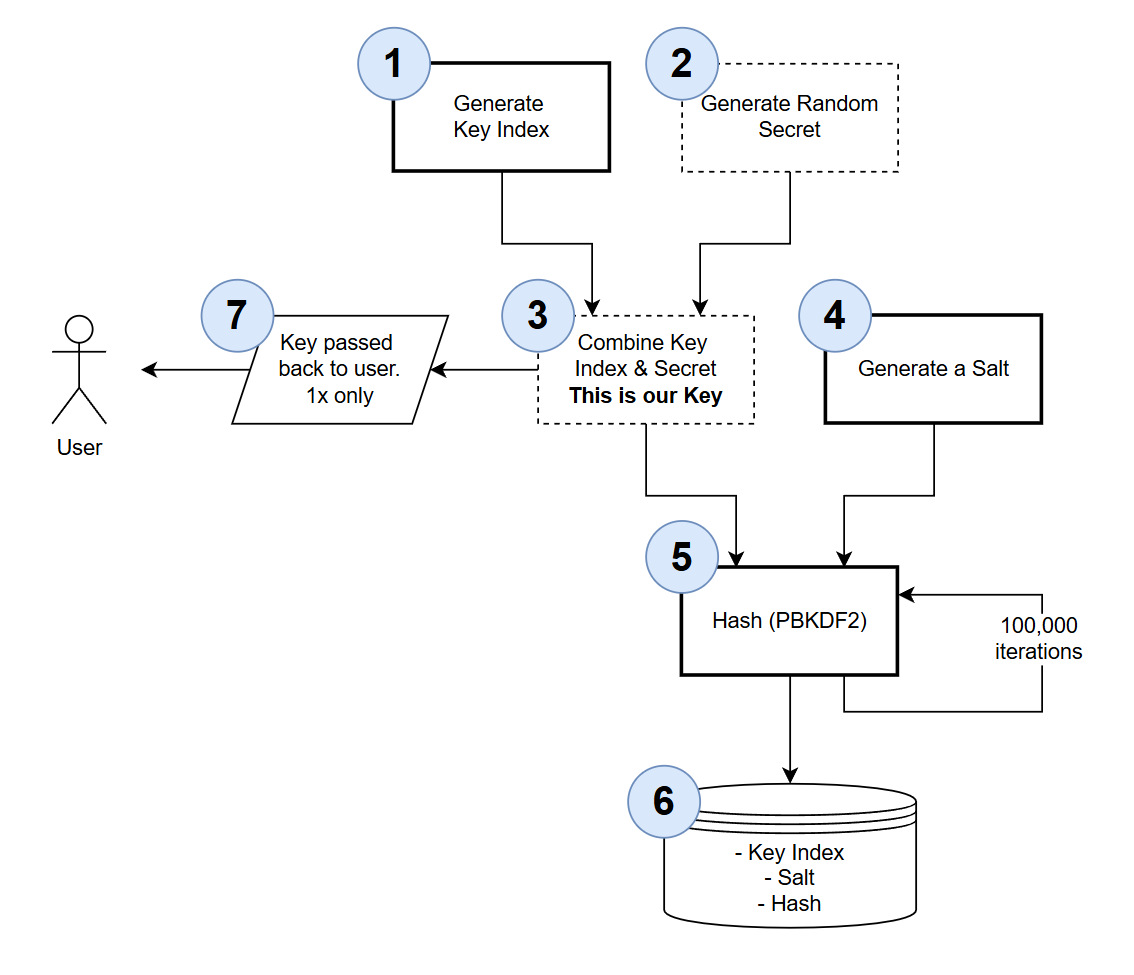
The generation of the key we pass back to the user is pretty simple:
- We generate a Key Index this is just a GUID value we use to perform a database look up when attempting to validate the key - we'll cover this more in the Key Validation flow
- We generate a random secret of 32 bytes
- We combine the Key Index and the Secret to form the API key we pass back to the user (step 7.). The API Key composition is shown below:

Some important points to note:
- We generate a Key Index to perform database lookups on the key (rather than use the
id) as:- Key Index is non-sequential -
idis. This just minimizes the use of sequential request attacks - Key Index is of fixed length, making it is easier to isolate and extract from the entire key
- Key Index is non-sequential -
- The Key passed back to the user is passed back 1x, it cannot be retrieved by the user.
- If the user loses their key they would need to generate a new one (and delete the old one)
- Inferred from the point above but worth emphasizing: the API Key is not stored anywhere in our domain
- How the user decides to handle this is their responsibility, but from our perspective this is not stored
What do we store then?
Let's pick up the flow where we left off.
- We generate a Salt this a 16 byte, randomly generated string
- Taking the Full API Key and the Salt we run this through the PBKDF2 hashing algorithm for 100,000 iterations and generate the Hash
- The following are stored in the DB:
- Key Index
- Salt
- Hash
What does this actually mean then? If this information was exposed somehow - wouldn't that compromise API Key authentication? The answer is: no, and is best explained by looking at how requests secured by API key authentication are validated.
Again we'll use a diagram.
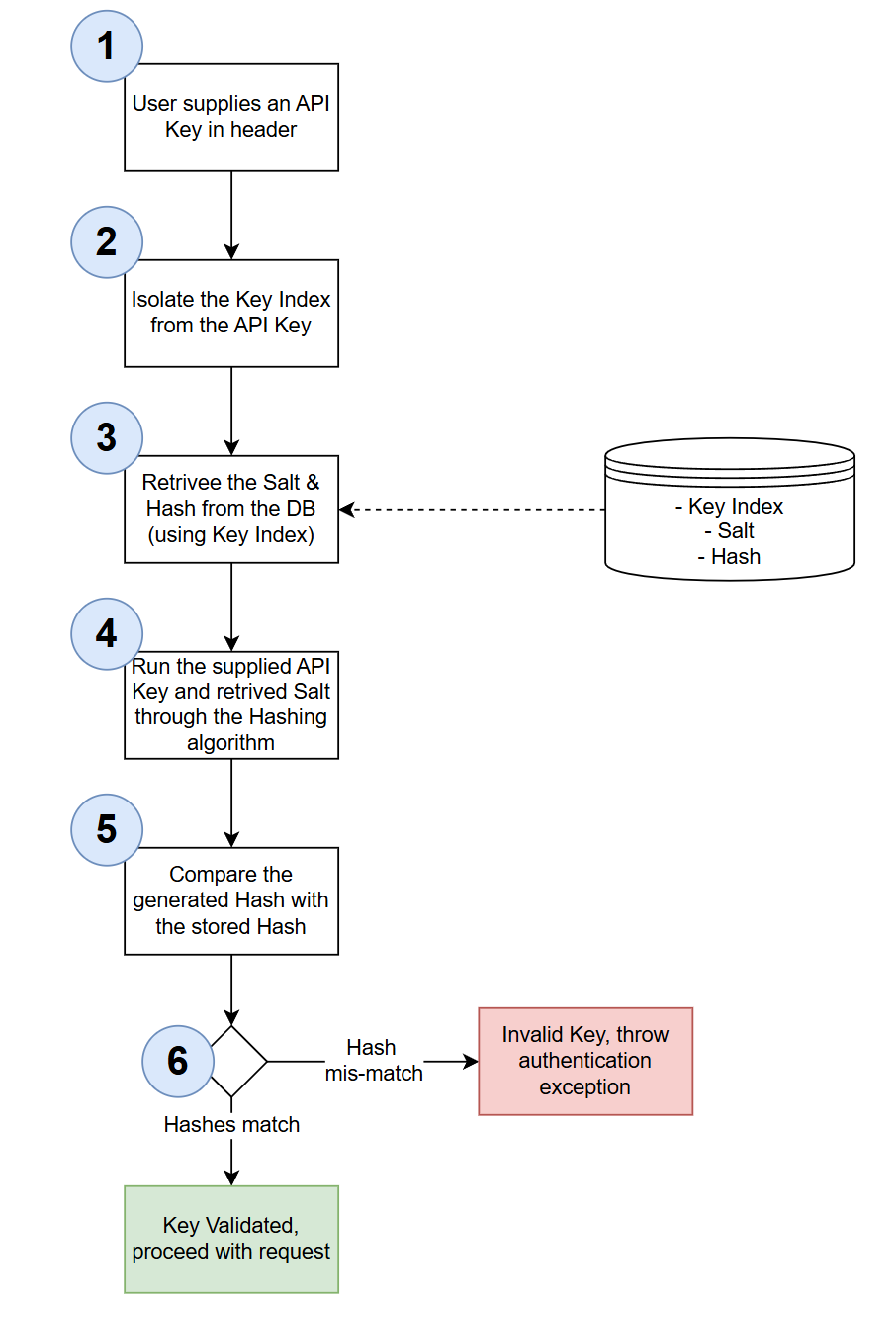
So in answer to the above question, the only way the stored data is of any use is when it's paired with a valid API key value. If only the stored data is exposed, that on its own does not tell anyone what the API keys are.
A rainbow table is a precomputed database of hash values for common passwords. Attackers use these tables to quickly reverse hash values back to their original passwords - instead of trying millions of password combinations, they simply look up the hash in their table.
How rainbow table attacks work: If an attacker steals a database of hashed passwords / keys, they can compare those hashes against their rainbow table. For example, if they see the following hash in the stolen list of hashes 5f4dcc3b5aa765d61d8327deb882cf99, they can then look up to see if there is a corresponding hash in the rainbow table, if there's a match then the rainbow table also provides the password.
Why we're not concerned here: Rainbow tables are effective against weak, predictable passwords that users commonly choose (like "password123", "qwerty", etc.). However, our API keys are:
- Randomly generated using cryptographically secure methods (32+ hex characters)
- High entropy - billions of possible combinations
- Not in any rainbow table - no precomputed tables exist for 32-character random hex strings
Even without salting, a rainbow table attack on our API keys would be impractical. That said, we're still using salts as an additional security layer and best practice for hashing sensitive data.
With the theory out of the way, we can now move to coding.
Model
Create a file called KeyRegistration.cs and place it in the Models folder, updating it as follows:
namespace CommandAPI.Models;

public class KeyRegistration
{
    public int Id { get; set; }

    public Guid KeyIndex { get; set; }

    public Guid Salt { get; set; }

    public required string KeyHash { get; set; }

    public required string Description { get; set; }

    public required string UserId { get; set; }
}
Based on the previous discussion these properties should make sense, the only 1 worth calling out is: UserId. Until we implement user / password authentication using OAuth in the next chapter, we won't have a value for this yet - for now we'll just hard code.
DbContext
Open AppDbContext.cs and add a DbSet for KeyRegistration:
// .
// .
// .
// Existing code

public AppDbContext(DbContextOptions<AppDbContext> options) : base(options)
{ }

public DbSet<Platform> Platforms { get; set; }
public DbSet<Command> Commands { get; set; }
public DbSet<KeyRegistration> KeyRegistrations { get; set; }

protected override void OnModelCreating(ModelBuilder modelBuilder)
{

// Existing code
// .
// .
// .
Then inside OnModelCreating add the EF Core Fluent API definitions for KeyRegistration:
 // KeyRegistration configuration
    modelBuilder.Entity<KeyRegistration>(entity =>
    {
        entity.HasKey(k => k.Id);

        entity.Property(k => k.KeyIndex)
            .IsRequired();

        entity.Property(k => k.Salt)
            .IsRequired();

        entity.Property(k => k.KeyHash)
            .IsRequired()
            .HasMaxLength(500);

        entity.Property(k => k.Description)
            .IsRequired()
            .HasMaxLength(250);

        entity.Property(k => k.UserId)
            .IsRequired()
            .HasMaxLength(50);
    });

    // Index on KeyIndex for lookup performance
    modelBuilder.Entity<KeyRegistration>()
        .HasIndex(k => k.KeyIndex)
        .IsUnique()
        .HasDatabaseName("Index_KeyRegistration_KeyIndex");
We've seen code similar to this before. The only design decision worth calling out is the fact we're creating an index on KeyIndex this will just make look ups on the table more performant.
Migrations
Generate the migrations for the database updates as follows:
dotnet ef migrations add AddKeyRegistrations
Validate that the migrations were generated correctly, then update the database to push the changes:
dotnet ef database update
I won't show this step as we've done it before, but you can use a tool like DBeaver to validate the table was created successfully.
Repository
Create a file called IRegistrationRepository and add it to the Data folder, populating it as follows:
using CommandAPI.Models;

namespace CommandAPI.Data;

public interface IRegistrationRepository
{
    Task<bool> SaveChangesAsync();

    Task<KeyRegistration?> GetRegistrationByIndex(string keyIndex);
    Task CreateRegistrationAsync(KeyRegistration keyRegistration);
    void DeleteRegistration(KeyRegistration keyRegistration);
}
You'll note we don't have any collection type methods: those that require pagination, we also don't (by design) have any update methods. Keys can be created or deleted - that's it.
Moving to the implementation, create a file called: PgSqlRegistrationRepository.cs also in Data and populate it as follows:
using Microsoft.EntityFrameworkCore;
using CommandAPI.Models;
using CommandAPI.Data;

namespace CommandAPI.Data;

public class PgSqlRegistrationRepository : IRegistrationRepository
{
    private readonly AppDbContext _context;

    public PgSqlRegistrationRepository(AppDbContext context)
    {
        _context = context;
    }

    public async Task<bool> SaveChangesAsync()
    {
        return await _context.SaveChangesAsync() >= 0;
    }

    public async Task<KeyRegistration?> GetRegistrationByIndex(string keyIndex)
    {
        return await _context.KeyRegistrations
            .FirstOrDefaultAsync(k => k.KeyIndex.ToString() == keyIndex);
    }

    public async Task CreateRegistrationAsync(KeyRegistration keyRegistration)
    {
        ArgumentNullException.ThrowIfNull(keyRegistration);
        await _context.KeyRegistrations.AddAsync(keyRegistration);
    }

    public void DeleteRegistration(KeyRegistration keyRegistration)
    {
        ArgumentNullException.ThrowIfNull(keyRegistration);
        _context.KeyRegistrations.Remove(keyRegistration);
    }
}
The code for this is self-explanatory.
Program.cs
Register the new repository interface and implementation class with the DI container (in Program.cs):
// .
// .
// .
// Existing code

builder.Services.AddScoped<IPlatformRepository, PgSqlPlatformRepository>();
builder.Services.AddScoped<ICommandRepository, PgSqlCommandRepository>();
builder.Services.AddScoped<IRegistrationRepository, PgSqlRegistrationRepository>();

// Existing code
// .
// .
// .
DTOs
In the DTOs folder create a file called KeyRegistrationCreateDto and populate it as follows:
namespace CommandAPI.Dtos;

public record KeyRegistrationCreateDto
{
    public required string Description { get; init; }

    public required string UserId { get; init; }
};
Validator
In the Validators folder create a file called KeyRegistrationCreateDtoValidator.cs and update it as follows:
using FluentValidation;

namespace CommandAPI.Validators;

public class KeyRegistrationMutateDtoValidator : AbstractValidator<Dtos.KeyRegistrationCreateDto>
{
    public KeyRegistrationMutateDtoValidator()
    {
        RuleFor(x => x.Description)
            .NotNull()
            .WithMessage("Description is required");

        RuleFor(x => x.UserId)
            .NotNull()
            .WithMessage("UserId is required");
    }
}
We've seen code similar to this before, so we can move on.
Controller
Create a file called RegistrationsController.cs in the Controllers folder and populate it as follows:
using System.Security.Cryptography;
using Microsoft.AspNetCore.Mvc;
using CommandAPI.Data;
using CommandAPI.Models;
using CommandAPI.Dtos;

namespace CommandAPI.Controllers;


[Route("api/[controller]")]
[ApiController]
public class RegistrationsController : ControllerBase
{
    private readonly IRegistrationRepository _regoRepo;
    private readonly ILogger<RegistrationsController> _logger;

    public RegistrationsController(IRegistrationRepository regoRepo, ILogger<RegistrationsController> logger)
    {
        _regoRepo = regoRepo;
        _logger = logger;
    }

    // This action will need to be protected by OAuth - Chapter 19
    // Currently non-authenticated users can create API Keys
    [HttpPost]
    public async Task<ActionResult> RegisterKey([FromBody] KeyRegistrationCreateDto keyRegistrationCreateDto)
    {
        _logger.LogInformation("Registering new API key");

        // Step 1: Generate random index (36 chars when converted to string)
        var keyIndex = Guid.NewGuid();

        // Step 2: Generate random secret (32 bytes → ~44 chars base64)
        byte[] secretBytes = new byte[32];
        using (var rng = RandomNumberGenerator.Create())
        {
            rng.GetBytes(secretBytes);
        }
        string secret = Convert.ToBase64String(secretBytes).TrimEnd('='); // Remove padding for cleaner key

        // Step 3: Combine index + secret to create full key
        string fullKey = keyIndex.ToString() + secret;

        // Step 4: Generate random salt (16 bytes)
        byte[] saltBytes = new byte[16];
        using (var rng = RandomNumberGenerator.Create())
        {
            rng.GetBytes(saltBytes);
        }
        var salt = new Guid(saltBytes);

        // Step 5: Hash using PBKDF2 with 100,000 iterations
        byte[] hashBytes = Rfc2898DeriveBytes.Pbkdf2(
            fullKey,
            saltBytes,
            100000,
            HashAlgorithmName.SHA256,
            32); // 32 bytes = 256 bits

        string keyHash = Convert.ToBase64String(hashBytes);

        // Step 6: Store index, salt, and hash (never store plaintext key)
        KeyRegistration keyRego = new()
        {
            KeyIndex = keyIndex,
            Salt = salt,
            KeyHash = keyHash,
            Description = keyRegistrationCreateDto.Description,
            UserId = keyRegistrationCreateDto.UserId
        };

        await _regoRepo.CreateRegistrationAsync(keyRego);
        await _regoRepo.SaveChangesAsync();

        _logger.LogInformation("Successfully registered API key with KeyIndex: {KeyIndex}", keyIndex);

        // Step 7: Return full key to user ONCE (this is their only chance to see it)
        return Ok(new {
            apiKey = fullKey,
            message = "Store this key securely. It will not be shown again."
        });
    }
}
I've placed comments in the code above which align to the discussion we've already had on Key Generation so I don't feel further commentary is needed here.
The only point to reiterate is that this controller is not protected by any form or Authentication, so anyone can call it currently. We'll change that in the next chapter.
No I'm not talking about Thomas the Tank Engine character, but the fact we've embedded quite a bit of logic in the controller that is not principally aligned to HTTP concerns.
Meaning that we're doing something in here (API Key generation) that really should sit outside the controller in some kind of service. As this chapter was already large, I didn't want to diverge too much further and introduce a separate service and further abstraction.
This is something we can perhaps revisit if we want to do some clean-up refactoring.
Middleware
We need to update the API Key Authentication middleware to:
- Use database lookups
- Perform re-hashing to check API Key header validity
Open ApiKeyAuthenticationHandler.cs and update to reflect the following:
using System.Security.Claims;
using System.Security.Cryptography;
using System.Text.Encodings.Web;
using CommandAPI.Data;
using Microsoft.AspNetCore.Authentication;
using Microsoft.Extensions.Options;


namespace CommandAPI.Middleware;

public class ApiKeyAuthenticationHandler : AuthenticationHandler<AuthenticationSchemeOptions>
{
    private const string ApiKeyHeaderName = "x-api-key";

    private readonly IRegistrationRepository _regRepo;


    public ApiKeyAuthenticationHandler(
        IOptionsMonitor<AuthenticationSchemeOptions> options,
        ILoggerFactory logger,
        UrlEncoder encoder,

         IRegistrationRepository regRepo)
        : base(options, logger, encoder)
    {
        _regRepo = regRepo;
    }

    protected override async Task<AuthenticateResult> HandleAuthenticateAsync()
    {
        if (!Request.Headers.TryGetValue(ApiKeyHeaderName, out var apiKeyHeaderValues))
        {
            Logger.LogWarning("API key header missing from request");
            return await Task.FromResult(AuthenticateResult.NoResult());
        }

        var providedApiKey = apiKeyHeaderValues.FirstOrDefault();


        if (apiKeyHeaderValues.Count == 0 || string.IsNullOrWhiteSpace(providedApiKey))
        {
            Logger.LogWarning("Empty API key provided");
            return await Task.FromResult(AuthenticateResult.NoResult());
        }

        //Validate the API Key
        var keyRego = await ValidateKey(providedApiKey);
        if(keyRego != null)
        {
            Logger.LogInformation("API key authentication successful for user {UserId}", keyRego.UserId);
            var claims = new[]
            {
                new Claim(ClaimTypes.Name, "ApiKeyUser"),
                new Claim(ClaimTypes.NameIdentifier,  keyRego.UserId),
                new Claim("KeyIndex", keyRego.KeyIndex.ToString())
            };
            var identity = new ClaimsIdentity(claims, Scheme.Name);
            var principal = new ClaimsPrincipal(identity);
            var ticket = new AuthenticationTicket(principal, Scheme.Name);

            return await Task.FromResult(AuthenticateResult.Success(ticket));
        }

        Logger.LogWarning("Invalid API key provided");
        return await Task.FromResult(AuthenticateResult.Fail("Invalid API Key Provided"));
    }

    private async Task<Models.KeyRegistration?> ValidateKey(string providedApiKey)
    {
        // Extract the index (first 36 characters)
        string extractedIndex = providedApiKey[..36];
        var keyRego = await _regRepo.GetRegistrationByIndex(extractedIndex);

        if(keyRego == null)
            return null;

        // Convert salt GUID back to bytes
        byte[] saltBytes = keyRego.Salt.ToByteArray();

        // Hash the provided key with the same salt and iterations
        byte[] hashBytes = Rfc2898DeriveBytes.Pbkdf2(
            providedApiKey,
            saltBytes,
            100000,
            HashAlgorithmName.SHA256,
            32); // 32 bytes = 256 bits

        string generatedHash = Convert.ToBase64String(hashBytes);

        // Use constant-time comparison to prevent timing attacks
        byte[] storedHashBytes = Convert.FromBase64String(keyRego.KeyHash);
        byte[] generatedHashBytes = Convert.FromBase64String(generatedHash);

        bool isValid = CryptographicOperations.FixedTimeEquals(storedHashBytes, generatedHashBytes);
        return isValid ? keyRego : null;
    }
}
The primary updates to this code are:
- We've introduced the Registrations Repository so we can perform database lookups to fetch the key entry
- Add the
ValidateKeymethod, that takes the supplied key and attempts to validate it by running the hashing algorithm again.
The main point of novelty (at least for me) in the ValidateKey method is the use of CryptographicOperations.FixedTimeEquals. This method performs a constant-time comparison of the two byte arrays (storedHashBytes vs. generatedHashBytes). Unlike standard comparison operators (==), which exit as soon as they find the first mismatched byte, FixedTimeEquals always takes the same amount of time to complete regardless of whether the values match or where they differ. This is crucial for preventing timing attacks, where an attacker could measure how long comparisons take to gradually deduce the correct hash value. By ensuring consistent comparison time, we eliminate this attack vector.
App settings
As we have now moved to storing keys in the DB, we can remove the temporary config from appSettings.Development.json that held the ValidKey value and metadata:
{
  "Serilog": {
    "MinimumLevel": {
      "Default": "Information",
      "Override": {
        "Microsoft.AspNetCore": "Warning",
        "Microsoft.AspNetCore.Hosting.Diagnostics": "Information",
        "CommandAPI.Controllers": "Debug",
        "CommandAPI.Middleware": "Information"
      }
    }
  },
  "ConnectionStrings": {
    "PostgreSqlConnection":"Host=localhost;Port=5432;Database=commandapi;Pooling=true;"
  }
}
Exercising
Create a file called registrations.http and place it in the Requests folder. Populate it with a test API Key creation request:
@baseUrl = https://localhost:7276
@baseUrlHttp = http://localhost:5181

# Register a new API key
POST {{baseUrl}}/api/Registrations HTTP/1.1
Content-Type: application/json

{
    "userId": "hardcode until we have OAuth",
    "description": "from requests"
}
This should return the following:
{
  "apiKey": "b7e956bf-633c-46ce-a982-a7a95fe5c39ao1g6mUEEIg+4r8pJIIaDVkx3dsGxDNzlgGBSipqxcq4",
  "message": "Store this key securely. It will not be shown again."
}
Copy the value for the API Key and supply it as a value to a mutation request that requires an API key:
### Create a new platform
POST {{baseUrl}}/api/platforms
Content-Type: application/json
x-api-key: b7e956bf-633c-46ce-a982-a7a95fe5c39ao1g6mUEEIg+4r8pJIIaDVkx3dsGxDNzlgGBSipqxcq4

{
  "platformName": "Thought Stream"
}
This should return a successful result:
HTTP/1.1 201 Created
Connection: close
Content-Type: application/json; charset=utf-8
Date: Mon, 16 Feb 2026 14:47:48 GMT
Server: Kestrel
Location: https://localhost:7276/api/Platforms/5
Transfer-Encoding: chunked

{
  "id": 5,
  "platformName": "Thought Stream",
  "createdAt": "2026-02-16T14:47:49.0637259Z"
}
Version Control
With the code complete, it's time to commit our code. A summary of those steps can be found below, for a more detailed overview refer to Chapter 5
- Save all files
git add .git commit -m "add API key authentication"git push(will fail - copy suggestion)git push --set-upstream origin chapter_18_api_key_auth- Move to GitHub and complete the PR process through to merging
- Back at a command prompt:
git checkout main git pull
Conclusion
In this chapter, we implemented a comprehensive API Key authentication system, the first of two authentication approaches. This was broken into phases.
Phase 1: Established the authentication infrastructure by creating custom authentication middleware that extended AuthenticationHandler. We learned the about the distinction between authentication (verifying identity) and authorization (controlling access), and configured both authentication schemes and authorization policies in .NET.
Phase 2: Transformed our implementation into a secure, database-backed system. We implemented cryptographically secure API key generation using RandomNumberGenerator, creating keys composed of a GUID-based index and a random secret. Most importantly, we learned that API keys must never be stored in plain text - instead, we use PBKDF2 hashing with salts to create secure hashes. The key validation process rehashes incoming keys and uses CryptographicOperations.FixedTimeEquals for constant-time comparison, preventing timing attacks.
We also explored important security concepts like rainbow table attacks, understanding why they pose minimal risk to our high-entropy random keys, and why salting remains important as a defense-in-depth strategy.
Currently, our key registration endpoint is unprotected - anyone can create an API key. We need a second (user-driven, interactive) authentication mechanism to protect it. In the next chapter, we'll implement OAuth-based authentication with username/password login, which will allow us to restrict API key registration to authenticated users only.