22. Hangfire
About this chapter
In this chapter we take a look at how background jobs can enhance the capabilities of an API by providing the ability to asynchronously process work that would otherwise be too time consuming to process in a synchronous way - think bulk importing of data. We'll leverage Hangfire to provide this capability.
Learning outcomes
- Understand the difference between
asyncendpoints and asynchronous background job processing - Implement Hangfire for persistent, long-running background tasks
- Create batch processing services with validation, error handling, and progress tracking
- Implement basic multi-tenant data isolation using user claims
- Use the Hangfire dashboard for job monitoring and management
Architecture Checkpoint
In reference to our solution architecture, we'll be making code changes to the highlighted components in this chapter:
- DTOs (partially complete)
- Controllers (partially complete)
- Repository (partially complete)
- DB Context (partially complete)
- Models (partially complete)
- Hangfire Service (complete)
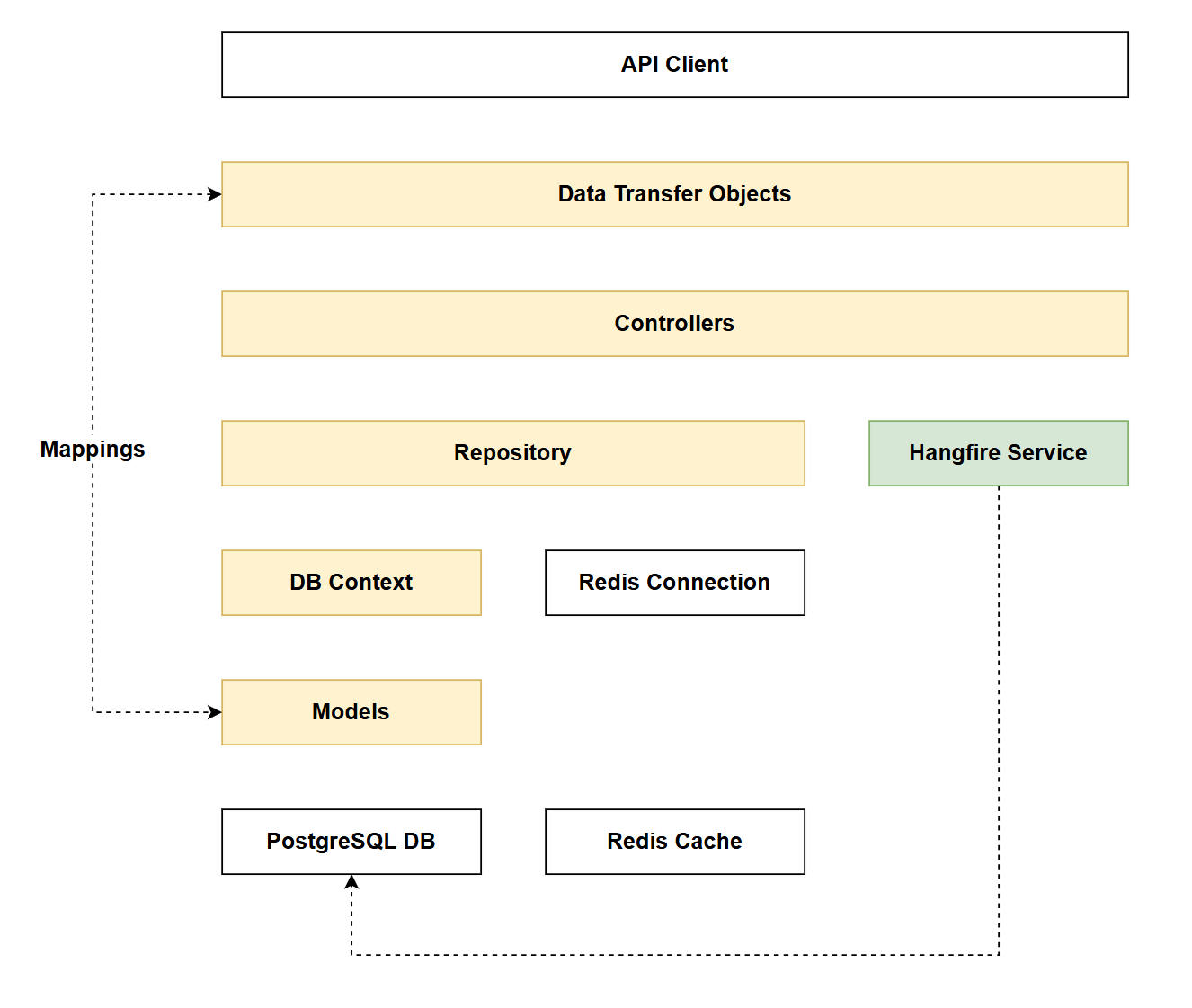
- The code for this section can be found here on GitHub
- The complete finished code can be found here on GitHub
Feature branch
Ensure that main is current, then create a feature branch called: chapter_22_hangfire, and check it out:
git branch chapter_22_hangfire
git checkout chapter_22_hangfire
If you can't remember the full workflow, refer back to Chapter 5
Async processing
As mentioned in the intro, this chapter is about processing large amounts of work in an asynchronous way. Taking a look at one of our existing endpoints you may state: our endpoints are already asynchronous:
[HttpPost]
[Authorize(Policy = "ApiKeyPolicy")]
[ResponseCache(NoStore = true)]
public async Task<ActionResult<PlatformReadDto>> CreatePlatform(PlatformCreateDto platformCreateDto)
{
    _logger.LogInformation(
        "Creating new platform: {PlatformName}",
        platformCreateDto.PlatformName);

// Existing code
// .
// .
// .
This is true from one perspective, just not the one we're focused on in this chapter. The differences are explained below:
asyncendpoints: Theasynckeyword allows the endpoint to perform non-blocking I/O operations (database queries, API calls, etc.) without tying up a thread while waiting. (As a refresher we covered this in Chapter 5). The HTTP request still remains open waiting for a response, but the server thread is freed to handle other requests. This improves scalability but doesn't help with long-running operations that would cause client timeouts. Our endpoints still work in a synchronous way from a request / response perspective: i.e. we wait for the response for the completed work. This is just not suitable if we need to do a lot of processing.- Asynchronous background processing: This approach immediately returns a response to the client (often with a job ID or confirmation), then processes the actual work in the background using a job queue. The HTTP connection closes quickly, and the long-running work (like bulk imports) continues independently. The client can later check job status or receive a notification when complete.
This may seem like an obvious distinction, but I felt it was one worth making as it positions us nicely for what we're going to implement.
Bulk uploader
Our API allows us to create resources 1 at a time. But what if we wanted to create a lot of platforms or commands (1000's, 10,000's, 100,000's etc.)? We could absolutely just call our existing endpoints n times (where n is the number of resources to create) but this ties up the client. Often API consumers just want to pass us the work, and be notified when it is done - classic asynchronous processing.
As outlined in the Project Overview, we're going to implement 2 endpoints to support the bulk creation of Platforms:
| Function | Resource | HTTP Verb | Route Fragment |
|---|---|---|---|
| Bulk import platforms | Platform | POST | /api/platforms/bulk |
| Get bulk import status | Platform | GET | /api/platforms/bulk/{jobId}/status |
I've decided in the interests of time and space, just to implement a bulk endpoint for platforms and not commands.
Once you're comfortable with the concepts introduced in this chapter, adding bulk command functionality would be a perfect learning exercise.
Hangfire
Hangfire is an open-source framework that enables background job processing in .NET applications. It provides persistent storage for jobs, automatic retries, scheduling capabilities, and a built-in dashboard for monitoring job execution.
Native .NET alternatives
- IHostedService / BackgroundService: Built-in .NET classes for running background tasks, but require manual implementation of job persistence, retry logic, and monitoring.
- Channels & System.Threading.Tasks: Lower-level primitives for async work, but lack job persistence across application restarts.
Why Hangfire?
- Persistent storage: Jobs survive application restarts (stored in SQL Server, Redis, etc.)
- Built-in dashboard: Visual monitoring and management of jobs without custom UI development
- Automatic retries: Configurable retry policies for failed jobs
- Scheduling capabilities: Support for delayed, recurring, and continuation jobs
- Minimal setup: Production-ready features with significantly less code than rolling your own solution
Implementing
There is a lot of code to implement in this chapter. While the narrative below should be easy enough to follow, remember that you can check against the GitHub repo.
Packages
Run the following at a command prompt to add the required Hangfire packages:
dotnet add package Hangfire.Core
dotnet add package Hangfire.AspNetCore
dotnet add package Hangfire.PostgreSQL
- Hangfire.Core: Core functionality
- Hangfire.AspNetCore: ASP.NET support
- Hangfire.PostgreSQL: Uses a PostgreSQL backend to persist and manage Hangfire jobs.
With regards the last package: Hangfire.PostgreSQL, a few points:
- You can use different DB backends with Hangfire - it makes sense for us to use the existing PostgrSQL db
- We could theoretically leverage the data schema that Hangfire creates on the PostgreSQL DB and use it for status reporting of jobs. However I feel this couples us too much to the Hangfire implementation, and therefore we'll create our own job model (
BulkImportJob) to manage status of jobs. This means that if we chose to move to a different batch processing framework we'll have a suitable layer of abstraction that should minimize change impacts.
Models
Create a file called BulkImportJob.cs in the Models folder and add the following code:
namespace CommandAPI.Models;

public enum BulkImportStatus
{
    Pending,
    Processing,
    Completed,
    Failed,
    PartialSuccess
}

public class BulkImportJob : ICreatedAtTrackable
{
    public int Id { get; set; }
    public string HangfireJobId { get; set; } = string.Empty;
    public BulkImportStatus Status { get; set; } = BulkImportStatus.Pending;
    public int TotalRecords { get; set; }
    public int ProcessedRecords { get; set; } = 0;
    public int SuccessCount { get; set; } = 0;
    public int FailureCount { get; set; } = 0;
    public DateTime CreatedAt { get; set; }
    public DateTime? StartedAt { get; set; }
    public DateTime? CompletedAt { get; set; }
    public string UserId { get; set; } = string.Empty;
    public string? ErrorSummary { get; set; }
}
BulkImportStatus
This is simply an enumeration of potential statuses that our batch jobs could get into, it is used by our next model: BulkImportJob.
BulkImportJob
This is a standard .NET class, and most of the properties are self-explanatory. However, there's one property worth highlighting: UserId - this stores the Auth0 user identifier tied to the API key. We derive this from the authentication claims and persist it with each background job.
Why is this important? This implementation marks the beginning of a multi-tenant architecture - a fundamental pattern in Software as a Service (SaaS) platforms. Multi-tenancy means multiple users (tenants) share the same application infrastructure, but their data is logically isolated. Each user can only access their own data.
Contrast with existing resources: Currently, our Platform and Command resources follow a simpler model - any user with a valid API key can access all platforms and commands. There's no per-user data isolation. This works fine for shared reference data, but isn't suitable for user-specific workloads.
What we're implementing: By associating each BulkImportJob with a UserId and enforcing ownership checks in the status endpoint (returning 403 Forbidden for unauthorized access), we're implementing a basic tenant isolation pattern. While this isn't a complete multi-tenant system, it demonstrates key concepts you'll encounter when building SaaS applications:
- Data isolation: Users can only view their own jobs
- Tenant context: We derive the user identity from claims and use it throughout the request lifecycle
- Authorization beyond authentication: Having a valid API key isn't enough - you must also own the resource
This pattern could be extended to Platforms and Commands in the future, for now we'll start with BulkImportJobs.
DbContext
Open AppDbContext.cs and add the following DbSet:
// .
// .
// .
// Existing code

public DbSet<Platform> Platforms { get; set; }
public DbSet<Command> Commands { get; set; }
public DbSet<KeyRegistration> KeyRegistrations { get; set; }
public DbSet<BulkImportJob> BulkImportJobs { get; set; }

// Existing code
// .
// .
// .
Then update the OnModelCreating method with the following code additions:
// .
// .
// .
// Existing code

// BulkImportJob configuration
modelBuilder.Entity<BulkImportJob>(entity =>
{
    entity.HasKey(b => b.Id);

    entity.Property(b => b.HangfireJobId)
        .IsRequired()
        .HasMaxLength(100);

    entity.Property(b => b.Status)
        .IsRequired();

    entity.Property(b => b.TotalRecords)
        .IsRequired();

    entity.Property(b => b.CreatedAt)
        .IsRequired();

    entity.Property(b => b.UserId)
        .IsRequired()
        .HasMaxLength(255);

    entity.Property(b => b.ErrorSummary)
        .HasMaxLength(500);
});

// Index on HangfireJobId for lookup performance
modelBuilder.Entity<BulkImportJob>()
    .HasIndex(b => b.HangfireJobId)
    .HasDatabaseName("Index_BulkImportJob_HangfireJobId");

// Index on UserId for filtering user's jobs
modelBuilder.Entity<BulkImportJob>()
    .HasIndex(b => b.UserId)
    .HasDatabaseName("Index_BulkImportJob_UserId");

// Existing code
// .
// .
// .
This code:
- Includes the
BulkImportJobas a dataset - and will be modelled down to the DB - Includes the necessary EF Core Fluent API definitions for
BulkImportJob - Sets up 2 indexes to improve query response times.
Migrations
Ensure the changes so far have been saved and generate migrations:
dotnet ef migrations add AddBulkImportJob
Check the migrations were generated successfully, then update the database:
dotnet ef database update
Repository
In the Data folder create a file called IBulkImportJobRepository.cs and add the following code:
using CommandAPI.Models;

namespace CommandAPI.Data;

public interface IBulkImportJobRepository
{
    Task<BulkImportJob> CreateAsync(BulkImportJob job);
    Task<BulkImportJob?> GetByIdAsync(int id);
    Task UpdateAsync(BulkImportJob job);
}
This interface defines 3 methods:
- CreateAsync: creates a batch job
- GetByIdAsync: returns a batch job based on the DB primary key
- UpdateAsync: Updates the job - used for status updates
Next, create a file called PgSqlBulkImportJobRepository.cs and add it to the Data folder, then add the following code for the repository implementation:
using CommandAPI.Models;

namespace CommandAPI.Data;

public class PgSqlBulkImportJobRepository : IBulkImportJobRepository
{
    private readonly AppDbContext _context;

    public PgSqlBulkImportJobRepository(AppDbContext context)
    {
        _context = context;
    }

    public async Task<BulkImportJob> CreateAsync(BulkImportJob job)
    {
        _context.BulkImportJobs.Add(job);
        await _context.SaveChangesAsync();
        return job;
    }

    public async Task<BulkImportJob?> GetByIdAsync(int id)
    {
        return await _context.BulkImportJobs.FindAsync(id);
    }

    public async Task UpdateAsync(BulkImportJob job)
    {
        _context.BulkImportJobs.Update(job);
        await _context.SaveChangesAsync();
    }
}
There really is nothing of novelty here, so no further code explanation required.
DTOs
In the Dtos folder create the following files:
BulkImportJobResponseDto.csBulkImportJobStatusDto.csBulkImportJobRequestDto.cs
Then update them as follows:
BulkImportJobResponseDto.cs
namespace CommandAPI.Dtos;

public record BulkImportJobResponseDto
{
    public int Id { get; set; }
    public string HangfireJobId { get; set; } = string.Empty;
    public string Message { get; set; } = string.Empty;
    public int TotalRecords { get; set; }
}
BulkImportJobStatusDto.cs
namespace CommandAPI.Dtos;

public record BulkImportJobStatusDto
{
    public int Id { get; set; }
    public string HangfireJobId { get; set; } = string.Empty;
    public string Status { get; set; } = string.Empty;
    public int TotalRecords { get; set; }
    public int ProcessedRecords { get; set; }
    public int SuccessCount { get; set; }
    public int FailureCount { get; set; }
    public DateTime CreatedAt { get; set; }
    public DateTime? StartedAt { get; set; }
    public DateTime? CompletedAt { get; set; }
    public string? ErrorSummary { get; set; }
}
BulkImportJobRequestDto.cs
namespace CommandAPI.Dtos;

public record BulkPlatformImportRequestDto
{
    public List<PlatformCreateDto> Platforms { get; set; } = new();
}
In the Validators folder create a file called BulkImportRequestDtoValidator.cs and add the following code:
using CommandAPI.Dtos;
using FluentValidation;

public class BulkPlatformImportRequestDtoValidator : AbstractValidator<BulkPlatformImportRequestDto>
{
    public BulkPlatformImportRequestDtoValidator(IValidator<PlatformCreateDto> platformValidator)
    {
        RuleFor(x => x.Platforms)
            .NotNull()
            .WithMessage("Platforms list cannot be null");

        RuleFor(x => x.Platforms)
            .NotEmpty()
            .WithMessage("Platforms list must contain at least one platform");

        RuleFor(x => x.Platforms)
            .Must(list => list.Count <= 1000)
            .WithMessage("Bulk import cannot exceed 1000 platforms per request");

        RuleForEach(x => x.Platforms)
            .SetValidator(platformValidator);
    }
}
Mappings
As mentioned before, as the DTOs and Model related to the new bulk import functionality have the same property names, we don't need to explicitly define Mapster mappings. However, to keep the implementation pattern consistent I'll add them anyway.
Open MappingConfig.cs (inside the Mappings folder) and update as shown below:
// .
// .
// .
// Existing code

public void Register(TypeAdapterConfig config)
{
    // Platform mappings
    config.NewConfig<Platform, PlatformReadDto>();
    config.NewConfig<PlatformCreateDto, Platform>();
    config.NewConfig<PlatformUpdateDto, Platform>();

    // Command mappings
    config.NewConfig<Command, CommandReadDto>();
    config.NewConfig<CommandCreateDto, Command>();
    config.NewConfig<CommandUpdateDto, Command>();

    // BulkImportJob mappings
    config.NewConfig<BulkImportJob, BulkImportJobResponseDto>();
    config.NewConfig<BulkImportJob, BulkImportJobStatusDto>();
}

// Existing code
// .
// .
// .
Hangfire Service
In the root of the project create a new folder called Services, then create a file named BulkPlatformImportService.cs in that folder and add the following code:
using CommandAPI.Data;
using CommandAPI.Dtos;
using CommandAPI.Models;
using FluentValidation;

namespace CommandAPI.Services;

public class BulkPlatformImportService
{
    private readonly IPlatformRepository _platformRepository;
    private readonly IBulkImportJobRepository _jobRepository;
    private readonly IValidator<PlatformCreateDto> _validator;
    private readonly ILogger<BulkPlatformImportService> _logger;
    private const int BatchSize = 100;

    public BulkPlatformImportService(
        IPlatformRepository platformRepository,
        IBulkImportJobRepository jobRepository,
        IValidator<PlatformCreateDto> validator,
        ILogger<BulkPlatformImportService> logger)
    {
        _platformRepository = platformRepository;
        _jobRepository = jobRepository;
        _validator = validator;
        _logger = logger;
    }

    public async Task ProcessBulkImport(int jobId, List<PlatformCreateDto> platforms)
    {
        _logger.LogInformation("Starting bulk import job {JobId} with {TotalRecords} platforms",
            jobId, platforms.Count);

        var job = await _jobRepository.GetByIdAsync(jobId);
        if (job == null)
        {
            _logger.LogError("Job {JobId} not found", jobId);
            return;
        }

        job.Status = BulkImportStatus.Processing;
        job.StartedAt = DateTime.UtcNow;
        await _jobRepository.UpdateAsync(job);

        var successCount = 0;
        var failureCount = 0;
        var processedCount = 0;
        var errorMessages = new List<string>();

        try
        {
            for (int i = 0; i < platforms.Count; i += BatchSize)
            {
                var batch = platforms.Skip(i).Take(BatchSize).ToList();

                _logger.LogInformation("Processing batch starting at index {StartIndex}, batch size {BatchSize}",
                    i, batch.Count);

                foreach (var platformDto in batch)
                {
                    processedCount++;

                    try
                    {
                        var validationResult = await _validator.ValidateAsync(platformDto);

                        if (!validationResult.IsValid)
                        {
                            failureCount++;
                            var errors = string.Join(", ", validationResult.Errors.Select(e => e.ErrorMessage));
                            errorMessages.Add($"Platform '{platformDto.PlatformName}': {errors}");
                            _logger.LogWarning("Validation failed for platform: {PlatformName}", platformDto.PlatformName);
                            continue;
                        }

                        var platform = new Platform
                        {
                            PlatformName = platformDto.PlatformName!
                        };

                        await _platformRepository.CreatePlatformAsync(platform);
                        successCount++;
                    }
                    catch (Exception ex)
                    {
                        failureCount++;
                        errorMessages.Add($"Platform '{platformDto.PlatformName}': {ex.Message}");
                        _logger.LogError(ex, "Error creating platform: {PlatformName}", platformDto.PlatformName);
                    }
                }

                job.ProcessedRecords = processedCount;
                job.SuccessCount = successCount;
                job.FailureCount = failureCount;
                await _jobRepository.UpdateAsync(job);

                _logger.LogInformation("Batch completed. Progress: {Processed}/{Total}, Success: {Success}, Failures: {Failures}",
                    processedCount, platforms.Count, successCount, failureCount);
            }

            if (failureCount == 0)
            {
                job.Status = BulkImportStatus.Completed;
                _logger.LogInformation("Bulk import job {JobId} completed successfully. All {SuccessCount} records imported",
                    jobId, successCount);
            }
            else if (successCount == 0)
            {
                job.Status = BulkImportStatus.Failed;
                _logger.LogWarning("Bulk import job {JobId} failed. All {FailureCount} records failed",
                    jobId, failureCount);
            }
            else
            {
                job.Status = BulkImportStatus.PartialSuccess;
                _logger.LogWarning("Bulk import job {JobId} completed with partial success. Success: {SuccessCount}, Failures: {FailureCount}",
                    jobId, successCount, failureCount);
            }

            job.ErrorSummary = errorMessages.Count > 0
                ? string.Join("; ", errorMessages.Take(10)) + (errorMessages.Count > 10 ? $" (and {errorMessages.Count - 10} more)" : "")
                : null;

            job.CompletedAt = DateTime.UtcNow;
            await _jobRepository.UpdateAsync(job);
        }
        catch (Exception ex)
        {
            _logger.LogError(ex, "Fatal error during bulk import job {JobId}", jobId);

            job.Status = BulkImportStatus.Failed;
            job.ErrorSummary = $"Fatal error: {ex.Message}";
            job.CompletedAt = DateTime.UtcNow;
            await _jobRepository.UpdateAsync(job);

            throw;
        }
    }
}
This code:
- Retrieves the job from the database and marks it as
Processing - Processes platforms in batches of 100 to avoid memory issues with large imports
- Validates each platform DTO using FluentValidation
- Creates valid platforms in the database; logs and skips invalid ones
- Tracks success/failure counts and collects error messages
- Updates job progress after each batch completes
- Sets final job status:
Completed(no failures),Failed(all failed), orPartialSuccess(mixed results) - Stores up to 10 error messages in
ErrorSummary(truncates if more) - Handles fatal errors by marking the job as
Failedand rethrowing the exception
Controller
Open the PlatformsController.cs file and add the following using statements:
using CommandAPI.Services;
using System.Security.Claims;
using Hangfire;
Update the class constructor to allow for the injection of the new bulk job repository:
private readonly IPlatformRepository _platformRepo;
private readonly ICommandRepository _commandRepo;
private readonly IBulkImportJobRepository _jobRepo;
private readonly ILogger<PlatformsController> _logger;

public PlatformsController(
    IPlatformRepository platformRepo,
    ICommandRepository commandRepo,
    IBulkImportJobRepository jobRepo,
    ILogger<PlatformsController> logger)
{
    _platformRepo = platformRepo;
    _commandRepo = commandRepo;
    _jobRepo = jobRepo;
    _logger = logger;
}
Add the the BulkImportPlatforms endpoint:
[HttpPost("bulk")]
[Authorize(Policy = "ApiKeyPolicy")]
[ResponseCache(NoStore = true)]
public async Task<ActionResult<BulkImportJobResponseDto>> BulkImportPlatforms(
    [FromBody] BulkPlatformImportRequestDto request)
{
    var userId = User.FindFirstValue(ClaimTypes.NameIdentifier)
                 ?? User.FindFirstValue("sub")
                 ?? "unknown";

    _logger.LogInformation(
        "User {UserId} initiated bulk import with {Count} platforms",
        userId, request.Platforms.Count);

    var job = new BulkImportJob
    {
        HangfireJobId = string.Empty,
        Status = BulkImportStatus.Pending,
        TotalRecords = request.Platforms.Count,
        UserId = userId,
        CreatedAt = DateTime.UtcNow
    };

    var createdJob = await _jobRepo.CreateAsync(job);

    var hangfireJobId = BackgroundJob.Enqueue<BulkPlatformImportService>(
        service => service.ProcessBulkImport(createdJob.Id, request.Platforms));

    createdJob.HangfireJobId = hangfireJobId;
    await _jobRepo.UpdateAsync(createdJob);

    _logger.LogInformation(
        "Bulk import job created: JobId={JobId}, HangfireJobId={HangfireJobId}, TotalRecords={TotalRecords}",
        createdJob.Id, hangfireJobId, createdJob.TotalRecords);

    var response = createdJob.Adapt<BulkImportJobResponseDto>();
        response.Message = "Bulk import job successfully queued";

    return Accepted(response);
}
This code:
- Specifies that we do not use HTTP Caching
- Requires API Key authentication
- Extracts
UserIdfrom authentication claims (supports bothNameIdentifierandsubclaim types) - Creates a
BulkImportJobrecord withPendingstatus and persists it to the database - Enqueues the background job with Hangfire using
BackgroundJob.Enqueue - Updates the job record with the Hangfire-generated job ID
- Returns
202 Acceptedwith job details, allowing the client to disconnect immediately - Logs the import initiation and job creation for monitoring
Add the GetBulkImportStatus endpoint:
[HttpGet("bulk/{jobId}/status")]
[Authorize(Policy = "ApiKeyPolicy")]
[ResponseCache(NoStore = true)]
public async Task<ActionResult<BulkImportJobStatusDto>> GetBulkImportStatus(int jobId)
{
    var userId = User.FindFirstValue(ClaimTypes.NameIdentifier)
                ?? User.FindFirstValue("sub")
                ?? "unknown";

    _logger.LogInformation(
        "User {UserId} checking status of bulk import job {JobId}",
        userId, jobId);

    var job = await _jobRepo.GetByIdAsync(jobId);

    if (job == null)
    {
        _logger.LogWarning(
            "Bulk import job {JobId} not found",
            jobId);
        return NotFound(new { message = "Job not found" });
    }

    if (job.UserId != userId)
    {
        _logger.LogWarning(
            "User {UserId} attempted to access job {JobId} owned by {OwnerId}",
            userId, jobId, job.UserId);
        return Forbid();
    }

    var statusDto = job.Adapt<BulkImportJobStatusDto>();

    _logger.LogInformation(
        "Returning status for job {JobId}: Status={Status}, Processed={Processed}/{Total}",
        jobId, job.Status, job.ProcessedRecords, job.TotalRecords);

    return Ok(statusDto);
}
This code:
- Requires API Key authentication
- Specifies that we do not use HTTP Caching
- Extracts
UserIdfrom authentication claims to establish tenant context - Retrieves the job from the database by
jobId - Returns
404 Not Foundif the job doesn't exist - Enforces tenant isolation by comparing the requesting user's ID with the job's
UserId - Returns
403 Forbiddenif the user attempts to access another user's job (multi-tenant security) - Maps the job to a DTO and returns
200 OKwith current status, progress, and error details - Logs all access attempts for security auditing
When testing the tenant isolation aspect of this endpoint, be mindful of the following:
- 2 API Keys generated by the same Auth0 user will not trigger this clause
- Although we have 2 keys, they belong to the same user.
- 2 API Keys generated by different Auth0 users will trigger this clause
Program.cs
Open Program.cs and add the following using statements:
using Hangfire;
using Hangfire.PostgreSql;
using Run1API.Services;
Register the new repository with the others, as well as the new Hangfire service:
// .
// .
// .
// Existing code

builder.Services.AddScoped<IPlatformRepository, PgSqlPlatformRepository>();
builder.Services.AddScoped<ICommandRepository, PgSqlCommandRepository>();
builder.Services.AddScoped<IRegistrationRepository, PgSqlRegistrationRepository>();
builder.Services.AddScoped<IBulkImportJobRepository, PgSqlBulkImportJobRepository>();

builder.Services.AddScoped<BulkPlatformImportService>();

builder.Services.AddAuthentication(opt =>
{

// Existing code
// .
// .
// .
Then register Hangfire as follows:
// .
// .
// .
// Existing code

builder.Services.AddFluentValidationAutoValidation();

builder.Services.AddHangfire(config => config
        .UsePostgreSqlStorage(c => c
                .UseNpgsqlConnection(connectionString.ConnectionString))
        .SetDataCompatibilityLevel(CompatibilityLevel.Version_180)
        .UseSimpleAssemblyNameTypeSerializer()
        .UseRecommendedSerializerSettings());

builder.Services.AddHangfireServer(options =>
{
    options.WorkerCount = Environment.ProcessorCount * 2;
});

var app = builder.Build();

// Existing code
// .
// .
// .
We'll also add the Hangfire Dashboard to the request pipeline, but only in development:
// .
// .
// .
// Existing code

if (app.Environment.IsDevelopment())
{
    app.MapOpenApi();
    app.UseHangfireDashboard();
}

// Existing code
// .
// .
// .
Exercising
Ensure everything is saved, and run up the API.
Dashboard
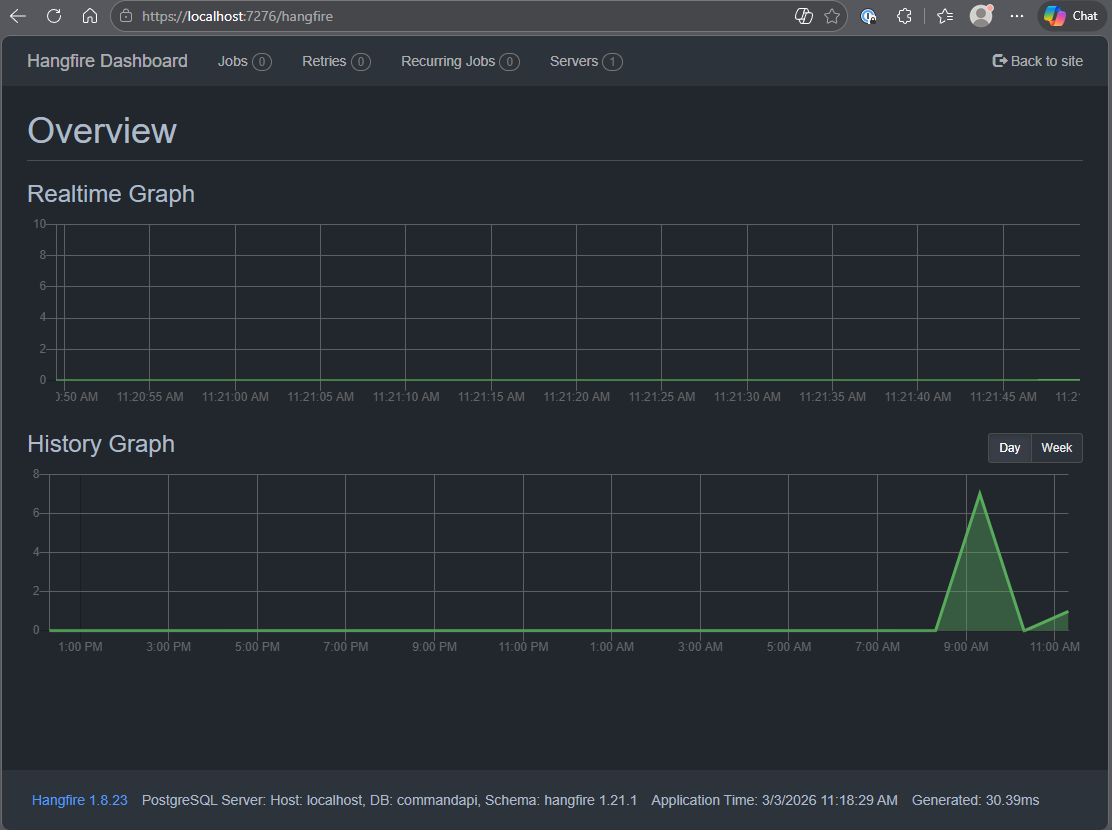
Navigate to: https://localhost:<your_port>/hangfire and you should see the Hangfire dashboard:
Bulk request
Open platforms.http and add the following request (replacing the API Key of course):
### Submit large bulk platform import job (10 platforms)
POST {{baseUrl}}/api/platforms/bulk
Content-Type: application/json
x-api-key: 7189c70b-.....

{
  "platforms": [
    { "platformName": "Platform 1" },
    { "platformName": "Platform 2" },
    { "platformName": "Platform 3" },
    { "platformName": "Platform 4" },
    { "platformName": "Platform 5" },
    { "platformName": "Platform 6" },
    { "platformName": "Platform 7" },
    { "platformName": "Platform 8" },
    { "platformName": "Platform 9" },
    { "platformName": "Platform 10" }
  ]
}
Executing this request should return something similar to the following:
HTTP/1.1 202 Accepted
Connection: close
Content-Type: application/json; charset=utf-8
Date: Tue, 03 Mar 2026 11:25:06 GMT
Server: Kestrel
Cache-Control: no-store
Transfer-Encoding: chunked

{
  "id": 9,
  "hangfireJobId": "9",
  "message": "Bulk import job successfully queued",
  "totalRecords": 10
}
If you're looking at the Hangfire dashboard, you should see activity on the Realtime Graph.
Next add the following request to check the status, (replacing the API Key and Job Id values):
### Check bulk import job status (replace {id} with actual job ID from POST response)
GET {{baseUrl}}/api/platforms/bulk/9/status
x-api-key: 26b69607-ac74-42dc-b1ea-6dbf18ad0d27JhoaRcT6My3PMhuok8y03oDKKbZ8nPMDBCxgUmOEZXI
This job should complete almost immediately, so you should see a status of Completed:
HTTP/1.1 200 OK
Connection: close
Content-Type: application/json; charset=utf-8
Date: Tue, 03 Mar 2026 11:27:37 GMT
Server: Kestrel
Cache-Control: no-store
Transfer-Encoding: chunked

{
  "id": 9,
  "hangfireJobId": "9",
  "status": "Completed",
  "totalRecords": 10,
  "processedRecords": 10,
  "successCount": 10,
  "failureCount": 0,
  "createdAt": "2026-03-03T11:25:06.796842Z",
  "startedAt": "2026-03-03T11:25:06.834179Z",
  "completedAt": "2026-03-03T11:25:06.846161Z",
  "errorSummary": null
}
There are other scenarios for you to try including, but not limited to:
- Exercise without an API key
- Exercise Create and Status calls with different API keys generated by the same user
- Exercise Create and Status calls with different API keys generated by different users
- Exercise the Create call with object data that should trigger validations
These are great candidates to run yourself to assist and embed learning.
Version Control
With the code complete, it's time to commit our code. A summary of those steps can be found below, for a more detailed overview refer to Chapter 5
- Save all files
git add .git commit -m "add bulk processing with Hangfire"git push(will fail - copy suggestion)git push --set-upstream origin chapter_22_hangfire- Move to GitHub and complete the PR process through to merging
- Back at a command prompt:
git checkout main git pull
Conclusion
In this chapter we've significantly enhanced our API's capabilities by implementing asynchronous background job processing with Hangfire. This opens up possibilities for handling time-consuming operations like bulk imports, report generation, or data processing without blocking client connections.
Key achievements:
- Distinguished between
asyncendpoints (non-blocking I/O) and background job processing (fire-and-forget workloads) - Integrated Hangfire with PostgreSQL for persistent job storage that survives application restarts
- Built a robust batch import service with validation, error handling, and progress tracking
- Implemented basic multi-tenant data isolation using user claims from Auth0
- Utilized the Hangfire dashboard for real-time job monitoring
Multi-tenancy foundation: The UserId-based isolation pattern we introduced with BulkImportJob demonstrates fundamental SaaS concepts. While our Platform and Command resources remain shared across all authenticated users, background jobs now belong to specific users. This pattern could be extended to create fully isolated data models where each user (or organization) has their own workspace.
The patterns and techniques introduced here form a solid foundation for building enterprise-grade APIs capable of handling complex, long-running workloads at scale.