21. HTTP Response Caching
About this chapter
In this chapter we continue our exploration of caching strategies by implementing HTTP response caching. While Chapter 20 focused on server-side application caching with Redis, HTTP response caching operates at a different layer of the stack: allowing responses to be cached by clients, browsers, proxy servers, and CDNs.
Learning outcomes
- Understand what HTTP response caching is and how it differs from application-level caching
- Implement the ASP.NET Core Response Caching middleware
- Configure cache control headers using the
ResponseCacheattribute - Understand cache location options (client, intermediary, any)
- Recognize when to use HTTP response caching vs Redis caching
Architecture Checkpoint
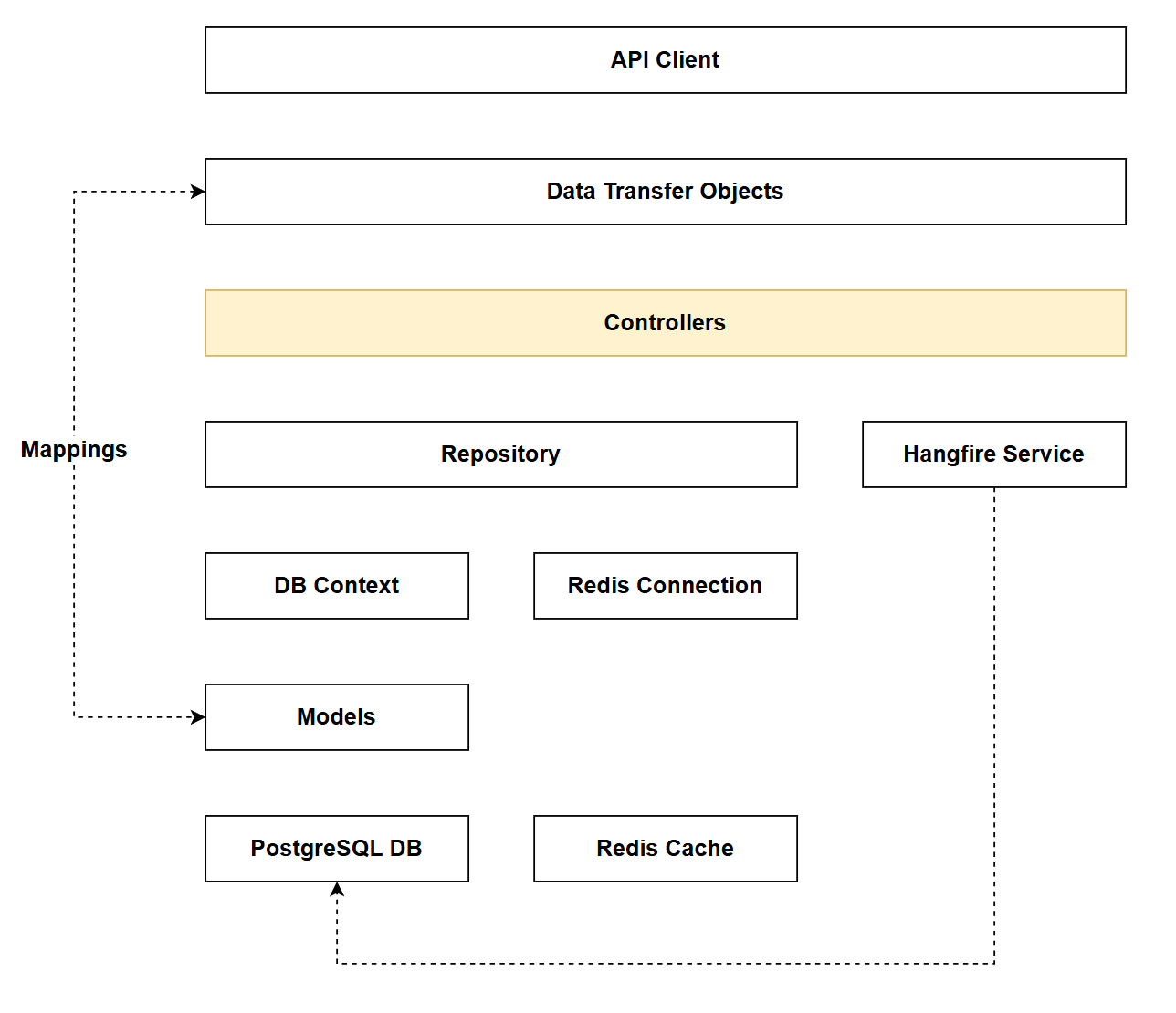
In reference to our solution architecture, we'll be making code changes to the highlighted components in this chapter:
- Controllers (partially complete)
- The code for this section can be found here on GitHub
- The complete finished code can be found here on GitHub
Feature branch
Ensure that main is current, then create a feature branch called: chapter_21_http_response_caching, and check it out:
git branch chapter_21_http_response_caching
git checkout chapter_21_http_response_caching
If you can't remember the full workflow, refer back to Chapter 5
What is HTTP response caching?
HTTP response caching is a mechanism that allows entire HTTP responses to be stored and reused by clients, browsers, proxy servers, or CDNs, reducing the need for subsequent requests to reach the origin server. Unlike application-level caching (like Redis), HTTP response caching operates at the HTTP protocol level and is controlled through standard HTTP headers that instruct intermediate layers on how to cache content.
RFC 9111: HTTP Caching describes how HTTP Caching should operate.
How it works
When you make a request to an API endpoint configured with response caching:
- The API includes cache-control headers in the HTTP response (e.g.,
Cache-Control: public, max-age=300) - These headers instruct clients and intermediaries (browsers, proxies, CDNs) that the response can be cached
- For subsequent requests within the cache duration:
- The cached response is returned directly without hitting the API
- The API server doesn't process the request at all
- Database queries don't execute
- Application code doesn't run
There are a few caveats when implementing HTTP Response Caching:
-
Do not cache endpoints that contain information for authenticated clients. To do so raises all sorts of security concerns - so avoid.
-
HTTP Caching should only be implemented on endpoints that do not change server state - so essentially read operations with
GET.
Given these 2 factors, the GET endpoints in both the Platform and Command controllers are good candidates for HTTP Response Caching.
HTTP Caching vs Redis
The Redis cache solution we implemented in Chapter 20 is considered application caching - meaning that the caching strategy is implemented in our app.
With HTTP Response Caching, while we'll make some code changes to the API, the act of caching is not performed by the application (API), but rather intermediaries, e.g. a Proxy Server.
The use-cases are also slightly different. Redis is being used to cache API keys to allow for more efficient key checks, whereas HTTP Response Caching will be used to enhance the read response times of our data payloads.
Finally, in our particular implementation: Redis-cached operations only occur on mutate endpoints, and HTTP caching only occurs on read endpoints, so the 2 different caching mechanisms never (in this case) interplay with each other.
Cache location options
HTTP response caching supports different storage locations:
ResponseCacheLocation.Any (Public)
- Response can be cached by anyone: the client browser, intermediate proxy servers, and CDNs
- Suitable for public data that's the same for all users
- Maximum performance benefit
ResponseCacheLocation.Client (Private)
- Response can only be cached by the client browser
- Suitable for user-specific data
- More secure but benefits fewer users
ResponseCacheLocation.None
- Response should not be cached anywhere
- Useful for disabling caching on specific endpoints
Implementing
Program.cs
Open program.cs and add the following service registration:
// .
// .
// .
// Existing code
builder.Services.AddMapster();

builder.Services.AddResponseCaching();

builder.Services.AddControllers();
// Existing code
// .
// .
// .
Then add HTTP Response Caching to our request pipeline:
// .
// .
// .
// Existing code
if (app.Environment.IsDevelopment())
{
    app.MapOpenApi();
}

app.UseResponseCaching();

app.UseHttpsRedirection();
// Existing code
// .
// .
// .
As with all things related to the request pipeline, the placement of the caching middleware is critical to its effectiveness and security.
Response Caching should be placed strategically to short-circuit the pipeline as early as possible, (to leverage the benefits of caching) but after any middleware that affects cache validity.
Take Rate Limiting for example (covered in detail in Chapter 26), we would want to place caching before rate limiting so that cached responses are served without consuming rate limit quota. This maximizes the performance benefit of caching while protecting your API from excessive load.
Platforms controller
GetPlatforms
Open PlatformsController.cs and update GetPlatforms endpoint as follows:
[HttpGet]
[ResponseCache(Duration = 300, Location = ResponseCacheLocation.Any, VaryByQueryKeys = new[] { "pageIndex", "pageSize", "search", "sortBy", "descending" })]
public async Task<ActionResult<PaginatedList<PlatformReadDto>>> GetPlatforms(
    [FromQuery] PaginationParams pagination,
    [FromQuery] string? search = null,
    [FromQuery] string? sortBy = null,
    [FromQuery] bool descending = false)
// Existing code
// .
// .
// .
This code adds the ResponseCache attribute and:
- Caches the response for 300 seconds (
Duration = 300) - Allows the response to be cached anywhere (
Location = ResponseCacheLocation.Any) - client browsers, proxy servers, and CDNs (public caching) - Creates separate cache entries for different combinations of query parameters (
VaryByQueryKeys)- Without this,
/api/platforms?pageIndex=1and/api/platforms?pageIndex=2would return the same cached response - With this, each unique combination of
pageIndex,pageSize,search,sortBy, anddescendinggets its own cache entry - Essential for paginated, filtered, and sorted endpoints where query parameters change the response data
- Without this,
- Resulting header:
Cache-Control: public, max-age=300- Note:
VaryByQueryKeysis used by the server-side middleware for cache key generation but doesn't add a standard HTTP header
- Note:
GetPlatformById
[HttpGet("{id}", Name = "GetPlatformById")]
[ResponseCache(Duration = 300, Location = ResponseCacheLocation.Any)]
public async Task<ActionResult<PlatformReadDto>> GetPlatformById(int id)
// Existing code
// .
// .
// .
This code:
- Caches the response for 300 seconds (5 minutes)
- Allows public caching (clients, proxies, CDNs)
- Route parameters (the
id) are automatically included in the cache key, so/api/platforms/1and/api/platforms/2are cached separately - No
VaryByQueryKeysneeded since this endpoint doesn't accept query parameters - Resulting header:
Cache-Control: public, max-age=300
GetCommandsForPlatform
[HttpGet("{platformId}/commands")]
[ResponseCache(Duration = 300, Location = ResponseCacheLocation.Any, VaryByQueryKeys = new[] { "pageIndex", "pageSize", "search", "sortBy", "descending" })]
public async Task<ActionResult<PaginatedList<CommandReadDto>>> GetCommandsForPlatform(
    int platformId,
    [FromQuery] PaginationParams pagination,
    [FromQuery] string? search = null,
    [FromQuery] string? sortBy = null,
    [FromQuery] bool descending = false)
// Existing code
// .
// .
// .
The caching added here is similar to GetPlatforms so we don't require further explanation, except for:
- Resulting header:
Cache-Control: public, max-age=300 - Route parameter
platformIdis automatically included in the cache key
CreatePlatform
[HttpPost]
[Authorize(Policy = "ApiKeyPolicy")]
[ResponseCache(NoStore = true)]
public async Task<ActionResult<PlatformReadDto>> CreatePlatform(PlatformCreateDto platformCreateDto)
// Existing code
// .
// .
// .
This code:
- Explicitly prevents caching of this response
- Ensures POST responses are never cached by clients, proxies, or CDNs
- While mutation endpoints shouldn't be cached by default, explicitly declaring
NoStore = trueprovides defense-in-depth and makes intent clear - Resulting header:
Cache-Control: no-store
UpdatePlatform
[HttpPut("{id}")]
[Authorize(Policy = "ApiKeyPolicy")]
[ResponseCache(NoStore = true)]
public async Task<ActionResult> UpdatePlatform(int id, PlatformUpdateDto platformUpdateDto)
// Existing code
// .
// .
// .
This code is the same as CreatePlatform - explicitly prevents caching
- Resulting header:
Cache-Control: no-store
DeletePlatform
[HttpDelete("{id}")]
[Authorize(Policy = "ApiKeyPolicy")]
[ResponseCache(NoStore = true)]
public async Task<ActionResult> DeletePlatform(int id)
// Existing code
// .
// .
// .
This code is the same as CreatePlatform - explicitly prevents caching
- Resulting header:
Cache-Control: no-store
Commands controller
For each endpoint, I've placed the required ResponseCache attributes along with the expected resulting header. I've not included detailed descriptions as these were adequately covered for the Platforms controller.
GetCommands
[HttpGet]
[ResponseCache(Duration = 300, Location = ResponseCacheLocation.Any, VaryByQueryKeys = new[] { "pageIndex", "pageSize", "search", "sortBy", "descending" })]
public async Task<ActionResult<PaginatedList<CommandReadDto>>> GetCommands(
    [FromQuery] PaginationParams pagination,
    [FromQuery] string? search = null,
    [FromQuery] string? sortBy = null,
    [FromQuery] bool descending = false)
// Existing code
// .
// .
// .
- Resulting header:
Cache-Control: public, max-age=300
GetCommandById
[HttpGet("{id}", Name = "GetCommandById")]
[ResponseCache(Duration = 300, Location = ResponseCacheLocation.Any)]
public async Task<ActionResult<CommandReadDto>> GetCommandById(int id)
// Existing code
// .
// .
// .
- Resulting header:
Cache-Control: public, max-age=300
CreateCommand
[HttpPost]
[Authorize(Policy = "ApiKeyPolicy")]
[ResponseCache(NoStore = true)]
public async Task<ActionResult<CommandReadDto>> CreateCommand(CommandCreateDto commandCreateDto)
// Existing code
// .
// .
// .
- Resulting header:
Cache-Control: no-store
UpdateCommand
[HttpPut("{id}")]
[Authorize(Policy = "ApiKeyPolicy")]
[ResponseCache(NoStore = true)]
public async Task<ActionResult> UpdateCommand(int id, CommandUpdateDto commandUpdateDto)
// Existing code
// .
// .
// .
- Resulting header:
Cache-Control: no-store
PatchCommand
[HttpPatch("{id}")]
[Authorize(Policy = "ApiKeyPolicy")]
[ResponseCache(NoStore = true)]
public async Task<ActionResult> PatchCommand(int id, JsonPatchDocument<CommandUpdateDto> patchDoc)
// Existing code
// .
// .
// .
- Resulting header:
Cache-Control: no-store
DeleteCommand
[HttpDelete("{id}")]
[Authorize(Policy = "ApiKeyPolicy")]
[ResponseCache(NoStore = true)]
public async Task<ActionResult> DeleteCommand(int id)
// Existing code
// .
// .
// .
- Resulting header:
Cache-Control: no-store
Registrations controller
RegisterKey
[HttpPost]
[ResponseCache(NoStore = true)]
public async Task<ActionResult> RegisterKey([FromBody] KeyRegistrationCreateDto keyRegistrationCreateDto)
// Existing code
// .
// .
// .
- Resulting header:
Cache-Control: no-store
Exercising
GET endpoints
Save your work, ensure everything is running, and try running a GET request, e.g.:
### Get all platforms
GET {{baseUrl}}/api/platforms
You should see the following response headers:
HTTP/1.1 200 OK
Connection: close
Content-Type: application/json; charset=utf-8
Date: Fri, 27 Feb 2026 14:05:01 GMT
Server: Kestrel
Cache-Control: public,max-age=300
Transfer-Encoding: chunked
You can see we now have a Cache-Control header.
Run the same request again:
HTTP/1.1 200 OK
Connection: close
Content-Type: application/json; charset=utf-8
Date: Fri, 27 Feb 2026 14:05:01 GMT
Server: Kestrel
Age: 71
Cache-Control: public,max-age=300
Transfer-Encoding: chunked
We now also have an Age header that will gradually count up to the max-age, at which point it will reset. While we have a value for Age we'll get returned cached data.
As a further test:
- Add a new resource (e.g. a new Platform) before the
Agehas expired - Re-run the request - you'll see that the cached data is returned and not the result set with the newly added platform
- Wait for the
Ageto expire, and run again.
Mutate endpoints
Exercise a mutate endpoint, e.g.:
### Create a new platform
POST {{baseUrl}}/api/platforms
Content-Type: application/json
x-api-key: fdbd3b1a-bbc4-4557-8f39-0f704cac3ca2ayo7JORVzzUcnfpC8jYmZwPUqEggM6n/kJTnCM7lQYQ

{
  "platformName": "Temporal"
}
You should see the following header in the response:
HTTP/1.1 201 Created
Connection: close
Content-Type: application/json; charset=utf-8
Date: Fri, 27 Feb 2026 14:16:00 GMT
Server: Kestrel
Cache-Control: no-store
Location: https://localhost:7276/api/Platforms/6
Transfer-Encoding: chunked
Version Control
With the code complete, it's time to commit our code. A summary of those steps can be found below, for a more detailed overview refer to Chapter 5
- Save all files
git add .git commit -m "add http response caching"git push(will fail - copy suggestion)git push --set-upstream origin chapter_21_http_response_caching- Move to GitHub and complete the PR process through to merging
- Back at a command prompt:
git checkout main git pull
Conclusion
In this chapter, we implemented HTTP response caching to complement the Redis caching strategy we built in Chapter 20. While Redis operates as server-side application caching, HTTP response caching works at the protocol level, allowing responses to be cached by clients, browsers, proxies, and CDNs.
We configured the Response Caching middleware in our pipeline and applied the [ResponseCache] attribute to our endpoints with different strategies:
- GET endpoints: Configured with
Duration = 300andLocation = ResponseCacheLocation.Anyto enable public caching for 5 minutes - Paginated/filtered endpoints: Added
VaryByQueryKeysto ensure different query parameters generate separate cache entries - Mutation endpoints: Applied
NoStore = trueto explicitly prevent caching and ensure operations always execute
The key insight is that these two caching strategies serve different purposes and complement each other. Redis caching reduces database load by storing frequently accessed data server-side, while HTTP response caching reduces server load entirely by allowing cached responses to be served without reaching your API. In our implementation, Redis handles API key validation on mutate endpoints, while HTTP caching accelerates read operations on GET endpoints.
Understanding when and how to implement both strategies is crucial for building performant APIs. Use HTTP response caching for public, read-only data that's identical across users. Use Redis for server-side application state, user-specific data, or when you need complex cache invalidation logic.
With both caching layers now in place, our API is well-positioned to handle increased load efficiently while maintaining data freshness through time-based expiration policies.