23. Health Checks
About this chapter
In this chapter, we introduce health-checking for the system components our API relies upon: PostgreSQL, Redis and Hangfire. This provides an operation endpoint to administrators or indeed users of the API, enabling them to validate the health of the API systems.
Learning outcomes
- Understand what health checks are and their role in production monitoring and orchestration
- Implement health checks for PostgreSQL, Redis, and Hangfire using
AspNetCore.HealthCheckspackages - Differentiate between
Unhealthy(critical failure) andDegraded(non-critical) statuses - Create multiple health endpoints for overall and component-specific monitoring
- Use tagging to enable filtered health check queries
Architecture Checkpoint
In reference to our solution architecture, we'll be making code changes to the highlighted components in this chapter:
- Controllers (partially complete)
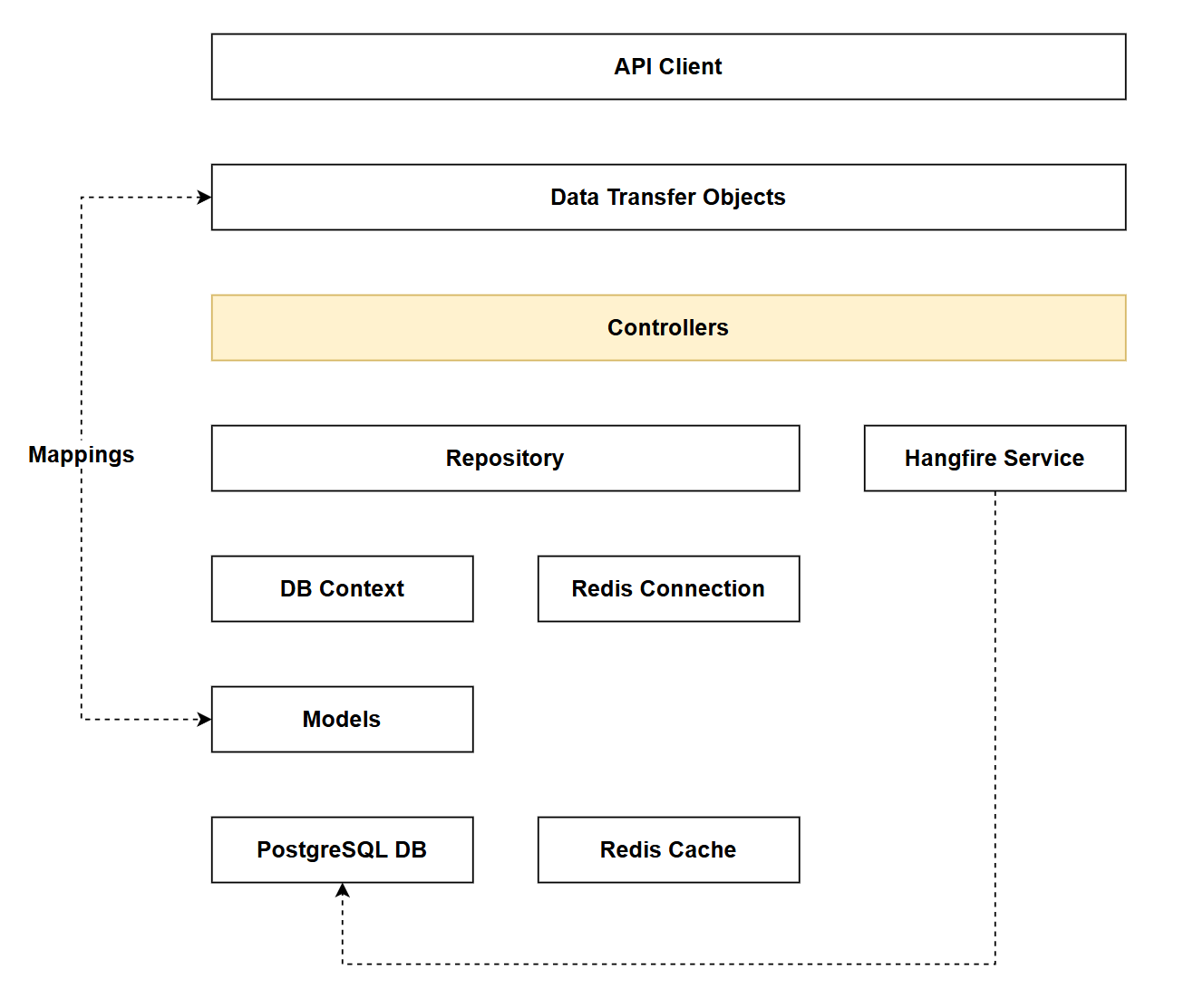
- The code for this section can be found here on GitHub
- The complete finished code can be found here on GitHub
Feature branch
Ensure that main is current, then create a feature branch called: chapter_23_health_checks, and check it out:
git branch chapter_23_health_checks
git checkout chapter_23_health_checks
If you can't remember the full workflow, refer back to Chapter 5
Health checks
Health checks are HTTP endpoints that report the operational status of an application and its dependencies. They answer a simple question: "Is your application ready to handle requests?"
Why use health checks?
In production environments, applications depend on external services (databases, caches, message queues, etc.). Health checks provide:
- Automated monitoring: Container orchestrators (Kubernetes, Docker Swarm) and load balancers use health checks to determine if an instance should receive traffic
- Proactive alerting: Monitoring systems can detect and alert on degraded services before users experience issues
- Graceful degradation: Distinguish between critical failures (database down = unhealthy) and non-critical issues (cache unavailable = degraded but functional)
- Deployment validation: Verify all dependencies are available before marking a deployment as successful
ASP.NET Core health checks
The AspNetCore.HealthChecks ecosystem provides pre-built health check implementations for common dependencies (PostgreSQL, Redis, SQL Server, RabbitMQ, etc.). These checks:
- Execute on-demand when the health endpoint is called
- Include configurable timeouts to prevent hanging checks
- Support tagging for filtered queries (check only database health, only cache health, etc.)
- Report status as
Healthy,Degraded, orUnhealthy
Our implementation exposes multiple endpoints:
/api/health- Overall system health/api/health/ready- Detailed readiness check with error messages/api/health/db,/api/health/cache,/api/health/jobs- Component-specific checks
Implementing
Packages
At a command prompt add the following packages:
dotnet add package AspNetCore.HealthChecks.Hangfire
dotnet add package AspNetCore.HealthChecks.NpgSql
dotnet add package AspNetCore.HealthChecks.Redis
Controller
Create a new class called HealthController.cs in the Controllers folder and add the following code:
using Microsoft.AspNetCore.Authorization;
using Microsoft.AspNetCore.Mvc;
using Microsoft.Extensions.Diagnostics.HealthChecks;

namespace CommandAPI.Controllers;

[Route("api/[controller]")]
[ApiController]
[Authorize(Policy = "ApiKeyPolicy")]
public class HealthController : ControllerBase
{
    private readonly HealthCheckService _healthCheckService;

    public HealthController(HealthCheckService healthCheckService)
    {
        _healthCheckService = healthCheckService;
    }

    [HttpGet]
    public async Task<IActionResult> GetHealth()
    {
        var report = await _healthCheckService.CheckHealthAsync();

        var result = new
        {
            status = report.Status.ToString(),
            checks = report.Entries.Select(e => new
            {
                name = e.Key,
                status = e.Value.Status.ToString(),
                description = e.Value.Description,
                duration = e.Value.Duration.TotalMilliseconds,
                tags = e.Value.Tags.ToList()
            }).ToList(),
            totalDuration = report.TotalDuration.TotalMilliseconds
        };

        return report.Status == HealthStatus.Healthy
            ? Ok(result)
            : StatusCode(503, result);
    }

    [HttpGet("ready")]
    public async Task<IActionResult> GetReadiness()
    {
        var report = await _healthCheckService.CheckHealthAsync();

        var result = new
        {
            status = report.Status.ToString(),
            timestamp = DateTime.UtcNow,
            checks = report.Entries.Select(e => new
            {
                name = e.Key,
                status = e.Value.Status.ToString(),
                description = e.Value.Description,
                duration = $"{e.Value.Duration.TotalMilliseconds}ms",
                tags = e.Value.Tags.ToList(),
                error = e.Value.Exception?.Message
            }).ToList(),
            totalDuration = $"{report.TotalDuration.TotalMilliseconds}ms"
        };

        return report.Status == HealthStatus.Healthy
            ? Ok(result)
            : StatusCode(503, result);
    }

    [HttpGet("db")]
    public async Task<IActionResult> GetDatabaseHealth()
    {
        var report = await _healthCheckService.CheckHealthAsync(
            check => check.Tags.Contains("db"));

        var result = new
        {
            status = report.Status.ToString(),
            checks = report.Entries.Select(e => new
            {
                name = e.Key,
                status = e.Value.Status.ToString(),
                duration = $"{e.Value.Duration.TotalMilliseconds}ms"
            }).ToList()
        };

        return report.Status == HealthStatus.Healthy
            ? Ok(result)
            : StatusCode(503, result);
    }

    [HttpGet("cache")]
    public async Task<IActionResult> GetCacheHealth()
    {
        var report = await _healthCheckService.CheckHealthAsync(
            check => check.Tags.Contains("cache"));

        var result = new
        {
            status = report.Status.ToString(),
            checks = report.Entries.Select(e => new
            {
                name = e.Key,
                status = e.Value.Status.ToString(),
                duration = $"{e.Value.Duration.TotalMilliseconds}ms"
            }).ToList()
        };

        return report.Status == HealthStatus.Healthy || report.Status == HealthStatus.Degraded
            ? Ok(result)
            : StatusCode(503, result);
    }

    [HttpGet("jobs")]
    public async Task<IActionResult> GetJobsHealth()
    {
        var report = await _healthCheckService.CheckHealthAsync(
            check => check.Tags.Contains("jobs"));

        var result = new
        {
            status = report.Status.ToString(),
            checks = report.Entries.Select(e => new
            {
                name = e.Key,
                status = e.Value.Status.ToString(),
                duration = $"{e.Value.Duration.TotalMilliseconds}ms"
            }).ToList()
        };

        return report.Status == HealthStatus.Healthy || report.Status == HealthStatus.Degraded
            ? Ok(result)
            : StatusCode(503, result);
    }
}
Program.cs
Add the following using statement to program.cs:
using Microsoft.Extensions.Diagnostics.HealthChecks;
Then register health checking:
// .
// .
// .
// Existing code

builder.Services.AddHangfireServer(options =>
{
    options.WorkerCount = Environment.ProcessorCount * 2;
});

builder.Services.AddHealthChecks()
    // PostgreSQL health check
    .AddNpgSql(
        connectionString: connectionString.ConnectionString!,
        name: "postgresql",
        failureStatus: HealthStatus.Unhealthy,
        tags: new[] { "db", "sql", "postgresql" },
        timeout: TimeSpan.FromSeconds(3))

    // Redis health check
    .AddRedis(
        redisConnectionString: redisConfig.ToString(),
        name: "redis",
        failureStatus: HealthStatus.Degraded,  // Redis failure is degraded, not unhealthy
        tags: new[] { "cache", "redis" },
        timeout: TimeSpan.FromSeconds(2))

    // Hangfire health check
    .AddHangfire(options =>
    {
        options.MinimumAvailableServers = 1;
        options.MaximumJobsFailed = 5;
    },
    name: "hangfire",
    failureStatus: HealthStatus.Degraded,
    tags: new[] { "jobs", "hangfire" });

var app = builder.Build();

// Existing code
// .
// .
// .
This code:
- Registers the health check service with ASP.NET Core
- Adds PostgreSQL health check with 3-second timeout, marks failure as
Unhealthy(critical dependency) - Adds Redis health check with 2-second timeout, marks failure as
Degraded(non-critical - app can function without cache) - Adds Hangfire health check requiring minimum 1 available server and maximum 5 failed jobs, marks failure as
Degraded(non-critical) - Tags each check (
db,cache,jobs) to enable filtered health check queries - Differentiates between critical dependencies (database) and nice-to-have services (cache, background jobs)
Exercising
Create a new file in the Requests folder called health.http and add the following:
@baseUrl = https://localhost:<your_https_port>
@baseUrlHttp = http://localhost:<your_http_port>
@apiKey = <your_api_key>

### Basic health check (consolidated status with all checks)
GET {{baseUrl}}/api/health
x-api-key: {{apiKey}}

### Detailed health check with all components and timestamp
GET {{baseUrl}}/api/health/ready
x-api-key: {{apiKey}}

### Check database health only
GET {{baseUrl}}/api/health/db
x-api-key: {{apiKey}}

### Check cache (Redis) health only
GET {{baseUrl}}/api/health/cache
x-api-key: {{apiKey}}

### Check Hangfire jobs health only
GET {{baseUrl}}/api/health/jobs
x-api-key: {{apiKey}}
The first request should return something similar to the following:
HTTP/1.1 200 OK
Connection: close
Content-Type: application/json; charset=utf-8
Date: Tue, 03 Mar 2026 13:41:28 GMT
Server: Kestrel
Transfer-Encoding: chunked

{
  "status": "Healthy",
  "checks": [
    {
      "name": "postgresql",
      "status": "Healthy",
      "description": null,
      "duration": 0.6547,
      "tags": [
        "db",
        "sql",
        "postgresql"
      ]
    },
    {
      "name": "redis",
      "status": "Healthy",
      "description": null,
      "duration": 1.1444,
      "tags": [
        "cache",
        "redis"
      ]
    },
    {
      "name": "hangfire",
      "status": "Healthy",
      "description": null,
      "duration": 1.2315,
      "tags": [
        "jobs",
        "hangfire"
      ]
    }
  ],
  "totalDuration": 1.3267
}
In this example all the services are healthy.
The first time I ran this I got a Degraded status for Redis. This was because the original code I used for the Redis health check (specifically the connection string) was incorrect, meaning that the health check could not authenticate - and therefore report Degraded.
While this was a sort of meta-check, I still found it useful.
Version Control
With the code complete, it's time to commit our code. A summary of those steps can be found below, for a more detailed overview refer to Chapter 5
- Save all files
git add .git commit -m "add health checks"git push(will fail - copy suggestion)git push --set-upstream origin chapter_23_health_checks- Move to GitHub and complete the PR process through to merging
- Back at a command prompt:
git checkout main git pull
Conclusion
In this chapter we've added production-ready health monitoring to our API by implementing health checks for all our subsystem dependencies: PostgreSQL, Redis, and Hangfire. These endpoints provide real-time visibility into the operational status of our application and its infrastructure.
To review, we:
- Implemented multiple health check endpoints for overall health as well as those targeted at specific platforms.
- Distinguished between critical dependencies (
Unhealthystatus) and non-critical services (Degradedstatus) - Configured appropriate timeouts to prevent health checks from hanging
- Used tagging to enable filtered queries for targeted monitoring
- Protected health endpoints with API key authentication
Critical vs degraded status
One of the most important concepts introduced is the differentiation between Unhealthy and Degraded statuses. Our database (PostgreSQL) is marked as Unhealthy when it fails because the API cannot function without it. However, Redis and Hangfire failures result in Degraded status - the API can still serve requests, albeit without caching or background job processing. This distinction helps orchestrators and monitoring systems make informed decisions about routing traffic.
With these health checks in place, our API is now better prepared for automated deployment pipelines, container orchestration, and proactive monitoring in production environments.