9. CRUD for Commands
About this chapter
In this chapter we're going to build out the remaining command related endpoints, including:
- Creating Commands
- Reading Commands
- Listing all Commands
- Listing a Command by its
id - Listing all Commands by their associated
platform_id
- Updating an entire Command
- Deleting a Command
Note: we'll cover partially updating a Command using the
PATCHverb separately in Chapter 11.
Learning outcomes
- Embed prior learnings about REST.
- Understanding how to take a pragmatic approach to building endpoints when multiple resources are involved.
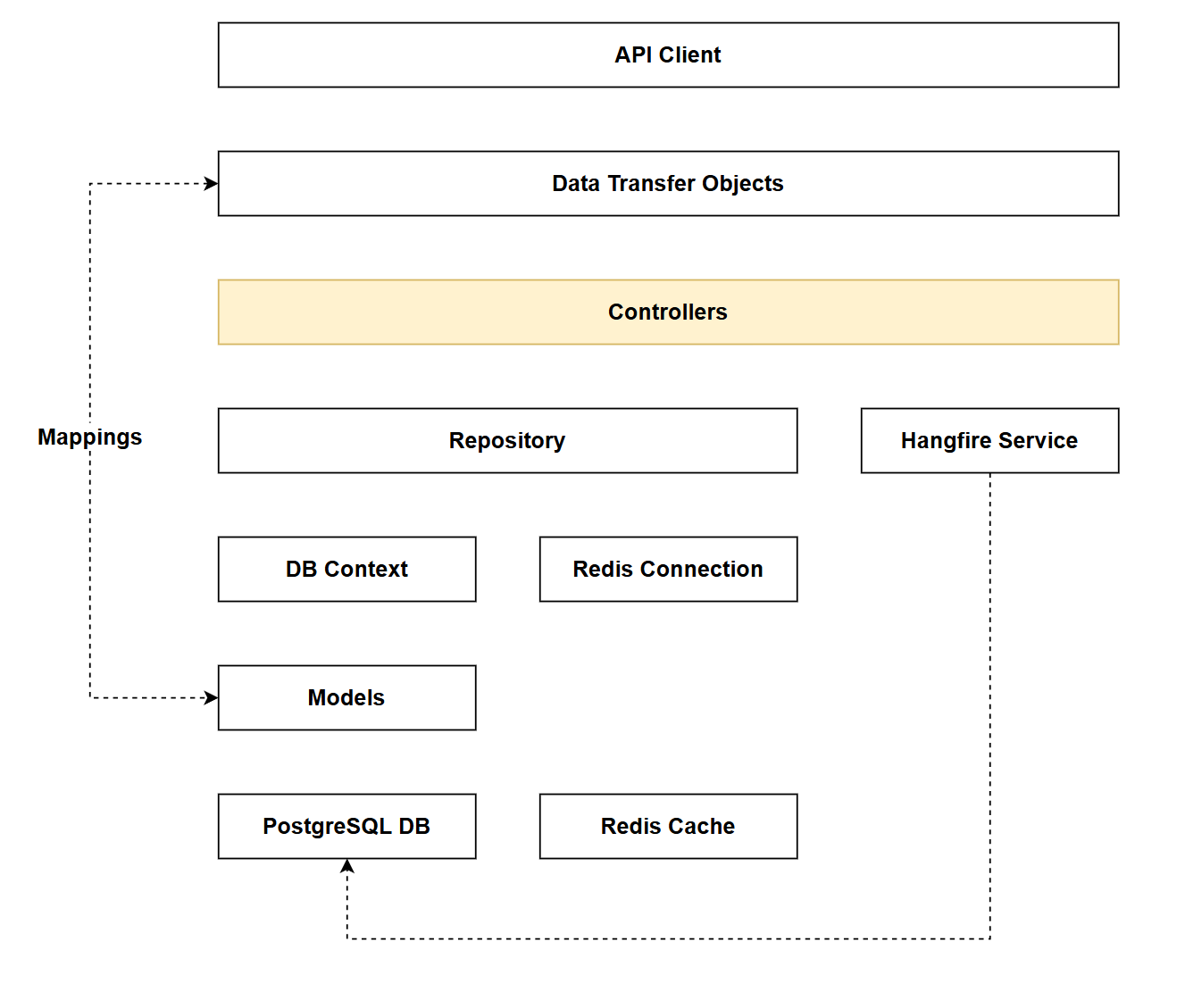
Architecture Checkpoint
In reference to our solution architecture, we'll be making code changes to the highlighted components in this chapter:
- Controllers (partially complete)
- The code for this section can be found here on GitHub
- The complete finished code can be found here on GitHub
Feature branch
Ensure that main is current, then create a feature branch called: chapter_9_commands_controller, and check it out:
git branch chapter_9_commands_controller
git checkout chapter_9_commands_controller
If you can't remember the full workflow, refer back to Chapter 5
Commands Controller
Create file called CommandsController.cs and place it in the existing Controllers folder.
Add the following code into that file:
using Microsoft.AspNetCore.Mvc;
using CommandAPI.Data;
using CommandAPI.Dtos;
using CommandAPI.Models;

namespace CommandAPI.Controllers;

[Route("api/[controller]")]
[ApiController]
public class CommandsController : ControllerBase
{
    private readonly ICommandRepository _commandRepo;

    public CommandsController(ICommandRepository commandRepo)
    {
        _commandRepo = commandRepo;
    }
}
This code should be self-explanatory as we've seen similar before, so let's move on.
Create a file called commands.http and place it into the existing Requests folder: adding the following code:
@baseUrl = https://localhost:7276
@baseUrlHttp = http://localhost:5181
Remember: Check the port allocations match what you are using.
Next up, we'll implement each of the endpoints.
Get commands
Inside the CommandsController class add the following code:
[HttpGet]
public async Task<ActionResult<IEnumerable<CommandReadDto>>> GetCommands()
{
    var commands = await _commandRepo.GetCommandsAsync();

    // Manual mapping to DTOs
    var commandDtos = commands.Select(c => new CommandReadDto(c.Id, c.HowTo, c.CommandLine, c.PlatformId, c.CreatedAt));

    return Ok(commandDtos);
}
This code:
- Accepts no inputs
- Retrieves any commands from the DB
- Maps to a collection of
commandReadDtos - Passes back a HTTP
200OK
To exercise this endpoint, add the following request to the commands.http file:
### Get all commands
GET {{baseUrl}}/api/commands
Unless you've added some commands to the DB, this should return an empty result set:
HTTP/1.1 200 OK
Connection: close
Content-Type: application/json; charset=utf-8
Date: Mon, 26 Jan 2026 09:45:44 GMT
Server: Kestrel
Transfer-Encoding: chunked

[]
Get command by Id
Inside the CommandsController class add the following code:
[HttpGet("{id}", Name = "GetCommandById")]
public async Task<ActionResult<CommandReadDto>> GetCommandById(int id)
{
    var command = await _commandRepo.GetCommandByIdAsync(id);
    if (command == null)
        return NotFound();

    // Manual mapping to DTO
    var commandDto = new CommandReadDto(command.Id, command.HowTo, command.CommandLine, command.PlatformId, command.CreatedAt);

    return Ok(commandDto);
}
This code:
- Accepts an
idas input - Retrieves a single command from the DB by its
id - Returns a HTTP
404Not Found if the command doesn't exist - If found,
- Manually maps to a
CommandReadDto - Passes back a HTTP
200OK with the command data
- Manually maps to a
To exercise this endpoint, add the following request to the commands.http file:
### Get command by ID
GET {{baseUrl}}/api/commands/1
This should return a HTTP 404:
HTTP/1.1 404 Not Found
Connection: close
Content-Type: application/problem+json; charset=utf-8
Date: Mon, 26 Jan 2026 09:47:49 GMT
Server: Kestrel
Transfer-Encoding: chunked

{
  "type": "https://tools.ietf.org/html/rfc9110#section-15.5.5",
  "title": "Not Found",
  "status": 404,
  "traceId": "00-e03a5d7c774173942d64821be5d35dd3-b85d6c6c2876955a-00"
}
Get commands by platform id
In this section we discuss placing this endpoint in either the:
- Commands Controller
- Platforms Controller
Be careful when following along that you make changes in the specified controller.
Here we have a few choices on how we want to implement this:
1. In the platforms controller
We could implement this in the platforms controller and have a route like this:
/api/platforms/{id}/commands
The only thing I don't like about this one is that you're returning Command resources from the Platforms Controller...
2. Nested resource pattern
Here we return the the commands from the commands controller, using a route like this:
/api/commands/{platform_id}/commands
Again this would work, you should note:
- This approach specifies the
platform_idas a resource in the route - The route pattern is a little confusing:
commandsis referenced in 2 places- The
idparameter can be for either a command or platform depending on the route:/api/commands/1: Theidrelates to a command/api/commands/2/commands: Theidrelates to a platform
3. Use a query parameter
Commands are returned from the Commands controller using a query parameter as a filter, the route would look like this:
/api/commands?platform_id=5
This approach:
- Uses the query parameter as a filter
- Would be part of the existing
GetCommandsendpoint - we're just adding a filter.
Which one do we go for? Ask 3 different developers and you'd get 3 different answers (there may even be more options!).
I've personally flip-flopped between all 3 but have settled on #1 as I think this is the cleanest. As discussed in Chapter 8, Commands are still only coming from the Commands Repository, but now we'll leverage that repository from the Platforms Controller.
The key takeaway here is that there isn't a single correct answer when it comes to REST API design. Yes, there are purist perspectives that might advocate for one approach over another based on strict REST principles, but in real-world development, pragmatism wins.
Consider your specific use case, your team's preferences, your API consumers' expectations, and the maintainability of your codebase. All three approaches discussed above are valid and have been successfully implemented in production systems. The best choice is the one that works for your context - not the one that adheres most rigidly to a theoretical ideal. Document your decision, be consistent, and move forward with confidence.
Inside the PlatformsController, (that's the Platforms controller) update the class constructor & private members to the following (additions are highlighted):
private readonly IPlatformRepository _platformRepo;
private readonly ICommandRepository _commandRepo;

public PlatformsController(
    IPlatformRepository platformRepo,
    ICommandRepository commandRepo)
{
    _platformRepo = platformRepo;
    _commandRepo = commandRepo;
}
This means that the Platforms Controller now has access to the GetCommandsByPlatformIdAsync method via the ICommandRepository.
Next we'll add the following endpoint to the Platforms Controller:
[HttpGet("{platformId}/commands")]
public async Task<ActionResult<IEnumerable<CommandReadDto>>> GetCommandsForPlatform(int platformId)
    {

    var platform = await _platformRepo.GetPlatformByIdAsync(platformId);
    if (platform == null)
        return NotFound();

    var commands = await _commandRepo.GetCommandsByPlatformIdAsync(platformId);
    var commandDtos = commands.Select(c => new CommandReadDto(c.Id, c.HowTo, c.CommandLine, c.PlatformId, c.CreatedAt));

    return Ok(commandDtos);
}
This code:
- Accepts a
platformIdas input - Retrieves the platform from the DB by its
platformIdto verify it exists - Returns a HTTP
404Not Found if the platform doesn't exist - If found, retrieves all commands associated with that
platformId - Maps the commands to a collection of
CommandReadDto - Passes back a HTTP
200OK with the command data (or an empty collection if no commands exist for that platform)
In the platforms.http file add the following:
### Get commands for a platform
GET {{baseUrl}}/api/platforms/1/commands
As this endpoint resides in the Platforms Controller it makes sense to place the request in platforms.http. However, from a functional perspective you could add it to commands.http also.
This request will return 1 of the following results depending on what data resides in your database:
| Data presence | Result |
|---|---|
No matching platform_id | HTTP 404 |
Matching platform_id, but no associated commands | HTTP 200 - empty array |
Matching platform_id, and n associated commands | HTTP 200 - array of n commands. |
Note: For the remainder of this chapter we will be working exclusively in the
CommandsControllerclass.
Create command
Inside the CommandsController class add the following code:
[HttpPost]
public async Task<ActionResult<CommandReadDto>> CreateCommand(CommandCreateDto commandCreateDto)
{
    // Manual mapping from DTO to entity
    var command = new Command
    {
        HowTo = commandCreateDto.HowTo,
        CommandLine = commandCreateDto.CommandLine,
        PlatformId = commandCreateDto.PlatformId
    };

    await _commandRepo.CreateCommandAsync(command);
    await _commandRepo.SaveChangesAsync();

    // Manual mapping to DTO for response
    var commandReadDto = new CommandReadDto(command.Id, command.HowTo, command.CommandLine, command.PlatformId, command.CreatedAt);

    return CreatedAtRoute(nameof(GetCommandById), new { Id = command.Id }, commandReadDto);
}
This code:
- Defines a
HTTP POSTendpoint (resource creation) - Accepts a
CommandCreateDtoas input containing the new command data - Manually maps from the DTO to a
Commandentity - Creates the command in the database via the repository
- Saves the changes to persist the new command
- Maps the created command (now with its generated
IdandCreatedAt) to aCommandReadDto - Returns a HTTP 201 Created with a
Locationheader pointing to the newly created resource and the command data in the response body
Add the following request to commands.http:
### Create a new command
POST {{baseUrl}}/api/commands
Content-Type: application/json

{
  "howTo": "List all running containers",
  "commandLine": "docker ps",
  "platformId": 2
}
Running this request will result in either:
- HTTP
201Created - HTTP
400Bad Request (a database constraint error idf the provided platformiddoes not exist)
Having created some commands you may want to re-run the requests for the 3 read (GET) endpoints.
Update command
Inside the CommandsController class add the following code:
[HttpPut("{id}")]
public async Task<ActionResult> UpdateCommand(int id, CommandUpdateDto commandUpdateDto)
{
    var commandFromRepo = await _commandRepo.GetCommandByIdAsync(id);
    if (commandFromRepo == null)
    {
        return NotFound();
    }

    // Manual mapping from DTO to entity
    commandFromRepo.HowTo = commandUpdateDto.HowTo;
    commandFromRepo.CommandLine = commandUpdateDto.CommandLine;

    await _commandRepo.UpdateCommandAsync(commandFromRepo);
    await _commandRepo.SaveChangesAsync();

    return NoContent();
}
This code:
- Defines a
HTTP PUTendpoint (update an entire resource) - Accepts an
idand aCommandUpdateDtoas input - Retrieves the existing command from the DB by its
id - Returns a HTTP
404Not Found if the command doesn't exist - If found, manually maps the DTO properties to the entity (
HowToandCommandLine) - Updates the command in the database via the repository
- Saves the changes to persist the update
- Returns a HTTP
204No Content (successful update with no response body)
Add the following request to commands.http:
### Update a command
PUT {{baseUrl}}/api/commands/1
Content-Type: application/json

{
  "howTo": "List all containers (including stopped)",
  "commandLine": "docker ps -a"
}
Running this request will result in either:
- HTTP
204No Content (the resource was successfully updated) - HTTP
404Not Found (the provided commandiddoes not exist)
Delete command
Inside the CommandsController class add the following code:
[HttpDelete("{id}")]
public async Task<ActionResult> DeleteCommand(int id)
{
    var commandFromRepo = await _commandRepo.GetCommandByIdAsync(id);
    if (commandFromRepo == null)
    {
        return NotFound();
    }

    _commandRepo.DeleteCommand(commandFromRepo);
    await _commandRepo.SaveChangesAsync();

    return NoContent();
}
This code:
- Defines a
HTTP DELETEendpoint (resource deletion) - Accepts an
idas input - Retrieves the existing command from the DB by its
id - Returns a HTTP
404Not Found if the command doesn't exist - If found, deletes the command from the database via the repository
- Saves the changes to persist the deletion
- Returns a HTTP
204No Content (successful deletion with no response body)
Add the following request to commands.http:
### Delete a command
DELETE {{baseUrl}}/api/commands/1
Running this request will result in either:
- HTTP
204No Content (the resource was successfully destroyed) - HTTP
404Not Found (the provided commandiddoes not exist)
With that, all our domain focused endpoints (Platforms and Commands) are complete.
Version Control
With the code complete, it's time to commit our code. A summary of those steps can be found below, for a more detailed overview refer to Chapter 5
- Save all files
git add .git commit -m "add command endpoints"git push(will fail - copy suggestion)git push --set-upstream origin chapter_9_commands_controller- Move to GitHub and complete the PR process through to merging
- Back at a command prompt:
git checkout main git pull
Conclusion
In this chapter we completed the full set of CRUD operations for the Commands resource, implementing:
GETendpoints for retrieving all commands, individual commands by ID, and commands associated to a specified platformPOSTendpoint for creating new commandsPUTendpoint for updating entire command resourcesDELETEendpoint for removing commands
While much of this was applying patterns we've already learned, the key discussion centered on pragmatic REST design - specifically, where to place the GetCommandsForPlatform endpoint. This illustrates an important real-world consideration: there's rarely one correct solution when dealing with related resources. The best choice depends on your specific requirements, team preferences, and API consumer expectations.
With all our domain-focused endpoints (Platforms and Commands) now complete, we have a relatively functional API, however there is still much work to do...
In the current code you may have noticed the repetitive nature of manually mapping between entities and DTOs - this is the next thing we'll tackle. In the next chapter, we'll address manual mapping and introduce Mapster, an object mapping library that can reduce boilerplate code while maintaining clean separation between our domain models and data transfer objects.