15. Global Error Handling
About this chapter
In this chapter we'll implement global error handling using custom middleware, allowing our API to:
- Catch and handle unhandled exceptions gracefully
- Return consistent, structured error responses compliant with RFC 7807
- Provide different error details for development vs production environments
Learning outcomes
- How to implement global error handling in a .NET REST API
- How to create custom middleware
Architecture Checkpoint
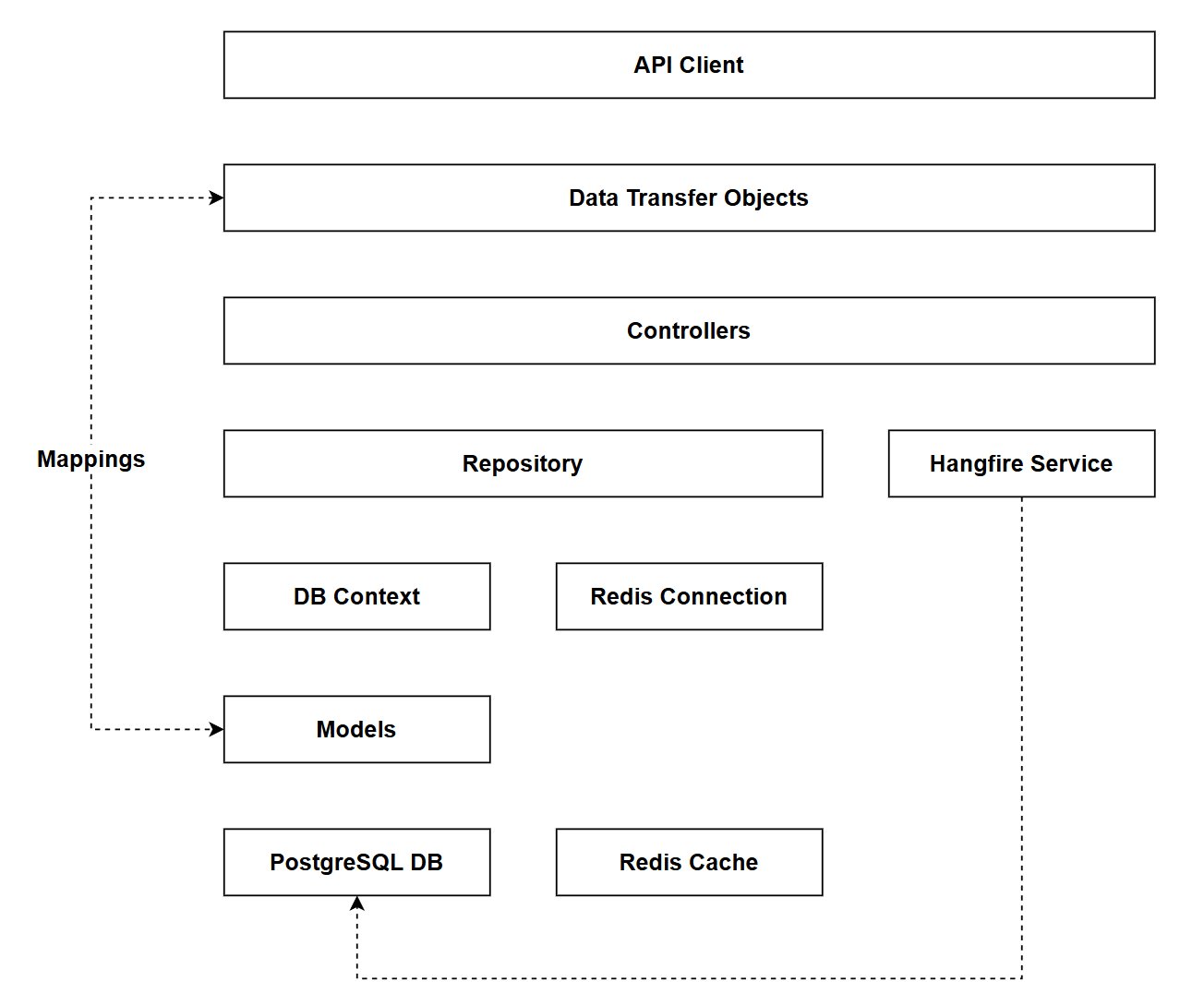
In this chapter we'll be creating custom middleware, which is not represented on our standard architecture.
- The code for this section can be found here on GitHub
- The complete finished code can be found here on GitHub
Feature branch
Ensure that main is current, then create a feature branch called: chapter_15_global_error_handling, and check it out:
git branch chapter_15_global_error_handling
git checkout chapter_15_global_error_handling
If you can't remember the full workflow, refer back to Chapter 5
Error Handling
Errors in an application can be categorized generally in 1 of 2 ways:
- Errors we can expect
- Unexpected errors
In terms of point 1, we can use things like Fluent Validation to create checks on the data that enters the API at the boundary and throw validation errors when those checks fail. We can almost certainly expect those types of errors to occur and we're handling them elegantly.
As another example, in our controllers we perform checks such as:
if (platform == null)
    return NotFound();
This will return a HTTP 404 when someone attempts to read a resource that is not there - almost certainly going to happen, so again expected.
But what about unexpected errors - those are the things that we either just haven't accounted for, or cases that we could conceivably envisage, but to wrap all our code in try / catch blocks would be inelegant and impractical.
Basically what we're asking: is there a catch all approach to trapping errors that we didn't account for, so the application responds in a graceful way.
Thankfully the answer is yes, and it involves writing some middleware.
Middleware
The .NET Middleware Pipeline is described in detail in the theory section, but to summarize it allows for:
- Sequential request processing: The middleware pipeline is a series of components that handle HTTP requests and responses in order, with each middleware either passing the request to the next component or short-circuiting the pipeline
- Bidirectional flow: Requests flow through middleware components in the order they're registered (top to bottom), then responses flow back through them in reverse order, allowing each middleware to process both incoming requests and outgoing responses
- Built-in and custom middleware: ASP.NET Core includes middleware for routing, authentication, CORS, etc., and you can create custom middleware (like global exception handlers) that plugs into the same pipeline to add cross-cutting concerns
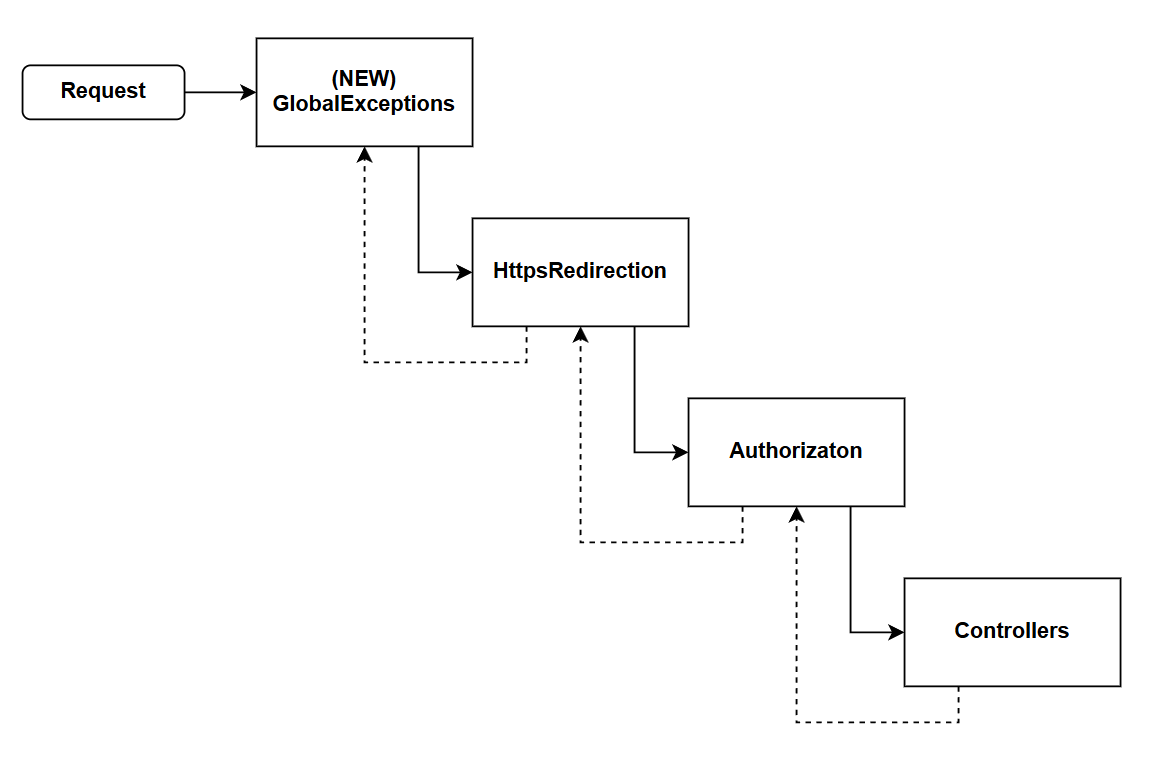
To enable us to catch errors that have not been caught by other parts of the app, we are going to write our own Global Error Handling Middleware, and register it first in the request pipeline, as shown below:
var app = builder.Build();

// Global exception handling middleware (must be first)
app.UseMiddleware<GlobalExceptionHandlerMiddleware>();

app.UseHttpsRedirection();

app.UseAuthorization();

app.MapControllers();

app.Run();
This is critical because as already mentioned, middleware is bidirectional in its execution. By placing it first, it wraps all subsequent middleware, then if an unhandled exception is thrown anywhere further down the pipeline it will bubble up to the Global Exception handler and be dealt with gracefully, not in an unhandled way.
Why this approach
This approach has the following benefits:
- Centralize exception handling: Instead of wrapping every controller action in try-catch blocks, you handle all unhandled exceptions in one place. This eliminates code duplication and ensures consistent error responses across your entire API.
- Standardized Error Response Format: We can provide a standardized error response payload (RFC7807 in this case) which gives consumers a consistent, predictable, format with which to work.
- Environmental Awareness: We can expose detailed error information (stack traces, inner exceptions) in development but hide sensitive details in production, improving security while aiding debugging.
Unhandled example
Before we implement the solution, let's take a look at a very common unhandled error - database unavailability. To demonstrate this:
- Stop the Docker container running PostgreSQL
- Run up the API
- Execute a request (e.g. get all platforms)
You'll get a HTTP 500 response similar to the following:
HTTP/1.1 500 Internal Server Error
Connection: close
Content-Type: text/plain; charset=utf-8
Date: Fri, 13 Feb 2026 13:24:31 GMT
Server: Kestrel
Transfer-Encoding: chunked

System.InvalidOperationException: An exception has been raised that is likely due to a transient failure.
 ---> Npgsql.NpgsqlException (0x80004005): Failed to connect to 127.0.0.1:5432
 ---> System.Net.Sockets.SocketException (111): Connection refused
   at System.Net.Sockets.Socket.AwaitableSocketAsyncEventArgs.ThrowException(SocketError error, CancellationToken cancellationToken)
   at System.Net.Sockets.Socket.AwaitableSocketAsyncEventArgs.System.Threading.Tasks.Sources.IValueTaskSource.GetResult(Int16 token)
   at Npgsql.Internal.NpgsqlConnector.ConnectAsync(NpgsqlTimeout timeout, CancellationToken cancellationToken)
   at Npgsql.Internal.NpgsqlConnector.ConnectAsync(NpgsqlTimeout timeout, CancellationToken cancellationToken)
   at Npgsql.Internal.NpgsqlConnector.RawOpen(NpgsqlTimeout timeout, Boolean async, CancellationToken cancellationToken)
   at Npgsql.Internal.NpgsqlConnector.<Open>g__OpenCore|209_0(NpgsqlConnector conn, String username, SslMode sslMode, GssEncryptionMode gssEncMode, NpgsqlTimeout timeout, Boolean async, CancellationToken cancellationToken)
   at Npgsql.Internal.NpgsqlConnector.Open(NpgsqlTimeout timeout, Boolean async, CancellationToken cancellationToken)
   at Npgsql.PoolingDataSource.OpenNewConnector(NpgsqlConnection conn, NpgsqlTimeout timeout, Boolean async, CancellationToken cancellationToken)
   at Npgsql.PoolingDataSource.<Get>g__RentAsync|33_0(NpgsqlConnection conn, NpgsqlTimeout timeout, Boolean async, CancellationToken cancellationToken)
   at Npgsql.NpgsqlConnection.<Open>g__OpenAsync|42_0(Boolean async, CancellationToken cancellationToken)
   at Microsoft.EntityFrameworkCore.Storage.RelationalConnection.OpenInternalAsync(Boolean errorsExpected, CancellationToken cancellationToken)
   at Microsoft.EntityFrameworkCore.Storage.RelationalConnection.OpenInternalAsync(Boolean errorsExpected, CancellationToken cancellationToken)
   at Microsoft.EntityFrameworkCore.Storage.RelationalConnection.OpenAsync(CancellationToken cancellationToken, Boolean errorsExpected)
   at Microsoft.EntityFrameworkCore.Storage.RelationalCommand.ExecuteReaderAsync(RelationalCommandParameterObject parameterObject, CancellationToken cancellationToken)
   at Microsoft.EntityFrameworkCore.Query.Internal.SingleQueryingEnumerable`1.AsyncEnumerator.InitializeReaderAsync(AsyncEnumerator enumerator, CancellationToken cancellationToken)
   at Npgsql.EntityFrameworkCore.PostgreSQL.Storage.Internal.NpgsqlExecutionStrategy.ExecuteAsync[TState,TResult](TState state, Func`4 operation, Func`4 verifySucceeded, CancellationToken cancellationToken)
   --- End of inner exception stack trace ---
   at Npgsql.EntityFrameworkCore.PostgreSQL.Storage.Internal.NpgsqlExecutionStrategy.ExecuteAsync[TState,TResult](TState state, Func`4 operation, Func`4 verifySucceeded, CancellationToken cancellationToken)
   at Microsoft.EntityFrameworkCore.Query.Internal.SingleQueryingEnumerable`1.AsyncEnumerator.MoveNextAsync()
   at Microsoft.EntityFrameworkCore.Query.ShapedQueryCompilingExpressionVisitor.SingleAsync[TSource](IAsyncEnumerable`1 asyncEnumerable, CancellationToken cancellationToken)
   at Microsoft.EntityFrameworkCore.Query.ShapedQueryCompilingExpressionVisitor.SingleAsync[TSource](IAsyncEnumerable`1 asyncEnumerable, CancellationToken cancellationToken)
   at CommandAPI.Data.PgSqlPlatformRepository.GetPlatformsAsync(Int32 pageIndex, Int32 pageSize, String search, String sortBy, Boolean descending) in /home/ljackson/dev/dotnet/Run2/CommandAPI/Data/PgSqlPlatformRepository.cs:line 65
   at PlatformsController.GetPlatforms(PaginationParams pagination, String search, String sortBy, Boolean descending) in /home/ljackson/dev/dotnet/Run2/CommandAPI/Controllers/PlatformsController.cs:line 35
   at lambda_method8(Closure, Object)
   at Microsoft.AspNetCore.Mvc.Infrastructure.ActionMethodExecutor.AwaitableObjectResultExecutor.Execute(ActionContext actionContext, IActionResultTypeMapper mapper, ObjectMethodExecutor executor, Object controller, Object[] arguments)
   at Microsoft.AspNetCore.Mvc.Infrastructure.ControllerActionInvoker.<InvokeActionMethodAsync>g__Awaited|12_0(ControllerActionInvoker invoker, ValueTask`1 actionResultValueTask)
   at Microsoft.AspNetCore.Mvc.Infrastructure.ControllerActionInvoker.<InvokeNextActionFilterAsync>g__Awaited|10_0(ControllerActionInvoker invoker, Task lastTask, State next, Scope scope, Object state, Boolean isCompleted)
   at Microsoft.AspNetCore.Mvc.Infrastructure.ControllerActionInvoker.Rethrow(ActionExecutedContextSealed context)
   at Microsoft.AspNetCore.Mvc.Infrastructure.ControllerActionInvoker.Next(State& next, Scope& scope, Object& state, Boolean& isCompleted)
   at Microsoft.AspNetCore.Mvc.Infrastructure.ControllerActionInvoker.<InvokeInnerFilterAsync>g__Awaited|13_0(ControllerActionInvoker invoker, Task lastTask, State next, Scope scope, Object state, Boolean isCompleted)
   at Microsoft.AspNetCore.Mvc.Infrastructure.ResourceInvoker.<InvokeFilterPipelineAsync>g__Awaited|20_0(ResourceInvoker invoker, Task lastTask, State next, Scope scope, Object state, Boolean isCompleted)
   at Microsoft.AspNetCore.Mvc.Infrastructure.ResourceInvoker.<InvokeAsync>g__Awaited|17_0(ResourceInvoker invoker, Task task, IDisposable scope)
   at Microsoft.AspNetCore.Mvc.Infrastructure.ResourceInvoker.<InvokeAsync>g__Awaited|17_0(ResourceInvoker invoker, Task task, IDisposable scope)
   at Microsoft.AspNetCore.Authorization.AuthorizationMiddleware.Invoke(HttpContext context)
   at Microsoft.AspNetCore.Authentication.AuthenticationMiddleware.Invoke(HttpContext context)
   at Microsoft.AspNetCore.Diagnostics.DeveloperExceptionPageMiddlewareImpl.Invoke(HttpContext context)

HEADERS
=======
Connection: close
Host: localhost:7276
User-Agent: vscode-restclient
Accept-Encoding: gzip, deflate
Now while a HTTP 500 is useful to some extent, this response is not handled gracefully and is not structured consistently for consumption by our consumers.
Implementing global exception handling
To implement our Global Exception Handler: create a folder called Middleware in the root of the project, then create a file called: GlobalExceptionHandlerMiddleware.cs, and add the following code:
using Microsoft.AspNetCore.Mvc;
using Microsoft.EntityFrameworkCore;

namespace CommandAPI.Middleware;

public class GlobalExceptionHandlerMiddleware
{
  private readonly RequestDelegate _next;
  private readonly ILogger<GlobalExceptionHandlerMiddleware> _logger;
  private readonly IHostEnvironment _environment;

  public GlobalExceptionHandlerMiddleware(
    RequestDelegate next,
    ILogger<GlobalExceptionHandlerMiddleware> logger,
    IHostEnvironment environment)
  {
    _next = next;
    _logger = logger;
    _environment = environment;
  }

  public async Task InvokeAsync(HttpContext context)
  {
    try
    {
      await _next(context);
    }
    catch (Exception ex)
    {
      _logger.LogError(ex, "An unhandled exception occurred");
      await HandleExceptionAsync(context, ex);
    }
  }

  private async Task HandleExceptionAsync(HttpContext context, Exception exception)
  {
    context.Response.ContentType = "application/json";
    var problemDetails = new ProblemDetails
    {
      Instance = context.Request.Path
    };

    switch (exception)
    {
      case BadHttpRequestException badRequestException:
        problemDetails.Status = StatusCodes.Status400BadRequest;
        problemDetails.Title = "Bad Request";
        problemDetails.Detail = badRequestException.Message;
        break;

      case KeyNotFoundException:
        problemDetails.Status = StatusCodes.Status404NotFound;
        problemDetails.Title = "Resource Not Found";
        problemDetails.Detail = exception.Message;
        break;

      case UnauthorizedAccessException:
        problemDetails.Status = StatusCodes.Status401Unauthorized;
        problemDetails.Title = "Unauthorized";
        problemDetails.Detail = "Authentication is required";
        break;

      case DbUpdateException dbUpdateException:
        problemDetails.Status = StatusCodes.Status409Conflict;
        problemDetails.Title = "Database Conflict";
        problemDetails.Detail = "A database constraint was violated";
        // Don't expose internal errors in production
        if (_environment.IsDevelopment())
        {
          problemDetails.Detail = dbUpdateException.Message;
        }
        break;

      default:
        problemDetails.Status = StatusCodes.Status500InternalServerError;
        problemDetails.Title = "Internal Server Error";
        problemDetails.Detail = _environment.IsDevelopment()
          ? exception.Message
          : "An error occurred processing your request";
        break;
      }
      context.Response.StatusCode = problemDetails.Status.Value;

      // Add stack trace in development
      if (_environment.IsDevelopment())
      {
        problemDetails.Extensions["stackTrace"] = exception.StackTrace;
        problemDetails.Extensions["innerException"] = exception.InnerException?.Message;
      }
      await context.Response.WriteAsJsonAsync(problemDetails);
    }
}
Quite a bit of code here, so let's step through it:
- Constructor - Injects
RequestDelegate(to call the next middleware),ILogger(for logging unhandled exceptions), andIHostEnvironment(to detect Development vs Production environments) - InvokeAsync - Wraps the execution of the next middleware in a try-catch block; if any exception bubbles up, it logs it and calls
HandleExceptionAsync - HandleExceptionAsync - Creates a
ProblemDetailsresponse conforming to RFC 7807 - Exception Type Mapping - Uses a switch statement to map specific exception types to appropriate HTTP status codes:
BadHttpRequestException→ 400 Bad RequestKeyNotFoundException→ 404 Not FoundUnauthorizedAccessException→ 401 UnauthorizedDbUpdateException→ 409 Conflict (masks internal details in production)- Everything else → 500 Internal Server Error
- Environment-Specific Behavior - In development, includes detailed error messages, stack traces, and inner exceptions; in production, returns generic messages to avoid exposing sensitive information
- RFC 7807 Compliance - Returns structured error responses with
status,title,detail, andinstanceproperties that API consumers can reliably parse
All we need to do now is add the middleware to the pipeline. Before we do that, add a using statement at the top of Program.cs as follows:
using CommandAPI.Middleware;
Then register the middleware, making sure to place it first (immediately after var app = builder.Build();):
// .
// .
// Existing code
var app = builder.Build();

// Global exception handling middleware (must be first)
app.UseMiddleware<GlobalExceptionHandlerMiddleware>();

// Existing code
// .
// .
Save everything, and then re-run a request to the API without the database running, you should get a response similar to the following:
HTTP/1.1 500 Internal Server Error
Connection: close
Content-Type: application/json; charset=utf-8
Date: Fri, 13 Feb 2026 13:44:26 GMT
Server: Kestrel
Transfer-Encoding: chunked

{
  "title": "Internal Server Error",
  "status": 500,
  "detail": "An exception has been raised that is likely due to a transient failure.",
  "instance": "/api/platforms",
  "stackTrace": "   at Npgsql.EntityFrameworkCore.PostgreSQL.Storage.Internal.NpgsqlExecutionStrategy.ExecuteAsync[TState,TResult](TState state, Func`4 operation, Func`4 verifySucceeded, CancellationToken cancellationToken)\n   at Microsoft.EntityFrameworkCore.Query.Internal.SingleQueryingEnumerable`1.AsyncEnumerator.MoveNextAsync()\n   at Microsoft.EntityFrameworkCore.Query.ShapedQueryCompilingExpressionVisitor.SingleAsync[TSource](IAsyncEnumerable`1 asyncEnumerable, CancellationToken cancellationToken)\n   at Microsoft.EntityFrameworkCore.Query.ShapedQueryCompilingExpressionVisitor.SingleAsync[TSource](IAsyncEnumerable`1 asyncEnumerable, CancellationToken cancellationToken)\n   at CommandAPI.Data.PgSqlPlatformRepository.GetPlatformsAsync(Int32 pageIndex, Int32 pageSize, String search, String sortBy, Boolean descending) in /home/ljackson/dev/dotnet/Run2/CommandAPI/Data/PgSqlPlatformRepository.cs:line 65\n   at PlatformsController.GetPlatforms(PaginationParams pagination, String search, String sortBy, Boolean descending) in /home/ljackson/dev/dotnet/Run2/CommandAPI/Controllers/PlatformsController.cs:line 35\n   at lambda_method8(Closure, Object)\n   at Microsoft.AspNetCore.Mvc.Infrastructure.ActionMethodExecutor.AwaitableObjectResultExecutor.Execute(ActionContext actionContext, IActionResultTypeMapper mapper, ObjectMethodExecutor executor, Object controller, Object[] arguments)\n   at Microsoft.AspNetCore.Mvc.Infrastructure.ControllerActionInvoker.<InvokeActionMethodAsync>g__Awaited|12_0(ControllerActionInvoker invoker, ValueTask`1 actionResultValueTask)\n   at Microsoft.AspNetCore.Mvc.Infrastructure.ControllerActionInvoker.<InvokeNextActionFilterAsync>g__Awaited|10_0(ControllerActionInvoker invoker, Task lastTask, State next, Scope scope, Object state, Boolean isCompleted)\n   at Microsoft.AspNetCore.Mvc.Infrastructure.ControllerActionInvoker.Rethrow(ActionExecutedContextSealed context)\n   at Microsoft.AspNetCore.Mvc.Infrastructure.ControllerActionInvoker.Next(State& next, Scope& scope, Object& state, Boolean& isCompleted)\n   at Microsoft.AspNetCore.Mvc.Infrastructure.ControllerActionInvoker.<InvokeInnerFilterAsync>g__Awaited|13_0(ControllerActionInvoker invoker, Task lastTask, State next, Scope scope, Object state, Boolean isCompleted)\n   at Microsoft.AspNetCore.Mvc.Infrastructure.ResourceInvoker.<InvokeFilterPipelineAsync>g__Awaited|20_0(ResourceInvoker invoker, Task lastTask, State next, Scope scope, Object state, Boolean isCompleted)\n   at Microsoft.AspNetCore.Mvc.Infrastructure.ResourceInvoker.<InvokeAsync>g__Awaited|17_0(ResourceInvoker invoker, Task task, IDisposable scope)\n   at Microsoft.AspNetCore.Mvc.Infrastructure.ResourceInvoker.<InvokeAsync>g__Awaited|17_0(ResourceInvoker invoker, Task task, IDisposable scope)\n   at Microsoft.AspNetCore.Authorization.AuthorizationMiddleware.Invoke(HttpContext context)\n   at CommandAPI.Middleware.GlobalExceptionHandlerMiddleware.InvokeAsync(HttpContext context) in /home/ljackson/dev/dotnet/Run2/CommandAPI/Middleware/GlobalExceptionHandlerMiddleware.cs:line 26",
  "innerException": "Failed to connect to 127.0.0.1:5432"
}
We still get a 500 response, but it is:
- Handled gracefully
- Returns a well-formed response that is compliant with RFC7807
Version Control
With the code complete, it's time to commit our code. A summary of those steps can be found below, for a more detailed overview refer to Chapter 5
- Save all files
git add .git commit -m "add global error handling middleware"git push(will fail - copy suggestion)git push --set-upstream origin chapter_15_global_error_handling- Move to GitHub and complete the PR process through to merging
- Back at a command prompt:
git checkout main git pull
Conclusion
In this chapter we implemented a centralized global error handling strategy using custom middleware, transforming how our API handles unexpected errors. Specifically, we:
- Created
GlobalExceptionHandlerMiddlewarethat catches all unhandled exceptions across the entire application - Positioned the middleware first in the pipeline to wrap all subsequent middleware and controllers
- Mapped specific exception types to appropriate HTTP status codes (
404,409,500, etc.) - Implemented RFC 7807 compliant error responses using
ProblemDetailsfor consistent, structured error payloads - Provide appropriately formatted responses depending on the environment (Prod Vs Dev)
This approach eliminates the need for repetitive try-catch blocks throughout controllers while ensuring API consumers receive predictable, well-formed error responses when things go wrong. By handling errors gracefully at a global level, we've significantly improved both the developer experience (easier debugging) and the consumer experience (consistent error format).
Combined with the Fluent Validation from Chapter 14, we now have comprehensive error handling covering both expected validation errors and unexpected runtime exceptions.