8. Relationships
About this chapter
Despite the name of this chapter, I'm not going to try and teach you about inter-personal relationships (I should be the last person to do that!) instead this chapter is concerned with adding a 2nd model to our domain (Command), and setting up the associated resources to support a 2nd model, including:
- Creating the
Commandmodel - Add a collection of commands property to the
Platformmodel - Define the relationships between
PlatformandCommandinAppDbContext - Create and run migrations to support the new model at the database layer
- Create a new repository interface and concrete class for a Command Repository
- Create DTOs to support API operations for Commands
Learning outcomes
- Understand how to add additional models to a domain
- Understand how to define relationships between models
- Reinforce learnings from previous chapters
- Understand that design decision are complex and nuanced
Architecture Checkpoint
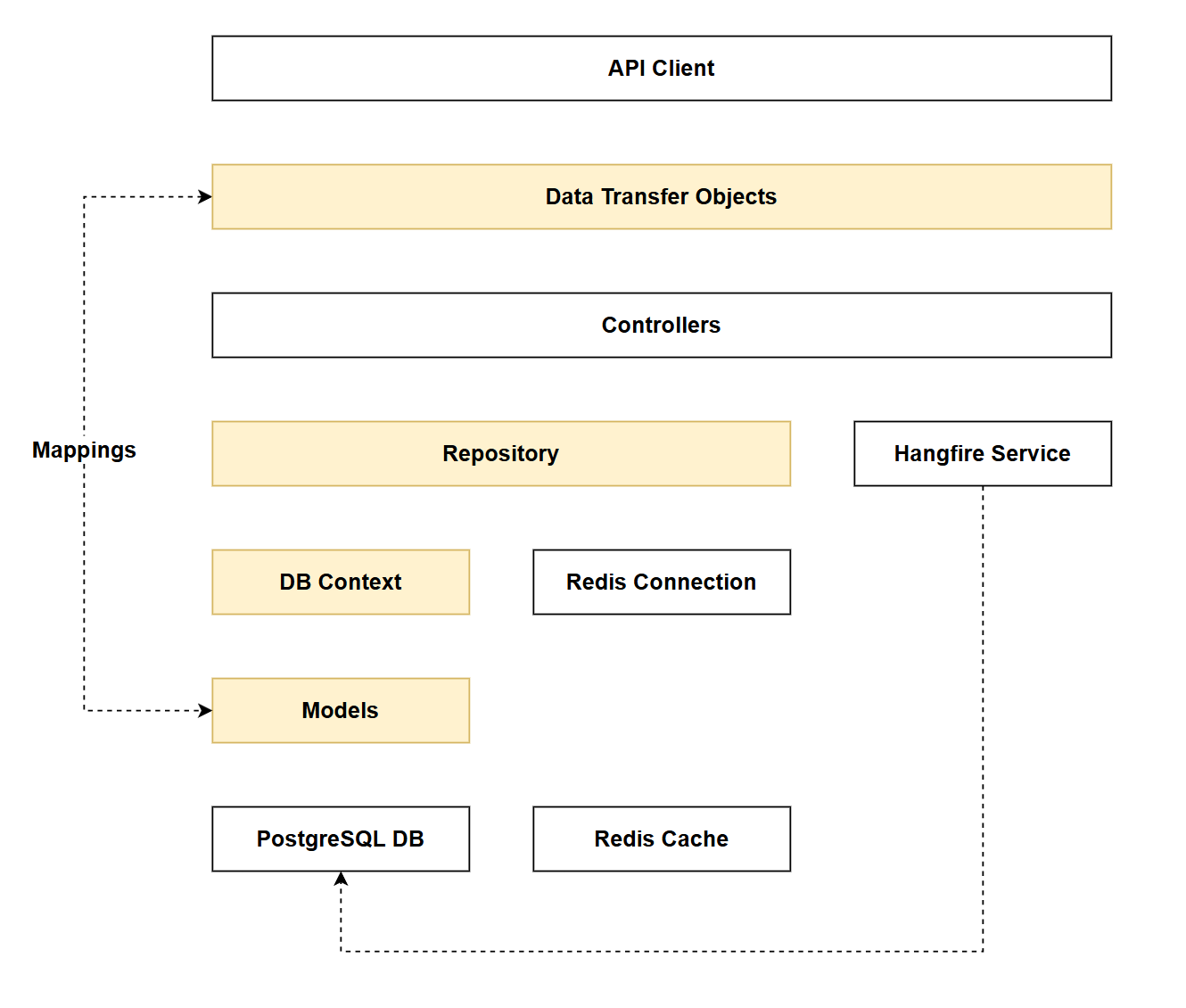
In reference to our solution architecture, we'll be making code changes to the highlighted components in this chapter:
- Models (partially complete)
- DTOs (partially complete)
- Repository (partially complete)
- AppDbContext (partially complete)
- The code for this section can be found here on GitHub
- The complete finished code can be found here on GitHub
Feature branch
Ensure that main is current, then create a feature branch called: chapter_8_relationships, and check it out:
git branch chapter_8_relationships
git checkout chapter_8_relationships
If you can't remember the full workflow, refer back to Chapter 5
Command model
We've already covered the domain model in Chapter 1, but to reiterate:
- Platform: represents the platforms that can have commands
- A platform can have 0 or more commands
- Command: represents the commands associated to a platform
- A command must have only 1 platform (a command cannot exist without an associated platform)
It's time to create the Command model.
Create a new file called Command.cs and place it in the Models folder, adding the following code:
using System.ComponentModel.DataAnnotations;
using System.ComponentModel.DataAnnotations.Schema;

namespace CommandAPI.Models;

public class Command
{
    [Key]
    public int Id { get; set; }

    [Required]
    [MaxLength(250)]
    public required string HowTo { get; set; }

    [Required]
    public required string CommandLine {get; set;}

    [Required]
    public DateTime CreatedAt { get; set; }

    // Foreign key to Platform
    public int PlatformId { get; set; }

    // Navigation property to represent the platform of the command
    [ForeignKey("PlatformId")]
    public Platform? Platform { get; set; }
}
You'll have seen similar properties in the Platform model so I won't detail those, the last 2 are worth looking at in a little more detail.
-
PlatformId: This is the foreign key property that stores the ID of the relatedPlatformrecord. This integer value establishes the relationship at the database level, linking eachCommandto its parentPlatform. Entity Framework uses this property to maintain referential integrity in the database. -
Platform: This is a navigation property that allows you to access the relatedPlatformobject directly from aCommandinstance. The[ForeignKey("PlatformId")]attribute explicitly tells Entity Framework which property (PlatformId) serves as the foreign key for this relationship. This enables you to navigate from a command to its platform (e.g.,command.Platform.Name).
Platform model
Open Platform.cs and add the highlighted property to the model:
using System.ComponentModel.DataAnnotations;

namespace CommandAPI.Models;

public class Platform
{
    [Key]
    public int Id { get; set; }

    [Required]
    public required string PlatformName { get; set; }

    [Required]
    public DateTime CreatedAt { get; set; }

    public ICollection<Command> Commands { get; set; } = new List<Command>();
}
Commands: This is a collection navigation property that represents the one-to-many relationship from Platform to Command. It allows you to access all commands associated with a platform (e.g., platform.Commands.Count). The initialization (= new List<Command>()) ensures the collection is never null (it can be empty though), preventing null reference exceptions when working with the property before EF Core loads the related data.
AppDbContext
We have a little bit of work to do in AppDBContext:
- Add the
Commandmodel asDbSetproperty ofAppDbContext - Ensure that the
CreatedAtproperty of theCommandmodel is auto-populated - Set up the relationships between
PlatformandCommandso these can be modelled in the database
Add command
Add Command as a DbSet property as follows:
public class AppDbContext : DbContext
{
    public AppDbContext(DbContextOptions<AppDbContext> options) : base(options)
    { }

    public DbSet<Platform> Platforms { get; set; }
    public DbSet<Command> Commands { get; set; }

    // Existing code
This explicitly specifies that we expect a table called Commands to be migrated down to the DB.
EF Core needs to know what classes we want to model in our DB, and those we do not. There are various ways EF Core can discover this information - adding a DbSet is the most obvious and sits atop the discovery chain.
The fact that we have specified navigation properties in both the Platform and Command models would also allow EF Core to understand the requirement to migrate Commands down to the DB, however this may result in unexpected naming of the resulting table in the database (Command rather than the desired Commands).
In short, use the DbSet construct to name your tables.
Setting CreatedAt
Referring back to the SaveChangesAsync method in AppDbContext:
public override Task<int> SaveChangesAsync(CancellationToken cancellationToken = default)
{
    var entries = ChangeTracker.Entries()
        .Where(e => e.Entity is Platform && e.State == EntityState.Added);

    foreach (var entry in entries)
    {
        ((Platform)entry.Entity).CreatedAt = DateTime.UtcNow;
    }

    return base.SaveChangesAsync(cancellationToken);
}
We are explicitly referencing Platform here, we could of course do the same for Command but this pattern does not scale well, and would quickly produce a code smell. We'll improve this by creating another interface.
Create a file called: ICreatedAtTrackable.cs, place it into the Models folder and populate it with the following code:
namespace CommandAPI.Models;

/// <summary>
/// Interface for entities that track creation time automatically.
/// </summary>
public interface ICreatedAtTrackable
{
    DateTime CreatedAt { get; set; }
}
Save the file, then we need to update both models (Platform and Command) to _implement this interface.
Platform
public class Platform : ICreatedAtTrackable
{
    // Existing properties
}
Command
public class Command : ICreatedAtTrackable
{
    //Existing properties
}
As both of our models already implemented CreatedAt, other than adding the interface to the class declaration we don't need to do anything else here.
Finally, we'll update the SaveChangesAsync method in AppDbContext to use the interface, rather than concrete classes:
public override Task<int> SaveChangesAsync(CancellationToken cancellationToken = default)
{
    var entries = ChangeTracker.Entries()
        .Where(e => e.Entity is ICreatedAtTrackable && e.State == EntityState.Added);

    foreach (var entry in entries)
    {
        ((ICreatedAtTrackable)entry.Entity).CreatedAt = DateTime.UtcNow;
    }

    return base.SaveChangesAsync(cancellationToken);
}
This approach:
- Handles both
PlatformandCommandautomatically - Works for any future models that need the same behavior
- Eliminates code duplication
- Is more maintainable and extensible
Overriding the SaveChangesAsync method like this is fine for typical CRUD operations (e.g. 1-100 inserts), but may not scale that well for bulk operations.
Some limitations of this approach from a bulk perspective are:
DateTime.UtcNowis assigned inside the loop, therefore if you were creating 10,000 entries theCreatedAttimes may be slightly different - this could be acceptable depending on your use-case. We could cache this value outside the loop of required.- Type checking overhead: the
IsCreatedAtTrackablecheck happens on every tracked entity, not just new ones. - ChangeTracker limitations: EF Core
ChangeTrackerisn't designed for extremely large batch operations (10,000 + entities). For bulk operations we'd need to find another approach. We cover Bulk Operations in Chapter 22
Concerns about bulk operations aside - the current approach is sound enough for now.
Relationships
That last change was a necessary detour to what is the core focus of this chapter: adding a new model and establishing the relationships between it and the the existing model.
We'll set up the relationship between Platform and Command by overriding the OnModelCreating method of DbContext as follows:
protected override void OnModelCreating(ModelBuilder modelBuilder)
{
    // Configuring one-to-many relationship
    modelBuilder.Entity<Platform>()
        .HasMany(p => p.Commands)
        .WithOne(c => c.Platform)
        .HasForeignKey(c => c.PlatformId)
        .OnDelete(DeleteBehavior.Cascade);

    modelBuilder.Entity<Command>()
        .HasIndex(c => c.PlatformId)
        .HasDatabaseName("Index_Command_PlatformId");
}
The OnModelCreating method is a hook in Entity Framework Core that allows you to configure how your models are mapped to database tables. While EF Core can infer many relationships automatically through conventions (like foreign key properties and navigation properties), OnModelCreating gives you explicit control to:
- Define relationships between entities (one-to-many, many-to-many, one-to-one)
- Configure foreign keys and their behavior (cascade deletes, restrict, etc.)
- Create database indexes for performance optimization
- Set column types, constraints, and default values
- Configure table names and schema mappings
Think of it as the place where you tell EF Core exactly how you want your domain models to be represented in the database, overriding or supplementing the default conventions.
Migrations
With all the necessary groundwork done, we're in a position to generate and run migrations. We have done this before, so this should just be review.
- Save everything
docker ps- to ensure Docker and your container are runningdotnet build- this happens when we attempt to generate migrations, but it's often useful to run in isolation before migration generation just to capture any issuesdotnet ef migrations add AddCommandModeldotnet ef database update
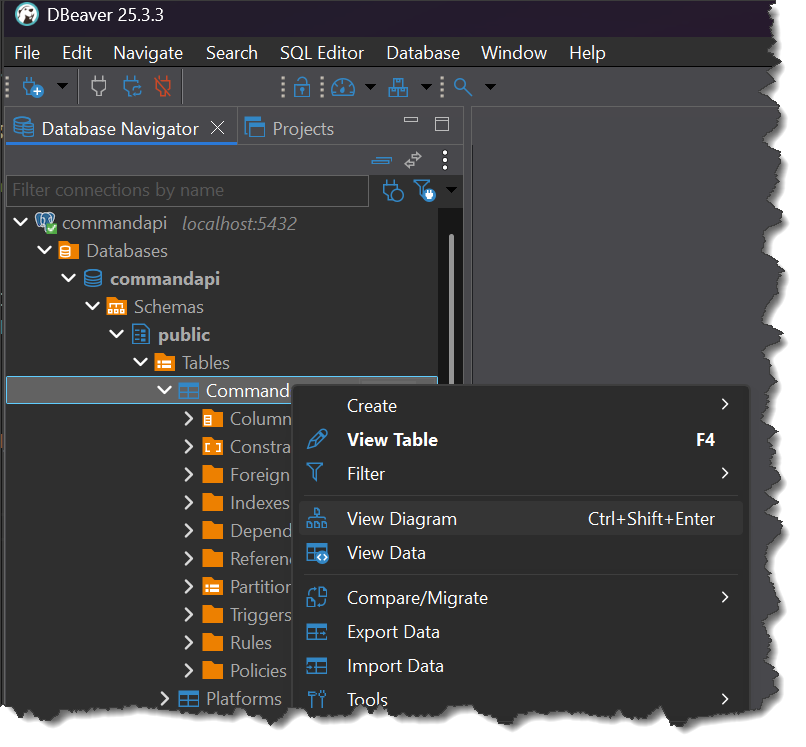
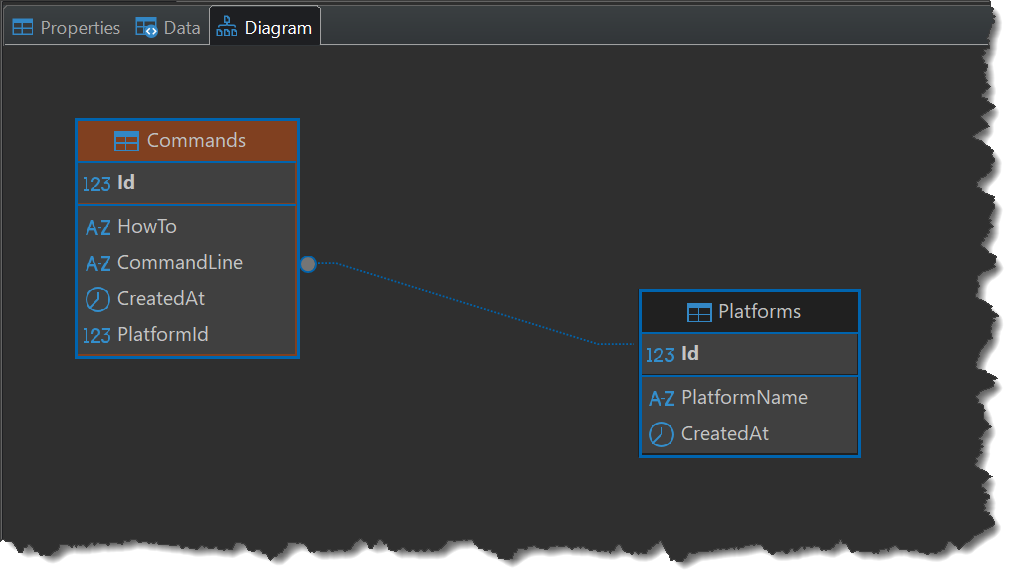
We can check the Commands table was created and relationships set up successfully by using DBeaver:
- Open DBeaver
- Expand Tables
- Right click the newly created
Commandstable - Select View Diagram
The resulting diagram should display the relationship between Platforms and Commands:
Repository
As we have adopted the repository pattern, we'll keep going with that and expand it to cover Commands as well. We have 2 broad design options here:
- Create an
ICommandRepositoryinterface andPgSqlCommandRepositoryconcrete class - Create a generic
IRepositoryinterface andRepositoryconcrete class
I'm going to implement 1 going forward , but I'll cover 2 here as well and let you decide which design you'd go with.
Generic pattern
We need the following functionality for both Platforms and Commands:
- Get all
<insert object name here> - Gat a
<insert object name here>by Id - Create a
<insert object name here> - Update a
<insert object name here> - Delete a
<insert object name here>
These are very standard CRUD based operations, and you could argue that if we were to add further models to our domain, they'd require the same operations too.
By implementing Option 1 (above) you would end up with multiple Interfaces and Concrete classes all doing exactly the same thing, the only difference being the model.
This is where a generic approach comes in (you can deep-dive generics here). With a generic approach you define a template for the operations, but do not specify an actual type, instead you define a generic placeholder (T). Then when you come to using the generic instance, you specify the type you are using.
If we wanted to implement this pattern for our repository, we'd:
- Create a generic
IRepositoryinterface - Create a generic
Repositoryconcrete class - Register the generic version in our DI container (in
Program.cs) - Inject the generic repository interface into the controller (and specify the type it should use)
See example code below for all these steps:
IRepository
namespace CommandAPI.Data;

public interface IRepository<T> where T : class
{
    Task<bool> SaveChangesAsync();

    Task<IEnumerable<T>> GetAllAsync();
    Task<T?> GetByIdAsync(int id);
    Task CreateAsync(T entity);
    Task UpdateAsync(T entity);
    void Delete(T entity);
}
Repository
using Microsoft.EntityFrameworkCore;

namespace CommandAPI.Data;

public class Repository<T> : IRepository<T> where T : class
{
    protected readonly AppDbContext _context;
    protected readonly DbSet<T> _dbSet;

    public Repository(AppDbContext context)
    {
        _context = context;
        _dbSet = _context.Set<T>();
    }

    public async Task CreateAsync(T entity)
    {
        if (entity == null)
        {
            throw new ArgumentNullException(nameof(entity));
        }

        await _dbSet.AddAsync(entity);
    }

    public void Delete(T entity)
    {
        if (entity == null)
        {
            throw new ArgumentNullException(nameof(entity));
        }

        _dbSet.Remove(entity);
    }

    public async Task<IEnumerable<T>> GetAllAsync()
    {
        return await _dbSet.AsNoTracking().ToListAsync();
    }

    public async Task<T?> GetByIdAsync(int id)
    {
        return await _dbSet.FindAsync(id);
    }

    public async Task<bool> SaveChangesAsync()
    {
        return await _context.SaveChangesAsync() >= 0;
    }

    public Task UpdateAsync(T entity)
    {
        if (entity == null)
        {
            throw new ArgumentNullException(nameof(entity));
        }

        // EF Core tracks changes automatically
        return Task.CompletedTask;
    }
}
Program.cs - Register in DI container
// Register generic repository
builder.Services.AddScoped(typeof(IRepository<>), typeof(Repository<>));
Controller - Inject to controller
[ApiController]
[Route("api/[controller]")]
public class PlatformsController : ControllerBase
{
    private readonly IRepository<Platform> _repository;

    // Inject the generic repository
    public PlatformsController(IRepository<Platform> repository)
    {
        _repository = repository;
    }

// Existing code
With this design, the only place we specify the use of Platform is in the controller when we inject the dependency. This means we can use the same interface and concrete class when we come to creating the Commands Controller in Chapter 9 without the need for further repository code.
Sounds great so why am I not using it?
- If you require type-specific operations (we will) then you need to create a type specific implementation for that anyway. This doesn't totally negate the generic approach but does diminish it somewhat.
- Our domain is going to remain small (essentially 2 domain models) so I feel it may be overkill to use the generic approach in this case. That's quite subjective though, possibly because I personally find generic code harder to read...
So far in this chapter we have uncovered some design decisions that could go in multiple directions:
- How we are assigning the
CreateAtdates to entities (overridingSaveChangesAsync) - Generic Vs Type Specific repositories
Which design choice is correct?
Bad news, there isn't always a "correct", in fact most usually that's the case.
Being a developer is constantly weighing up the options, thinking about trade-offs etc. The more complex the code you're working on gets, the more this magnifies.
So what to do? I found:
- Build code that works is better than perfect code (it doesn't exist anyway)
- Analyze the choices, and pick the best-fit solution for the use-cases you're working on now.
- If you work on another project with the same design decisions, you may make a different choice (based on experience and the use-cases)
- Don't go into analysis-paralysis (over thinking) you'll drive yourself crazy and not move forward
And ultimately, if in retrospect you would have made a different decision (this is sometimes referred to as a mistake) - so what?
Most of us work on non-critical systems, so we are afforded some mistakes, they are in fact the basis for learning. I've learned more from my mistakes, than my successes. I'm not saying don't care - you should always care, just don't beat yourself up if you think the decision was not the best one - at the time it was the best one. That's why you made it.
For those of you poor souls working in critical systems (medical, defence, flight-control, nuclear power etc.) my heart goes out to you. It takes a special kind of person to work in those domains (I did for a while in my 20's and it aged me about 10 years - never again).
You of course have to be a lot more careful...
With all that being said, let's proceed to creating a dedicated (and separate) ICommandRepository interface and PgSqlCommandRepository concrete class
Type specific
In the Data folder create the following 2 files:
ICommandRepository.csPgSqlCommandRepository.cs
Populate those files as follows:
ICommandRepository
using CommandAPI.Models;

namespace CommandAPI.Data;

public interface ICommandRepository
{
    Task<bool> SaveChangesAsync();

    Task<IEnumerable<Command>> GetCommandsAsync();
    Task<Command?> GetCommandByIdAsync(int id);
    Task<IEnumerable<Command>> GetCommandsByPlatformIdAsync(int platformId);
    Task CreateCommandAsync(Command command);
    Task UpdateCommandAsync(Command command);
    void DeleteCommand(Command command);
}
Most of the method signatures we've seen before, indeed that's why we had the whole discussion on using a generic approach, however there is 1 "new" signature:
Task<IEnumerable<Command>> GetCommandsByPlatformIdAsync(int platformId);
This is specifying that: given a platformId, return any associated Commands. This is what I was referring to in the generics discussion when I stated we would require type-specific implementations.
GetCommandsByPlatformIdAsync accepts a platformId so should it not sit in the IPlatformRepository interface?
The short answer is no. The repository pattern convention is that a repository should return its own type. The platformId is only the filter criteria, the method returns commands so it should be in the ICommandRepository interface
PgSqlCommandRepository
using Microsoft.EntityFrameworkCore;
using CommandAPI.Models;

namespace CommandAPI.Data;

public class PgSqlCommandRepository : ICommandRepository
{
    private readonly AppDbContext _context;

    public PgSqlCommandRepository(AppDbContext context)
    {
        _context = context;
    }

    public async Task<bool> SaveChangesAsync()
    {
        return await _context.SaveChangesAsync() >= 0;
    }

    public async Task<IEnumerable<Command>> GetCommandsAsync()
    {
        var commands = await _context.Commands.AsNoTracking().ToListAsync();

        return commands;
    }

    public async Task<Command?> GetCommandByIdAsync(int id)
    {
        return await _context.Commands.FirstOrDefaultAsync(c => c.Id == id);
    }

    public async Task CreateCommandAsync(Command command)
    {
        if(command == null)
        {
            throw new ArgumentNullException(nameof(command));
        }

        await _context.Commands.AddAsync(command);
    }

    public Task UpdateCommandAsync(Command command)
    {
        if(command == null)
        {
            throw new ArgumentNullException(nameof(command));
        }

        return Task.CompletedTask;
    }

    public void DeleteCommand(Command command)
    {
        if(command == null)
        {
            throw new ArgumentNullException(nameof(command));
        }

        _context.Commands.Remove(command);
    }


    public async Task<IEnumerable<Command>> GetCommandsByPlatformIdAsync(int platformId)
    {
        var commands = await _context.Commands
            .AsNoTracking()
            .Where(c => c.PlatformId == platformId)
            .ToListAsync();

        return commands;
    }
}
Now over in Program.cs we need to register the new interface and class with the DI Container:
builder.Services.AddDbContext<AppDbContext>(options =>
  options.UseNpgsql(connectionString.ConnectionString));

builder.Services.AddScoped<IPlatformRepository, PgSqlPlatformRepository>();

// New code
builder.Services.AddScoped<ICommandRepository, PgSqlCommandRepository>();
// End of new code

builder.Services.AddControllers();
DTOs
The last thing we're going to do in this chapter is create the associated DTOs to support Command operations.
Create the following 3 files, and place them in the Dtos folder:
CommandCreateDto.csCommandReadDto.csCommandUpdateDto.cs
Now populate each file as follows:
CommandCreateDto
using System.ComponentModel.DataAnnotations;

namespace CommandAPI.Dtos;

public record CommandCreateDto(
    [Required]
    [MaxLength(250)]
    string HowTo,

    [Required]
    string CommandLine,

    [Required]
    int PlatformId);
CommandReadDto
namespace CommandAPI.Dtos;

public record CommandReadDto(
    int Id,
    string HowTo,
    string CommandLine,
    int PlatformId,
    DateTime CreatedAt);
CommandUpdateDto
using System.ComponentModel.DataAnnotations;

namespace CommandAPI.Dtos;

public record CommandUpdateDto(
    [Required]
    [MaxLength(250)]
    string HowTo,

    [Required]
    string CommandLine);
You've seen most of this before, the only comment I'd make is that I've intentionally excluded the ability to update the PlatformId for an existing Command. I.e. the CommandUpdateDto does not allow you to pass PlatformId whereas CommandCreateDto does. This is a deliberate design decision on my part.
Version Control
With the code complete, (we'll exercise this code in the next chapter) - it's time to commit our code. A summary of those steps can be found below, for a more detailed overview refer to Chapter 5
- Save all files
git add .git commit -m "add command model and associated artifacts"git push(will fail - copy suggestion)git push --set-upstream origin chapter_8_relationships- Move to GitHub and complete the PR process through to merging
- Back at a command prompt:
git checkout main git pull
Conclusion
This may seem like a bit of an odd place to end the chapter - we can't really exercise that much of what we've done as we don't have any endpoints yet - we do all that in Chapter 9.
We covered a lot in this chapter, most of it review and embedding of knowledge, the novelty came in setting up our 2nd model and how we can establish relationships with other existing models.
The other takeaway I hope you have is more generic in nature, and that is about the need to continually weigh options and make design decisions. It's hard, but arguably the most interesting part of being a developer.