11. PATCH endpoints
About this chapter
In this chapter we'll implement partial updates using the HTTP PATCH verb and JSON Patch standard, allowing clients to:
- Update specific properties without sending the entire resource
- Perform multiple operations (add, remove, replace, copy, move, test) in a single request
- Reduce bandwidth and improve API efficiency
- Follow REST best practices for partial updates
Note: We'll implement a
PATCHendpoint only for Commands as it would overkill for the Platforms resource.
Learning outcomes
- Understanding the difference between
PUTandPATCHin REST - Learning about JSON Patch (RFC 6902) specification
- Implementing PATCH endpoints using ASP.NET Core JsonPatchDocument
Architecture Checkpoint
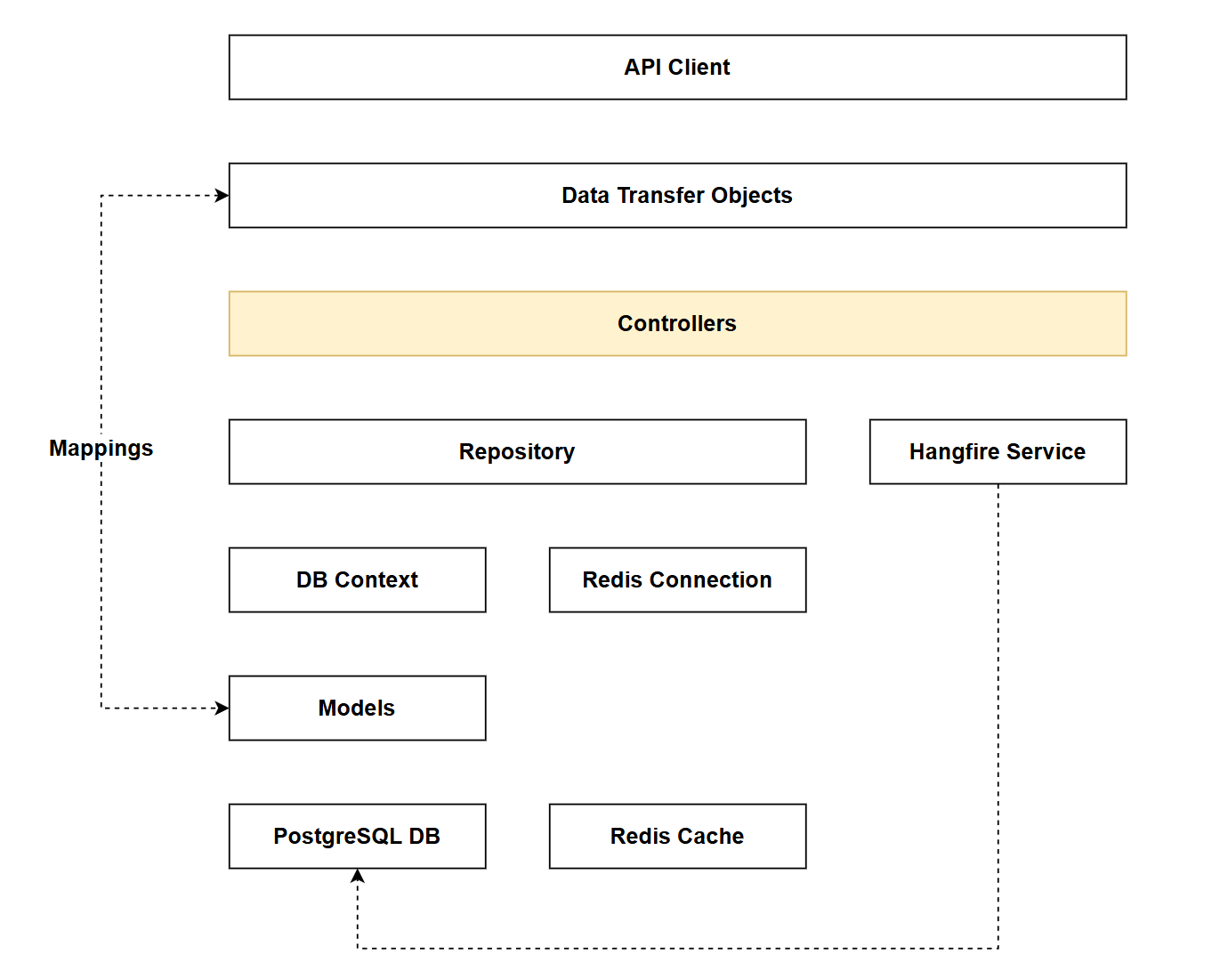
In reference to our solution architecture, we'll be making code changes to the highlighted components in this chapter:
- Controllers (adding PATCH endpoints)
- The code for this section can be found here on GitHub
- The complete finished code can be found here on GitHub
Feature branch
Ensure that main is current, then create a feature branch called: chapter_11_patch_endpoint, and check it out:
git branch chapter_11_patch_endpoint
git checkout chapter_11_patch_endpoint
If you can't remember the full workflow, refer back to Chapter 5
What is PATCH?
As always, a deeper discussion on the theory of PATCH can be found here. We'll provide only the essentials in this chapter to get you up and running.
We have already provided update endpoints in the API using the PUT verb, but this only allows us to update an entire resource. For example if we have an existing Command:
{
  "id": 3,
  "howTo": "List all running containers",
  "commandLine": "docker ps"
}
And we supply the following payload to: PUT /api/commands/3:
{
  "howTo": "List all containers (including stopped)",
  "commandLine": "docker ps -a"
}
The entire resource will be updated as per the contract enforced by CommandUpdateDto (i.e. we don't supply platformId or CreatedAt).
If we only wanted to update the commandLine value using this endpoint, e.g.:
{
  "commandLine": "docker ps -a"
}
This would not work with the following validation error being thrown:
{
  "type": "https://tools.ietf.org/html/rfc9110#section-15.5.1",
  "title": "One or more validation errors occurred.",
  "status": 400,
  "errors": {
    "HowTo": [
      "The HowTo field is required."
    ]
  },
  "traceId": "00-0cf6793974d949006003ab8623b9fdfe-b096a6188c1a2e48-00"
}
We have to update the entire resource. This is where PATCH comes in.
PATCH endpoints allow you to select what parts of an object you want to update by supplying a Patch Document in the payload which is prescriptive instruction-set detailing what is to be updated. A simple PATCH request payload is shown below:
[
  {
    "op": "replace",
    "path": "/howTo",
    "value": "List all containers including stopped ones"
  }
]
Broken down:
op: states the operation to be performed - this in this case value replacementpath: which property value to be replacedvalue: the new property value
You can read more about the technical specification of PATCH in the theory section.
PUTCould we not make the above partial update scenario work for the PUT endpoints?
Yes of course we could, and indeed you will often see this behavior in PUT endpoints where only the supplied properties are updated (and the omitted properties are not).
Going further, in my own experience of using REST-based APIs, I don't tend to see PATCH endpoints implemented anywhere near as frequently as PUT endpoints that allow for partial updates.
Again this is one of those decisions you would have to make as an API designer. Do you go with the technically correct (but less pragmatic) approach and only allow for full updates with PUT, or do you allow for partial updates with PUT and forget PATCH.
In an unusual turn of events, I'm going to shun the more pragmatic approach and implement PATCH for partial updates, purely because I feel I have a duty to cover the subject.
Adding PATCH
Package reference
We first need to add a specific package reference to support the PATCH endpoint, so at command prompt type:
dotnet add package Microsoft.AspNetCore.JsonPatch.SystemTextJson
Prior to .NET PATCH support was provided by Microsoft.AspNetCore.Mvc.NewtonsoftJson which as the name suggests used the Newtonsoft.Json serializer.
Endpoint
Move over to the CommandsController and ensure that you include the following using statement at the top of the file:
using Microsoft.AspNetCore.Mvc;
using CommandAPI.Data;
using CommandAPI.Dtos;
using CommandAPI.Models;
using Mapster;
using Microsoft.AspNetCore.JsonPatch.SystemTextJson;
Then add the following code inside the CommandsController class for the PATCH endpoint:
[HttpPatch("{id}")]
public async Task<ActionResult> PatchCommand(int id, JsonPatchDocument<CommandUpdateDto> patchDoc)
{
  var commandFromRepo = await _commandRepo.GetCommandByIdAsync(id);
  if (commandFromRepo == null)
  {
    return NotFound("You mus supply a valid commandId in the route");
  }

  var commandToPatch = commandFromRepo.Adapt<CommandUpdateDto>();
  patchDoc.ApplyTo(commandToPatch, JsonPatchError =>
  {
    var key = JsonPatchError.AffectedObject.GetType().Name;
    ModelState.AddModelError(key, JsonPatchError.ErrorMessage);
  });

  if (!ModelState.IsValid)
  {
    return BadRequest(ModelState);
  }

  commandToPatch.Adapt(commandFromRepo);

  await _commandRepo.UpdateCommandAsync(commandFromRepo);

  await _commandRepo.SaveChangesAsync();

  return NoContent();

}
This code:
- Retrieves the existing
Commandentity from the repository using the providedid - Returns a
404 NotFoundresponse if the command doesn't exist - Maps the command entity to a
CommandUpdateDtofor patching - Applies the JSON Patch document operations to the DTO, capturing any patch-specific errors and adding them to
ModelState - Validates the patched DTO using
ModelStateand returns a400 BadRequestif validation fails - Maps the successfully patched DTO back to the original command entity
- Updates the command in the repository using the repository's update method
- Persists the changes to the database
- Returns a
204 NoContentresponse on successful update
Exercising changes
Over in the commands.http file, add another request as follows:
### Patch a command (update howTo only)
PATCH {{baseUrl}}/api/commands/2
Content-Type: application/json-patch+json

[
  {
    "op": "replace",
    "path": "/howTo",
    "value": "List all containers including stopped ones"
  }
]
This request:
- Sends a
PATCHrequest to update the command with ID2 - Uses the
application/json-patch+jsoncontent type, which is the standard media type for JSON Patch documents - Provides a JSON Patch document as an array of operations
- Contains a single
replaceoperation that targets the/howToproperty - Updates only the
howTofield with the new value "List all containers including stopped ones" - Leaves all other properties of the command unchanged (partial update)
- Should return a
204 NoContentresponse on success
JSON Patch documents are covered in more detail in the Theory section, you can experiment with adding further use-case to commands.http.
Version Control
With the code complete, it's time to commit our code. A summary of those steps can be found below, for a more detailed overview refer to Chapter 5
- Save all files
git add .git commit -m "add patch endpoint to commands controller"git push(will fail - copy suggestion)git push --set-upstream origin chapter_11_patch_endpoint- Move to GitHub and complete the PR process through to merging
- Back at a command prompt:
git checkout main git pull
Conclusion
In this chapter, we implemented partial updates using HTTP PATCH. We learned how PATCH differs from PUT by allowing granular updates to specific properties without requiring the entire resource to be sent.
While PATCH endpoints are less commonly implemented in practice (with many APIs opting for partial updates via PUT), understanding the JSON Patch standard and its implementation provides a more technically correct approach to partial updates and demonstrates adherence to REST principles.
With PATCH endpoints in place, our API now supports the full spectrum of CRUD operations, so this not only brings is to the conclusion of this chapter, but also of Part 4 - Complete CRUD.
I'd say at this point we have a good solid foundation for our API, but in the chapters to come we delve further into the features that will set your API apart from a simple "tutorial-based" API, to that of a fully-featured production-quality API.