7. Repository
About this chapter
In this chapter we'll introduce the Repository Pattern, this includes:
- Creating a repository interface
- Implementing a concrete class that implements the interface
- Update the Platforms Controller to use the repository (as opposed to directly using
AppDbContext)
Learning outcomes
- Understand what the repository pattern is
- Understand why we'd use the repository pattern
- Understand why we'd not use the repository pattern
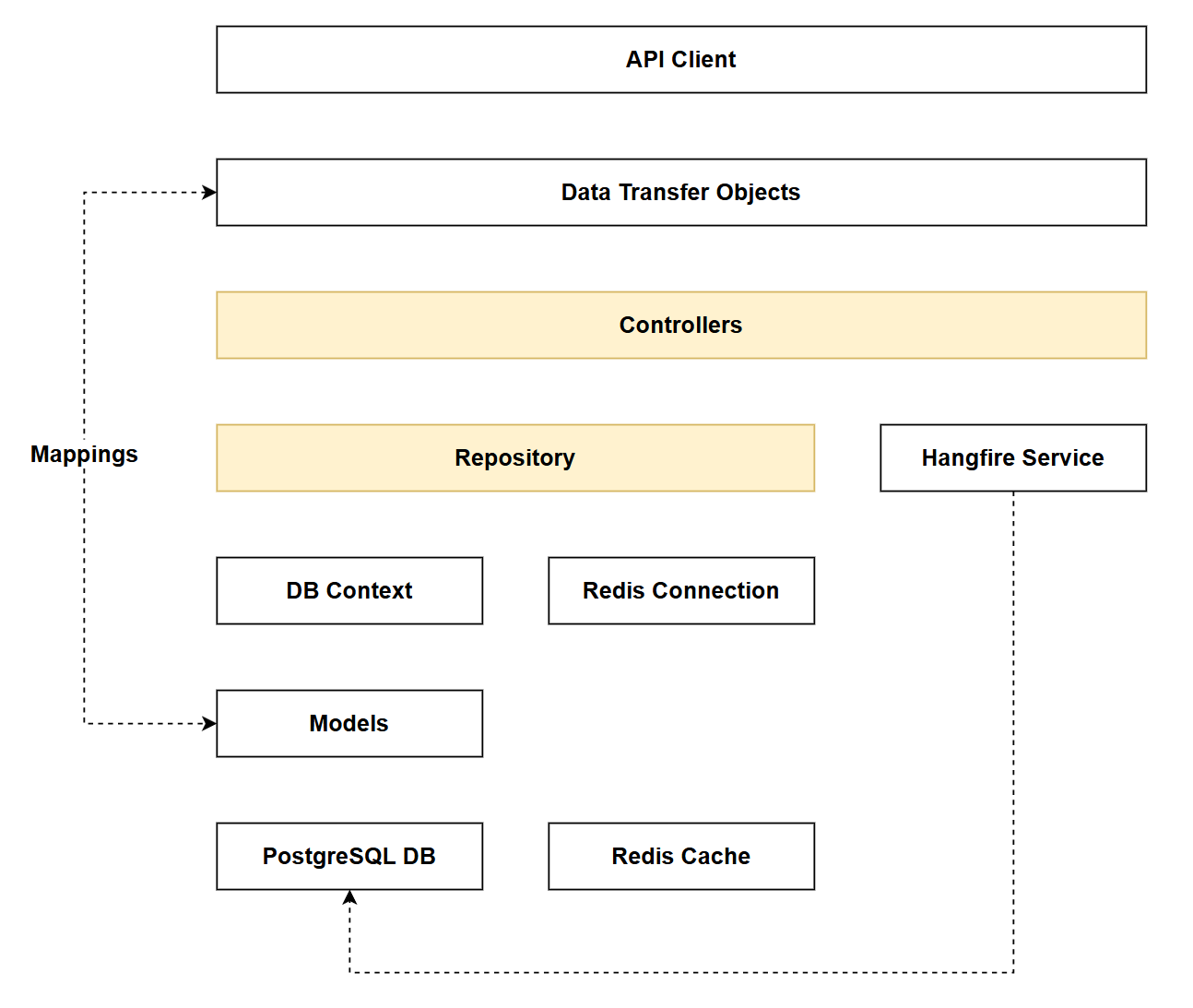
Architecture Checkpoint
In reference to our solution architecture, we'll be making code changes to the highlighted components in this chapter:
- Repository (partially complete)
- Controllers (partially complete)
- The code for this section can be found here on GitHub
- The complete finished code can be found here on GitHub
Feature branch
Ensure that main is current, then create a feature branch called: chapter_7_repository, and check it out:
git branch chapter_7_repository
git checkout chapter_7_repository
If you can't remember the full workflow, refer back to Chapter 5
What is the repository pattern
In nutshell the repository pattern encapsulates data access logic behind an interface:
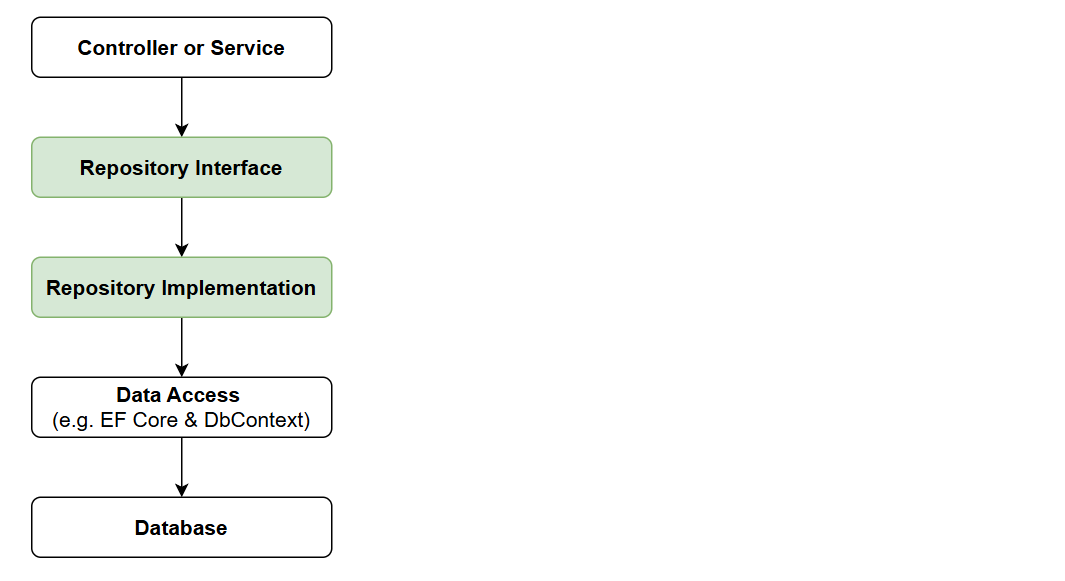
This creates a layer of abstraction that:
- Decouples business logic from data access
- Centralizes data access logic
- Enables easier testing through mocking
- Provides flexibility to change data access technologies
For me the 1st 3 points are of real value, the 4th: changing data access technologies can certainly be made easier through use of a repository, but I could count on 1 hand the number of times data access technologies get switched out on existing projects...
The theory guide goes into more detail on the repository pattern, so if you want to deep-dive go there.
Is it worth it?
There are some strong opinions in the .NET space around whether the repository pattern is a layer of abstraction too far, adding little value on top of what is already provided by the DbContext found in EF Core (for example).
If I'm being 100% honest, I probably wouldn't implement it in the real-world for this API.
So why am I covering it? Well aside from the benefits already called out; by covering it in this book, I feel arms the reader with a practical working example, allowing you to make more of an informed decision on whether (or not) you want to use it in your own projects.
Working with repositories also introduces the concept of interfaces in C#, and while this book isn't a tutorial in C# as such, they are a useful concept to get a handle on.
Repository Interface
Interfaces (as a general concept - forget repository specifically) in C# allow you to define the "what". I.e. when you implement this interface - this is what it provides to you.
Interfaces do not provide implementation detail or the "how".
The idea here is that by implementing an interface in a concrete class, you could theoretically (and in actuality) swap out 1 concrete class for another without having to refactor the services that use those classes as the interface is identical.
E.g. we could swap out EF Core and Postgres, for Dapper and SQL Server and the consuming classes (in our case the Controller) would not need to change the way they use the interface.
I think at this point a practical example is needed!
Back in the project create a file called: IPlatformRepository.cs and place it into the Data folder. To that file, add the following code:
using CommandAPI.Models;

namespace CommandAPI.Data;

public interface IPlatformRepository
{
    Task<bool> SaveChangesAsync();

    Task<IEnumerable<Platform>> GetPlatformsAsync();
    Task<Platform?> GetPlatformByIdAsync(int id);
    Task CreatePlatformAsync(Platform platform);
    Task UpdatePlatformAsync(Platform platform);
    void DeletePlatform(Platform platform);
}
This code:
- Defines the
IPlatformRepositoryinterface with 6 method signatures - The method signatures tell us what capabilities this interface provides, but with no implementation detail
- In this case all methods will be asynchronous, except the last one:
DeletePlatform- you'll see why when we come to implement this interface next.
Concrete class
A concrete class or implementation class states that it is going to implement an interface. This means that in order for it to compile, it must provide some form of implementation for every method signature defined in the interface. It can also implement additional features to those specified in the interface but does not need to.
Concrete classes implement something, meaning that they have implementation detail related data access technology (for example) we are using - in this case EF Core. Another concrete class may use Dapper etc.
Create a file called PgSqlPlatformRepository.cs in the Data folder and add the following code:
using Microsoft.EntityFrameworkCore;
using CommandAPI.Models;

namespace CommandAPI.Data;

public class PgSqlPlatformRepository : IPlatformRepository
{
    private readonly AppDbContext _context;

    public PgSqlPlatformRepository(AppDbContext context)
    {
        _context = context;
    }


    public async Task<bool> SaveChangesAsync()
    {
        return await _context.SaveChangesAsync() >= 0;
    }

    public async Task<IEnumerable<Platform>> GetPlatformsAsync()
    {
        var platforms = await _context.Platforms.AsNoTracking().ToListAsync();

        return platforms;
    }

    public async Task<Platform?> GetPlatformByIdAsync(int id)
    {
        return await _context.Platforms.FirstOrDefaultAsync(p => p.Id == id);
    }

    public async Task CreatePlatformAsync(Platform platform)
    {
        if (platform == null)
        {
            throw new ArgumentNullException(nameof(platform));
        }

        await _context.Platforms.AddAsync(platform);
    }

    public Task UpdatePlatformAsync(Platform platform)
    {
        if (platform == null)
        {
            throw new ArgumentNullException(nameof(platform));
        }

        return Task.CompletedTask;
    }

    public void DeletePlatform(Platform platform)
    {
        if (platform == null)
        {
            throw new ArgumentNullException(nameof(platform));
        }

        _context.Platforms.Remove(platform);
    }
}
This code:
- Declares the
PgSqlPlatformRepositoryconcrete class that implements theIPlatformRepositoryinterface - Uses dependency injection to receive an instance of
AppDbContextthrough the constructor - Implements
SaveChangesAsync()to persist changes to the database, returning true if successful - Implements
GetPlatformsAsync()to retrieve all platforms usingAsNoTracking()for optimized read-only queries - Implements
GetPlatformByIdAsync()to retrieve a single platform by its ID - Implements
CreatePlatformAsync()to add a new platform to the context with null validation - Implements
UpdatePlatformAsync()which validates the platform is not null and returns a completed task (EF Core tracks changes automatically, so no explicit update call is needed) - Implements
DeletePlatform()as a synchronous method (not async) because EF Core'sRemove()method doesn't perform database operations untilSaveChangesAsync()is called
Thin CRUD wrapper
Currently this concrete class is just a very thin wrapper for basic CRUD operations - which is not really leveraging the benefits of the repository pattern. When we come to refactoring the controller, you'll see that by using the repository pattern we can remove the existing data access code in the controller (to the repository) - which is a positive. Controllers should be focused on request orchestration, not dealing with data access implementations.
Even with this benefit, if we were not going to extend the data access requirements of the API beyond what we have here, then I'd probably not implement the repository pattern and just leave the data access code in the controller. However, as we are going to extend the data access capabilities required (pagination & filtering and sorting), keeping the repository makes sense as they will get more complex.
Dependency Injection
Having created an interface and concrete class we need to tell the dependency injection container how to work with these.
Open Program.cs and add the highlighted code in the same position as indicated here:
builder.Services.AddDbContext<AppDbContext>(options =>
  options.UseNpgsql(connectionString.ConnectionString));

// Start of new code
builder.Services.AddScoped<IPlatformRepository, PgSqlPlatformRepository>();
// End of new code

builder.Services.AddControllers();
This code:
- Registers
IPlatformRepositorywith the dependency injection container using a scoped lifetime - Maps the
IPlatformRepositoryinterface to thePgSqlPlatformRepositoryconcrete implementation - Ensures that whenever
IPlatformRepositoryis requested (e.g., in a controller), an instance ofPgSqlPlatformRepositoryis provided - Uses scoped lifetime, meaning a new instance is created per HTTP request and shared throughout that request
Refactor the controller
The last thing we need to do to make use of the repository is to call it from our controller. We're going to:
- Remove the use of
AppDbContext- this is all done inside the concrete class now - Change the controller constructor to request an instance of
IPlatformRepository(it will get assigned aPgSqlPlatformRepositoryconcrete implementation) - Update all our endpoints to make use of the repository as opposed to the db context.
Lets start with 1 and 2, updating the class constructor in PlatformsController.cs as follows:
[Route("api/[controller]")]
[ApiController]
public class PlatformsController : ControllerBase
{
    private readonly IPlatformRepository _platformRepo;

    public PlatformsController(IPlatformRepository platformRepo)
    {
        _platformRepo = platformRepo;
    }

// Existing code
Now let's update the code in each of our endpoints:
GetPlatforms
[HttpGet]
public async Task<ActionResult<IEnumerable<PlatformReadDto>>> GetPlatforms()
{
    var platforms = await _platformRepo.GetPlatformsAsync();

    // Manual mapping to DTOs
    var platformDtos = platforms.Select(p => new PlatformReadDto(p.Id, p.PlatformName, p.CreatedAt));

    return Ok(platformDtos);
}
This code:
- Removes the use of
_context - Add the use of the replacement
_platformRepomethod.
This looks a lot cleaner from the prior implementation, shifting the data access code to the repository. By removing direct database access from the controller, we keep it focused on what it should be doing: handling HTTP concerns, validating input, and orchestrating responses - not worrying about the specifics of how data is retrieved or persisted.
GetPlatformById
[HttpGet("{id}", Name = "GetPlatformById")]
public async Task<ActionResult<PlatformReadDto>> GetPlatformById(int id)
{
    var platform = await _platformRepo.GetPlatformByIdAsync(id);
    if (platform == null)
        return NotFound();

    // Manual mapping to DTO
    var platformDto = new PlatformReadDto(platform.Id, platform.PlatformName, platform.CreatedAt);

    return Ok(platformDto);
}
This code:
- Removes the use of
_context - Add the use of the replacement
_platformRepomethod.
CreatePlatform
[HttpPost]
public async Task<ActionResult<PlatformReadDto>> CreatePlatform(PlatformCreateDto platformCreateDto)
{

    // Manual mapping from DTO to entity
    var platform = new Platform
    {
        PlatformName = platformCreateDto.PlatformName
    };

    await _platformRepo.CreatePlatformAsync(platform);
    await _platformRepo.SaveChangesAsync();

    // Manual mapping to DTO for response
    var platformReadDto = new PlatformReadDto(platform.Id, platform.PlatformName, platform.CreatedAt);

    return CreatedAtRoute(nameof(GetPlatformById), new { Id = platform.Id }, platformReadDto);
}
This code:
- Removes the use of
_context - Add the use of the replacement
_platformRepomethods.
UpdatePlatform
[HttpPut("{id}")]
public async Task<ActionResult> UpdatePlatform(int id, PlatformUpdateDto platformUpdateDto)
{
    var platformFromRepo = await _platformRepo.GetPlatformByIdAsync(id);
    if (platformFromRepo == null)
    {
        return NotFound();
    }

    // Manual mapping from DTO to entity
    platformFromRepo.PlatformName = platformUpdateDto.PlatformName;

    await _platformRepo.UpdatePlatformAsync(platformFromRepo);
    await _platformRepo.SaveChangesAsync();

    return NoContent();
}
This code:
- Removes the use of
_context - Add the use of the replacement
_platformRepomethods. - Renames the
platformFromContextvar toplatformFromRepo
The use of the following line:
await _platformRepo.UpdatePlatformAsync(platformFromRepo);
May seem a little bazaar given that the implementation doesn't really do anything. So why have it?
You could remove it, and everything would work. However if we decided to swap ot the data access tech from EF Core to something else that required an update-type implementation, we'd have to refactor the controller code to make a call to the update method. By including a placeholder implementation (even one that does nothing) we don't need to worry about that eventuality.
As already mentioned, the number of times data access tech gets swapped out in a live production project (in my experience anyway) is rare, so this approach is probably theoretical only.
DeletePlatform
[HttpDelete("{id}")]
public async Task<ActionResult> DeletePlatform(int id)
{
    var platformFromRepo = await _platformRepo.GetPlatformByIdAsync(id);
    if (platformFromRepo == null)
    {
        return NotFound();
    }

    _platformRepo.DeletePlatform(platformFromRepo);
    await _platformRepo.SaveChangesAsync();

    return NoContent();
}
This code:
- Removes the use of
_context - Add the use of the replacement
_platformRepomethods. - Renames the
platformFromContextvar toplatformFromRepo
Exercising
Build and run the project, then run through the existing requests in platforms.http. There should be no difference to how the endpoints are called and the data they return.
This change was an internal architectural one only.
Version Control
With the code complete, and our requests exercised - it's time to commit our code. A summary of those steps can be found below, for a more detailed over view refer to Chapter 5
- Save all files
git add .git commit -m "update project to use the repository pattern"git push(will fail - copy suggestion)git push --set-upstream origin chapter_7_repository- Move to GitHub and complete the PR process through to merging
- Back at a command prompt:
git checkout main git pull
Conclusion
In this chapter we implemented the repository pattern, moving all data access logic from the controller into a dedicated repository class. Our controller is now cleaner and focused solely on HTTP concerns, orchestrating requests, validating input, and returning appropriate responses.
The repository pattern is admittedly controversial in the .NET community, and it's fair to question whether it adds meaningful value when Entity Framework Core's DbContext already provides an abstraction over the database. For simple CRUD operations like what we currently have, the repository can feel like an unnecessary layer.
However, the real value emerges as data access needs grow more complex. In upcoming chapters we'll add pagination, filtering, and sorting, features that benefit from being encapsulated in the repository rather than cluttering the controller. The repository also makes unit testing (covered in Chapter 28) significantly easier by allowing you to mock data access without needing to mock the entire DbContext.
My practical advice: for simple APIs with basic CRUD, skip the repository and use DbContext directly. For APIs with complex queries, business rules around data access, or where you want strong test isolation, the repository pattern earns its keep. You should now have the knowledge and a working implementation to make an informed decision for your own projects.