Containerization and Docker
What is Containerization?
Containerization is a lightweight form of virtualization that packages an application and all its dependencies into a standardized unit called a container. Unlike traditional virtual machines (VMs) that virtualize entire operating systems, containers share the host OS kernel while maintaining isolated user spaces. This makes them significantly more efficient in terms of resource usage and startup time.
Why Containers Matter
Containers solve several critical problems:
- Consistency: The same container runs identically on your laptop, a colleague's machine, a staging server, and in production
- Isolation: Each container operates in its own sandboxed environment, preventing conflicts between applications
- Portability: Containers abstract away infrastructure differences, making deployment straightforward across different environments
Docker: The Industry Standard
While Docker isn't the only containerization platform, alternatives like Podman, containerd, and LXC exist, it's by far the dominant player in the space. Docker popularized containerization and remains the de facto standard. When someone mentions "containers," they're almost certainly talking about Docker, even if they're technically using something else under the hood.
Docker provides:
- A runtime for executing containers
- Tools for building container images
- A registry system for sharing images (Docker Hub)
- An ecosystem of complementary tools and services
Core Concepts
Images
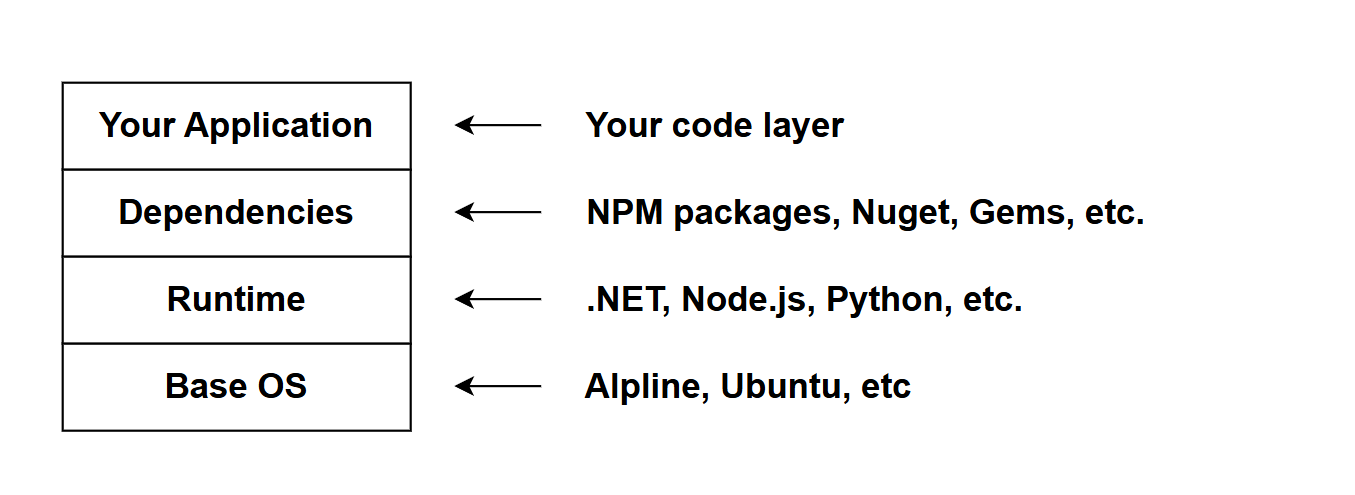
Think of an image as a read-only template or blueprint. It contains everything needed to run an application: the code, runtime, system libraries, and dependencies. Images are built in layers, where each layer represents a change or addition. This layering system is clever, it allows for efficient storage and distribution since common base layers can be shared across multiple images.
Images are typically stored in registries. The most popular is Docker Hub, which hosts official images for PostgreSQL, Redis, Node.js, Python, and thousands of other applications.
Containers
A container is a runnable instance of an image. When you run an image, Docker creates a container from it. Containers are isolated from each other and from the host system, but they're not completely locked down, you can configure networking, storage, and permissions as needed.
Multiple containers can be created from the same image, each operating independently. This is particularly useful in development when you need to test against different database states or run multiple versions of a service.
Dockerfile
A Dockerfile is a text file containing instructions for building an image. It defines the base image, copies files, installs dependencies, and specifies how the application should run. Here's a simplified example:
FROM node:18-alpine
WORKDIR /app
COPY package*.json ./
RUN npm install
COPY . .
EXPOSE 3000
CMD ["node", "server.js"]
Each instruction creates a new layer in the image. Docker caches these layers, so subsequent builds are faster if the early layers haven't changed.
Docker Compose
While Docker can run individual containers, Docker Compose orchestrates multiple containers working together. It uses a YAML file (docker-compose.yml) to define services, networks, and volumes in a declarative way.
This is invaluable in development environments where your application might need a database, cache, message queue, and the application itself all running and communicating:
services:
  app:
    build: .
    ports:
      - "3000:3000"
  database:
    image: postgres:16
    environment:
      POSTGRES_PASSWORD: secret
  cache:
    image: redis:7-alpine
With a single command (docker compose up), you can start an entire application stack.
Volumes
Containers are ephemeral by default, when you delete a container, its data disappears. Volumes solve this problem by providing persistent storage that exists outside the container lifecycle.
There are two main types:
- Named volumes: Managed by Docker, stored in Docker's storage area
- Bind mounts: Map a host directory directly into the container
Volumes are essential for databases, logs, or any data you don't want to lose when containers restart.
Networking
Docker automatically creates networks to allow containers to communicate. Containers on the same network can reach each other by service name, which acts as a hostname. This abstraction simplifies configuration, you don't need to track IP addresses.
Port Mapping
Containers run in isolated network spaces. To access a containerized application from your host machine, you map a port on your host to a port in the container. The notation is host:container, so -p 5432:5432 maps host port 5432 to container port 5432.
Common Commands
Here are the essential Docker commands you'll use regularly:
# List running containers
docker ps

# List all containers (including stopped)
docker ps -a

# Start containers defined in docker-compose.yml
docker compose up

# Start in detached mode (background)
docker compose up -d

# Stop containers from running (the containers are not removed)
docker compose stop

# Stop and remove containers (use with caution)
docker compose down

# View logs
docker logs <container-name>

# Execute command in running container
docker exec -it <container-name> bash

# Remove unused images and containers
docker system prune
Practical Development Benefits
Docker is great in development scenarios:
- Onboarding: New developers can spin up the entire development environment with a single command, no manual installation needed
- Database parity: Everyone works with the same database version, avoiding "works on their version" problems
- Service dependencies: Need Redis? Add three lines to your compose file instead of installing it globally
- Cleanup: When you're done with a project, remove its containers, no leftover services cluttering your system
- Experimentation: Try new versions or configurations without affecting your main setup
When Not to Use Docker
Docker isn't always the answer. Skip it for:
- Simple scripts with no dependencies
- Native desktop applications
- When performance is absolutely critical (though the overhead is usually negligible)
- If your team hasn't bought into containerization (forcing it creates friction)
Conclusion
The beauty of Docker is that it makes the complex simple. Setting up PostgreSQL used to mean downloading installers, configuring services, managing versions. Now it's three lines in a YAML file and a single command. That's the real value proposition.
For more information, see the official Docker documentation.